L-DALI User Manual 202 LOYTEC
Version 5.2 LOYTEC electronics GmbH
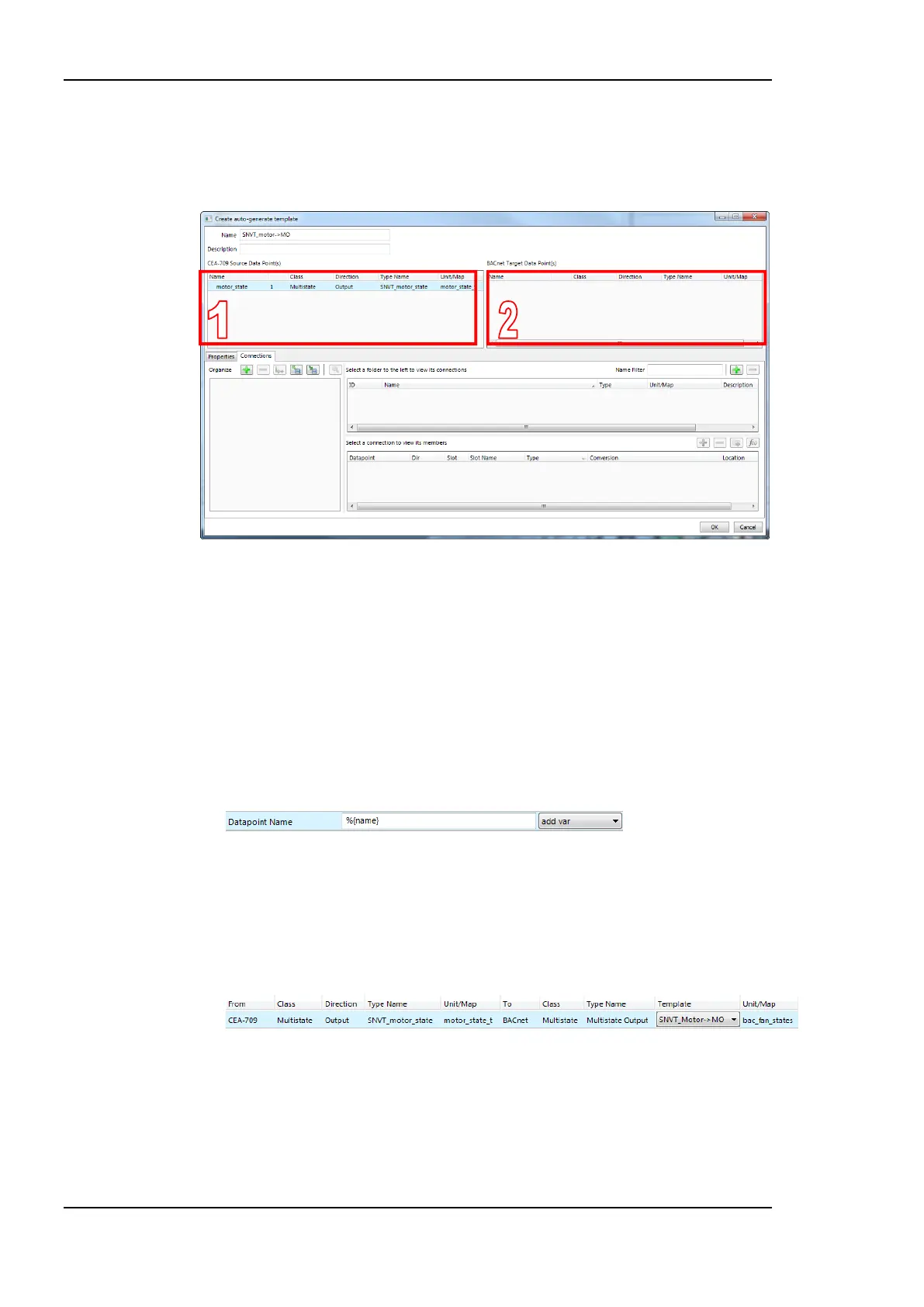
3. The auto-generate template editor opens as shown in Figure 189. It contains two data
point lists. The left-hand (denoted ‘1’) list is pre-filled and contains the selected source
data points. They are locked and cannot be modified. The right-hand list (denoted ‘2’)
is intended for creating the desired target data points.
Figure 189: Auto-generate template editor.
4. Enter Name and Description, which is used later to select the auto-generate template.
5. Right-click in the target data point list and select Create Data Point …. The creation
dialog of the respective target technology opens. Create the desired target data points,
e.g., a BACnet ‘MO’ data point with a custom multi-state map.
6. Edit the target data point name to use a variable placeholder for the target data point
name such as %{name}. Insert the placeholder by selecting the desired entry of the add
var drop-down list. When applying the auto-generate template, the placeholder is
expanded to the name of the actual source data point. Choose %{path}%{name} to
flatten the folder tree of the source data point and include the path in the target data
point name.
7. Drag and drop the source and target data points into the Connections tab below to
create the needed connections. Add custom conversions to the connection items as
needed.
8. Click OK to store the auto-generate template.
9. From now on it can be selected in the Template column and applied to the source.
7.9.10 Create a Complex Auto-Generate Template
Simple auto-generate templates as described in Section 7.9.9 are based on single data point
sources. These can be scalar or structured data points. In any case the decision, which auto-
generate template applies, is based on that single data point. If a given set of source data
points shall generate another specific set of target data points, so-called complex auto-
generate templates can be used. These are based on folders that contain the described data
points (i.e., name and types must match). With a complex auto-generate template the entire


 To Next Page