LPKF Laser & Electronics AG | V. 1.0
Measuring the thickness of the copper layer (S104 only)
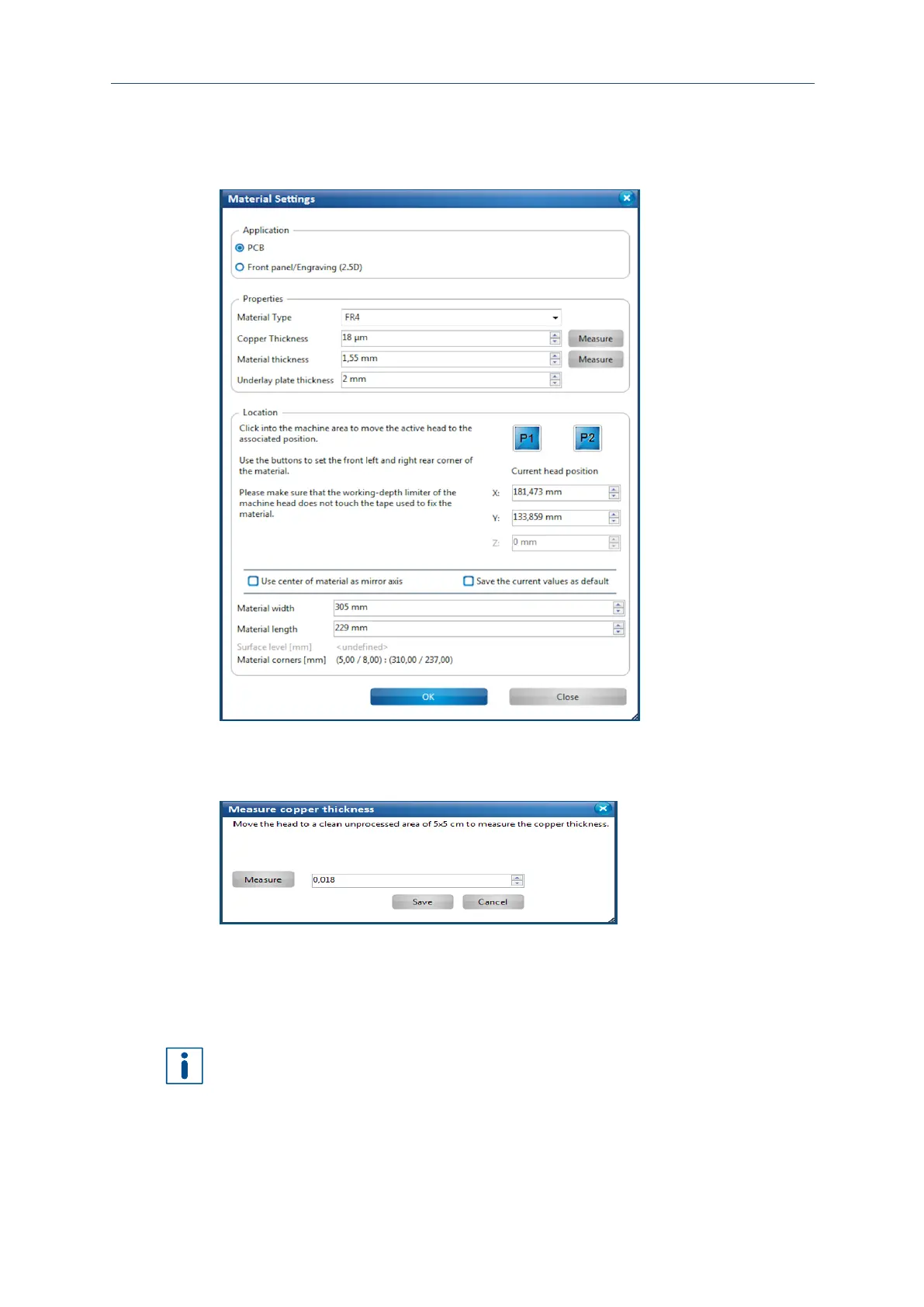
1. Click on Edit > Material settings...
The following dialog is displayed:
Fig. 95: Dialog Material settings
2. Click on [Measure] next to the drop-down list Copper layer thickness.
The following dialog is displayed:
Fig. 96: Dialog Measure copper layer thickness
3. Move the processing head to a clean, unused area (approx. 5 x 5 cm / 2 x 2 in).
4. Click on [Measure].
The probes for measuring the copper layer thickness are lowered. The measured
value is displayed in the spin box.
If you already have acquired experience with the material and want to influence the
material removal, you can modify the measured value accordingly using the arrow
buttons of the spin box.
5. Click on [Save] to apply the measured value in the dialog Material settings.
The thickness of the copper layer has been measured.



 To Next Page