V. 1.0 | LPKF Laser & Electronics AG
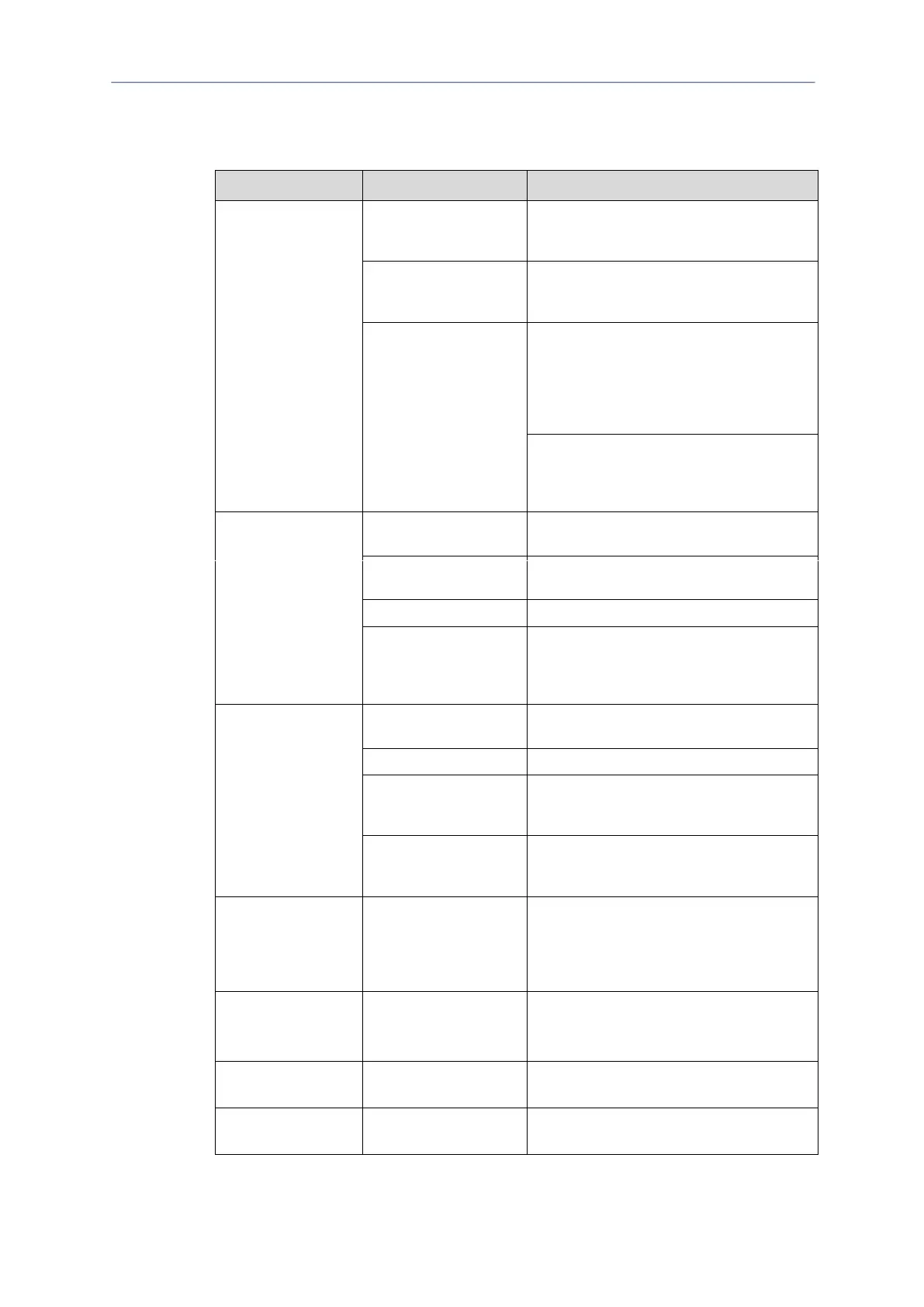
8.3 Fault table
The following table contains possible faults and proposals how to clear them.
No connection
between system and
PC
Check the mains cable and plug the mains
plug back into the socket.
Click on Machining > Connect.
Switch the main switch at the system to the
ON position.
Click on Machining > Connect.
No data transfer via the
USB cable.
Check the USB cable connection between
the system and the PC for damage or loose
connectors. Replace the USB cable if
damaged.
Click on Machining > Connect. Follow the
instructions on page page 83.
Check the USB settings of the operating
system.
Click on Machining > Connect. Follow the
instructions on page page 83.
Check the mains cable and plug the mains
plug back into the socket.
Extraction system
switched off
Set the mode selector switch to the position
ON or AUTOMATIC.
Circuit breaker triggered
Reset the extraction system.
Check the connection cable between the
system and the extraction system for damage
or loose connectors. Replace the cable if
damaged.
Insufficient extraction
power
Correct/Increase the extraction power of the
extraction system.
Extraction system is full.
Replace the filter bag (see page 141).
Unused areas on the
vacuum table are not
covered.
Mask or cover the vacuum table.
The extraction hose at
the processing head has
come loose.
Attach and fasten the extraction hose behind
the milling spindle.
Tool picked up
incorrectly; Unexpected
ending of the
software/processing
procedure.
Eject the tool from the collet.
In the menu Edit > Tool magazine, click on
the button [Drop tool].
System input pressure
too low.
Set the system input pressure to 6 bar.
Use a compressor with sufficient delivery
volume.
Grayed out function in
the system software
Selection of the user
group.
Change the user group to: Advanced user
Error message:
System resources
Insufficient PC
resources.



 To Next Page