EasyManua.ls Logo

LPKF ProtoMat S64 - Component Maintenance: Cleaning and Lubrication

LPKF ProtoMat S64
160 pages
Print Icon
To Next Page IconTo Next Page
To Previous Page IconTo Previous Page
Loading...
Maintenance
ProtoMat S64/S104
128/160
Cleaning and lubricating the collet
Before performing the steps, ensure that the following spare parts and auxiliaries are
available:
Spare parts and auxiliaries
Latex lab gloves
Collet cleaning kit
Collet wrench
1. Put down the tool that is in the collet into the tool magazine.
2. Move the processing head to the following position: x=15 mm; y=0 mm; z1=0 mm;
z2=0 mm.
3. Lock your computer screen with the keys + + so that no
more entries are possible in CircuitPro PM while performing maintenance tasks on
the collet.
4. Open the cover.
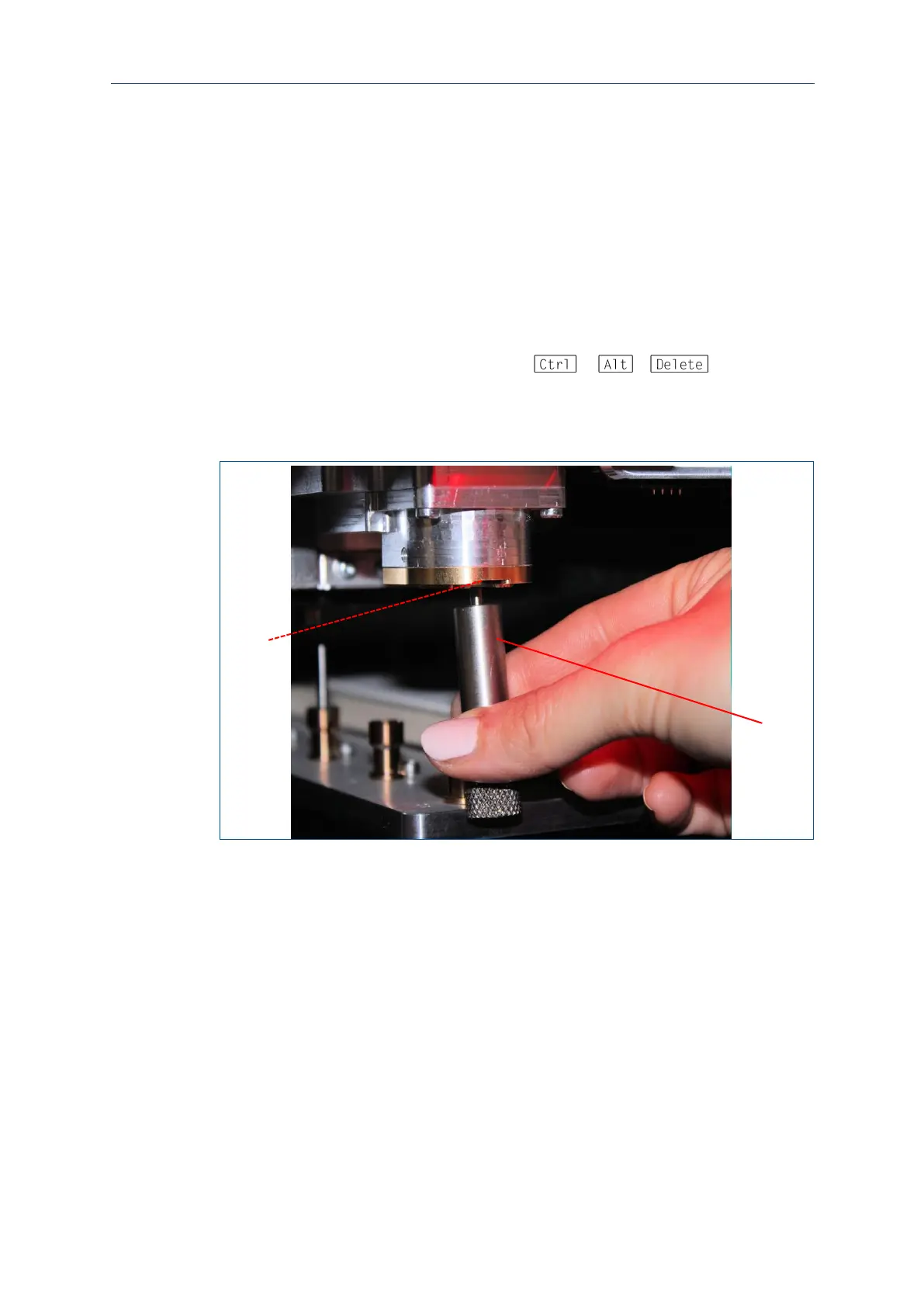
5. Insert the collet wrench (2) into the collet opening (1):
1 Collet opening
2 Collet wrench
2
1

Table of Contents

Other manuals for LPKF ProtoMat S64

Related product manuals