4-66
To remove the front panel of either the
upper or lower dryer, begin by opening the
dryer door and removing the lint filter.
Remove the service panel (See page 4-56).
Remove the lint filter housing
(See page 4-21).
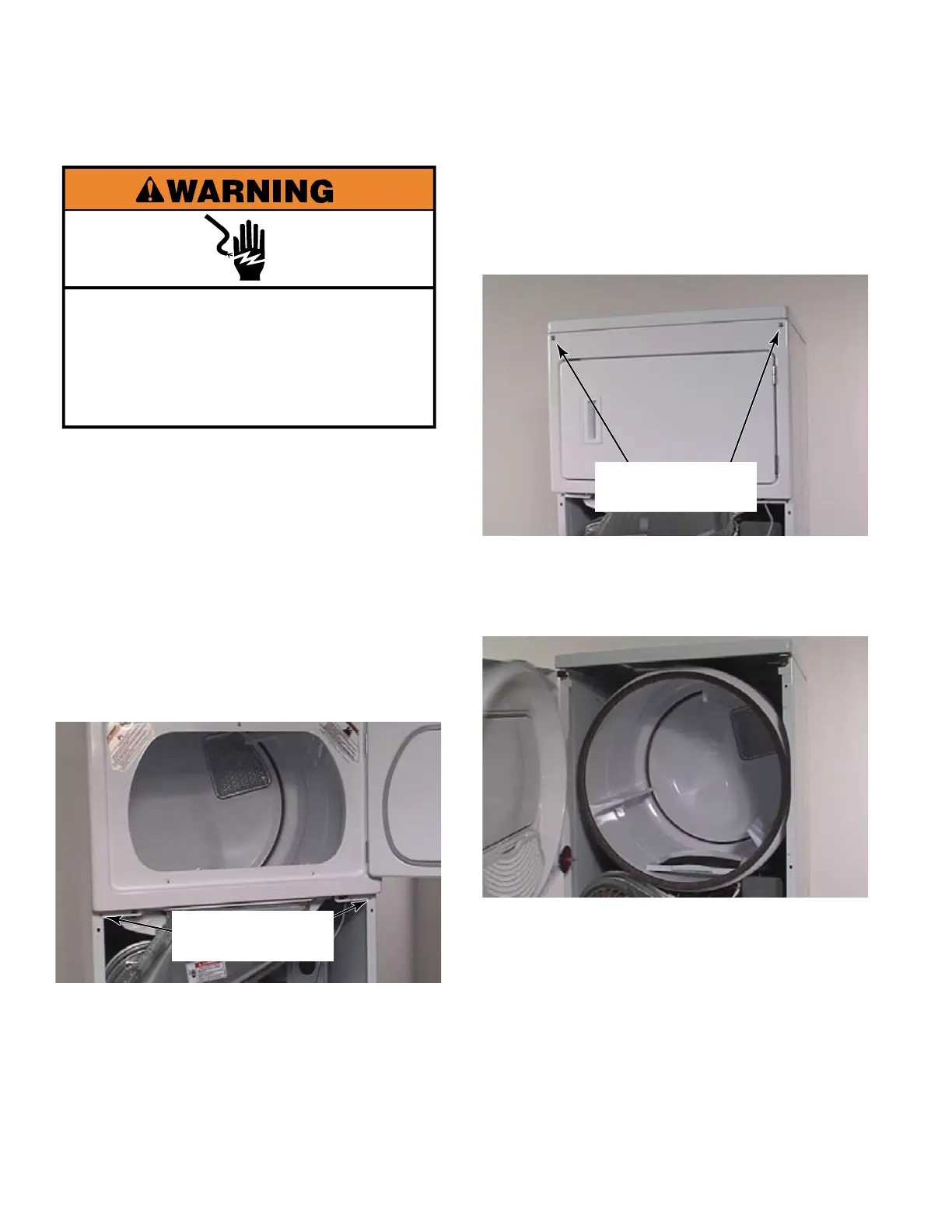
Remove two 1/4” hex head screws from the
bottom corners of the front panel that were
hidden behind the lower service panel.
Disconnect the door switch connector
behind the service panel.
1.
2.
3.
4.
5.
REMOVE FRONT PANEL OF STACK DRYER
Remove two T-20 security screws from
the front top corners of the front panel.
The washers on these screws must be
reinstalled to help avoid damage to the
finish of the dryer.
Pull the front panel away from the dryer.
The front panel only rests on the clips at the
top corners and will release when the front
panel is pulled forward.
NOTE: Resistance to pulling forward may
be due to front drum support rollers that
ride in the channel of the drum. Slight
manipulation of the front panel or lifting of
the dryer drum may be required to dislodge
the front support rollers from the channel in
the drum.
6.
7.
Two 1/4” Hex
Head Screws
Two T-20 Security
Screws
Electrical Shock Hazard
Disconnect power before servicing.
Replace all parts and panels before
operating.
Failure to do so can result in death or
electrical shock.


 To Next Page