4-50
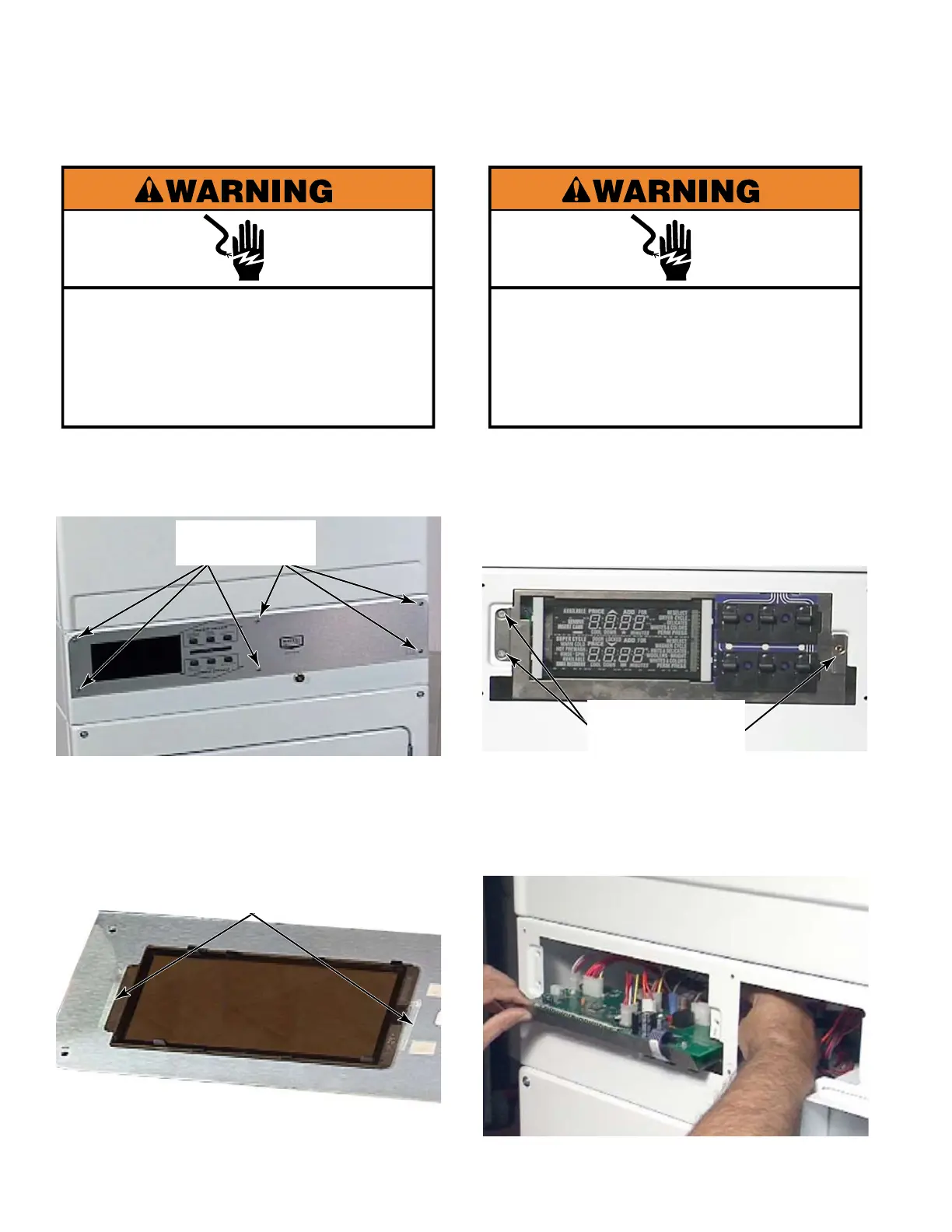
Remove six T-20 security screws from the
front of the facia..
Pull the facia off the front of the collar
The display lens is secured to the back of
the facia with two-sided tape.
1.
2.
3.
REMOVE FACIA AND
DISPLAY LENS
Six T-20
Security Screws
Electrical Shock Hazard
Disconnect power before servicing.
Replace all parts and panels before
operating.
Failure to do so can result in death or
electrical shock.
Remove the facia (See left column).
Remove three star head screws that secure
the bracket to the collar.
Rotate the bracket down and into the collar
until it is in a horizontal position. In this
position pull the bracket, control board and
user interface forward and out of the collar.
1.
2.
3.
Three Star
Head Screws
LOWER CONTROL BOARD
& BRACKET FOR SERVICE
Electrical Shock Hazard
Disconnect power before servicing.
Replace all parts and panels before
operating.
Failure to do so can result in death or
electrical shock.
Two-Sided
Tape


 To Next Page