October 2008 "3072ES / 3772ES / 3772ES HD" Service & Parts Manual
Page 2-6
Battery Replacement
BEFORE REMOVING A BATTERY FROM THE MACHINE, TURN OFF THE MASTER
DISCONNECT SWITCH. THERE SHOULD BE NO POWER.
Prevent damage to battery and/or electrical system;
• Always disconnect the negative battery cable first.
• Always connect the positive battery cable first.
To remove a battery;
1. Turn OFF the Master Disconnect switch.
2. Disconnect the battery cables and remove battery hold-down hardware.
3. Lift the battery from the compartment, put the battery aside and dispose of properly.
To install a battery;
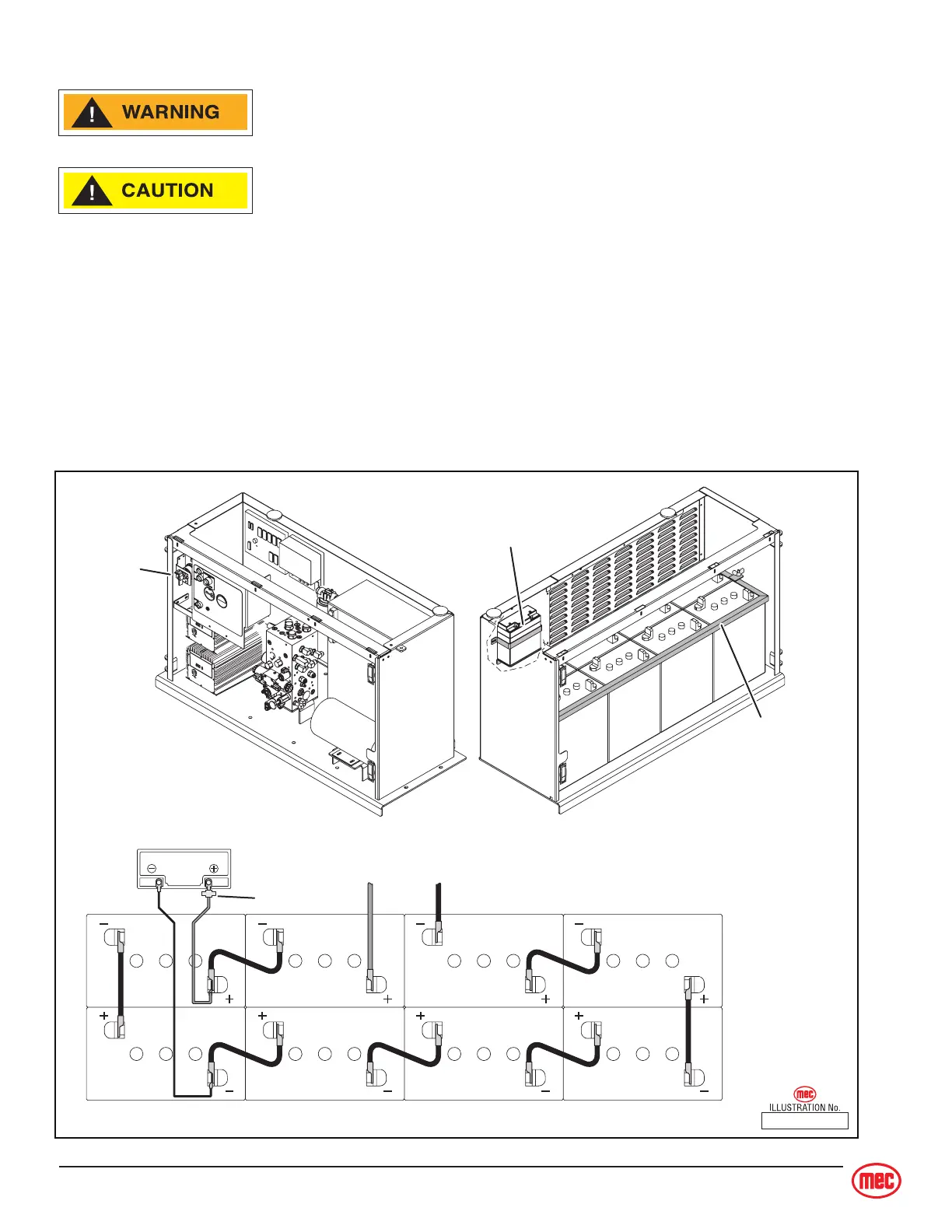
1. Position the battery in the compartment as illustrated and secure with hold-down hardware.
2. Connect battery cables as illustrated.
ART_2556
To Master
Disconnect
Switch
Diode
To
Chassis
Ground
Master
Disconnect
Switch
CONTROL MODULE
BATTERY PACK
POWER MODULE
Emergency Lowering
Battery (12 V DC)
Battery
Hold-Down
15



 To Next Page