DICOM
B-3
To enter the screen:
1. Press <Setup> to enter the Setup menu.
2. Move the cursor onto [Network Preset], the submenu pops up.
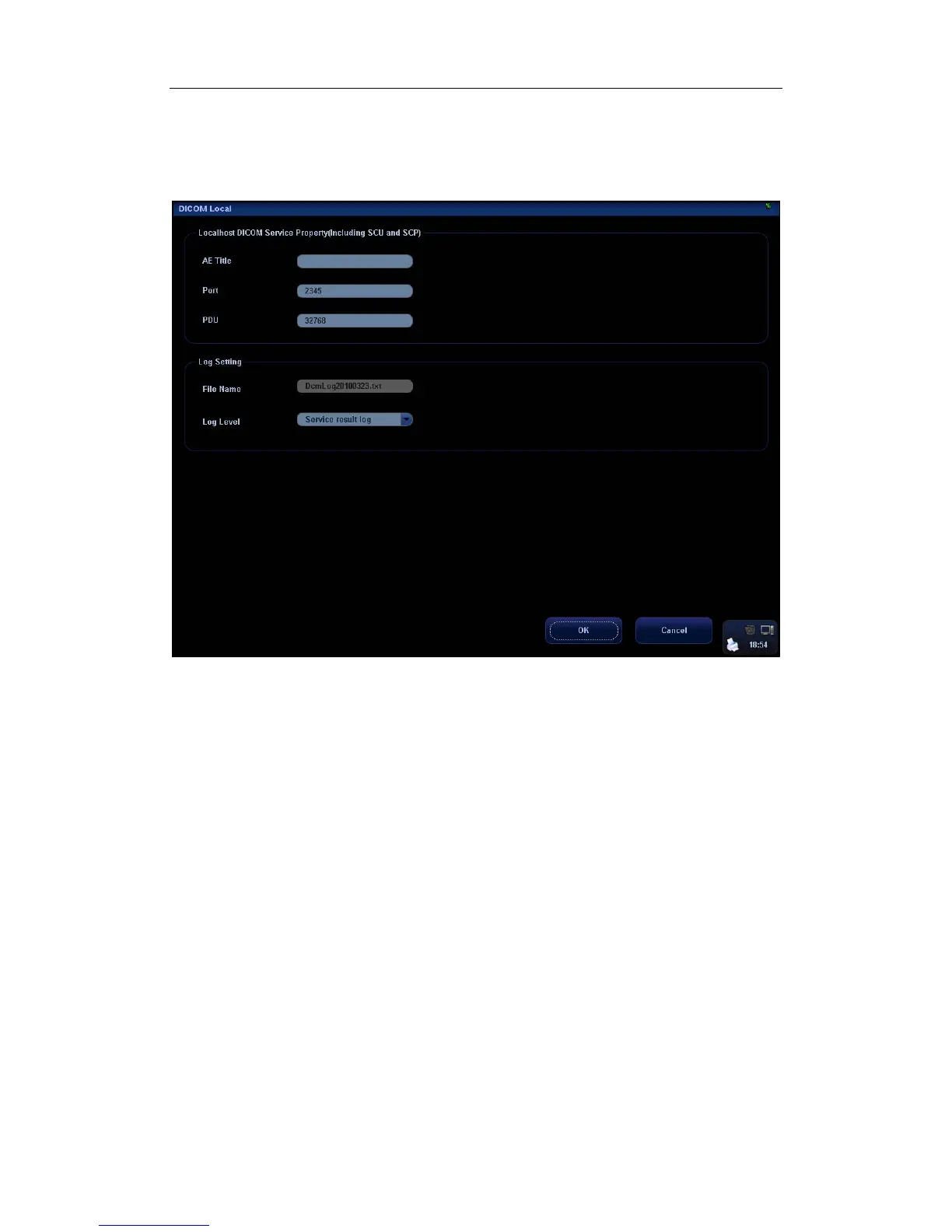
3. Select [DICOM Local], as shown in the following figure:
DICOM local setting items are described as follows:
1 AE Title: Application entity title of the ultrasound system, which should be
consistent with one of the acceptable SCU set in the server.
2 Port: DICOM communication port, which should be the same with the one in the
server.
3 PDU: Maximum PDU data package size ranging from 16384 to 65536. If the value
is less than 16384 or greater than 65536, the system automatically sets it to the
value 32768.
4 File Name: name of the DICOM log, generated by the system automatically.
5 Log Level: to set the log type.
The available selections: No log, Service result log, Service process log, All log.
We suggest setting “All log”, so that you can see the DICOM log.
6 OK: Click to confirm parameter setting.
7 Cancel: Click to cancel parameter setting.
Enter AE Title, Port, and PDU according to the actual situation, and then click [OK] to exit
the screen.
Tips:


 To Next Page