203
D
ISPLAY AND CONTROL PANEL
CHAPTER 6 OPERATION AND MAINTENANCE
The SMB Controller is up and running in normal mode or emergency mode.
1.
Shut-down the SMB Controller with the Shut-down button in the SMB Controller Manager System
reset view.
OR
Shut-down the SMB Controller with a long click (> 5s) of the pilot key (CTRL).
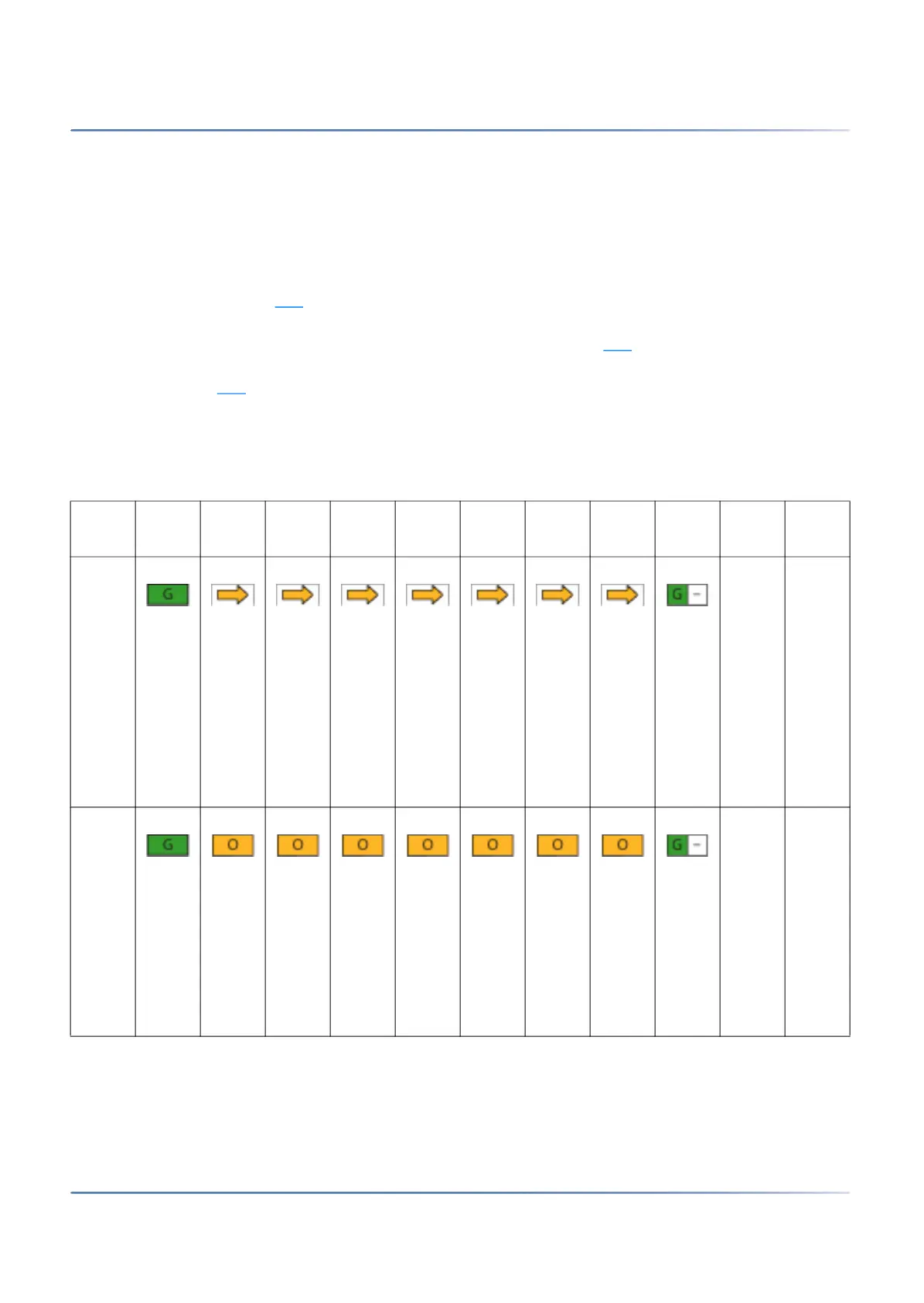
– The F0 - F6 LED are running orange while the applications are saving their data and are
closing (pattern [15]
).
– The running orange LED stops and the LED F0 - F6 are lights up orange. During this phase
the SMB Controller is saving its data and is closing (pattern [16]
).
– The F0 - F6 LED and the SYS LED are slowly flashing red to indicate the shut-down mode
(pattern [17]
).
2.
You can now disconnect the SMB Controller from the power supply without concerns within the next
1.5 minutes.
Table 6.9:Enter shut-down mode (Sheet 1 of 2)
No. PWR F0 F1 F2 F3 F4 F5 F6 SYS Durat
ion
Mean
ing
[15] up to
5
min.
Appli
catio
ns are
savin
g
their
data
and
are
closin
g
[16] ~20s SMB
Contr
oller
is
savin
g its
data
and is
closin
g



 To Next Page