TROUBLE DIAGNOSIS
MTC-59
C
D
E
F
G
H
I
K
L
M
A
B
MTC
Revision: January 2005 2004 Quest
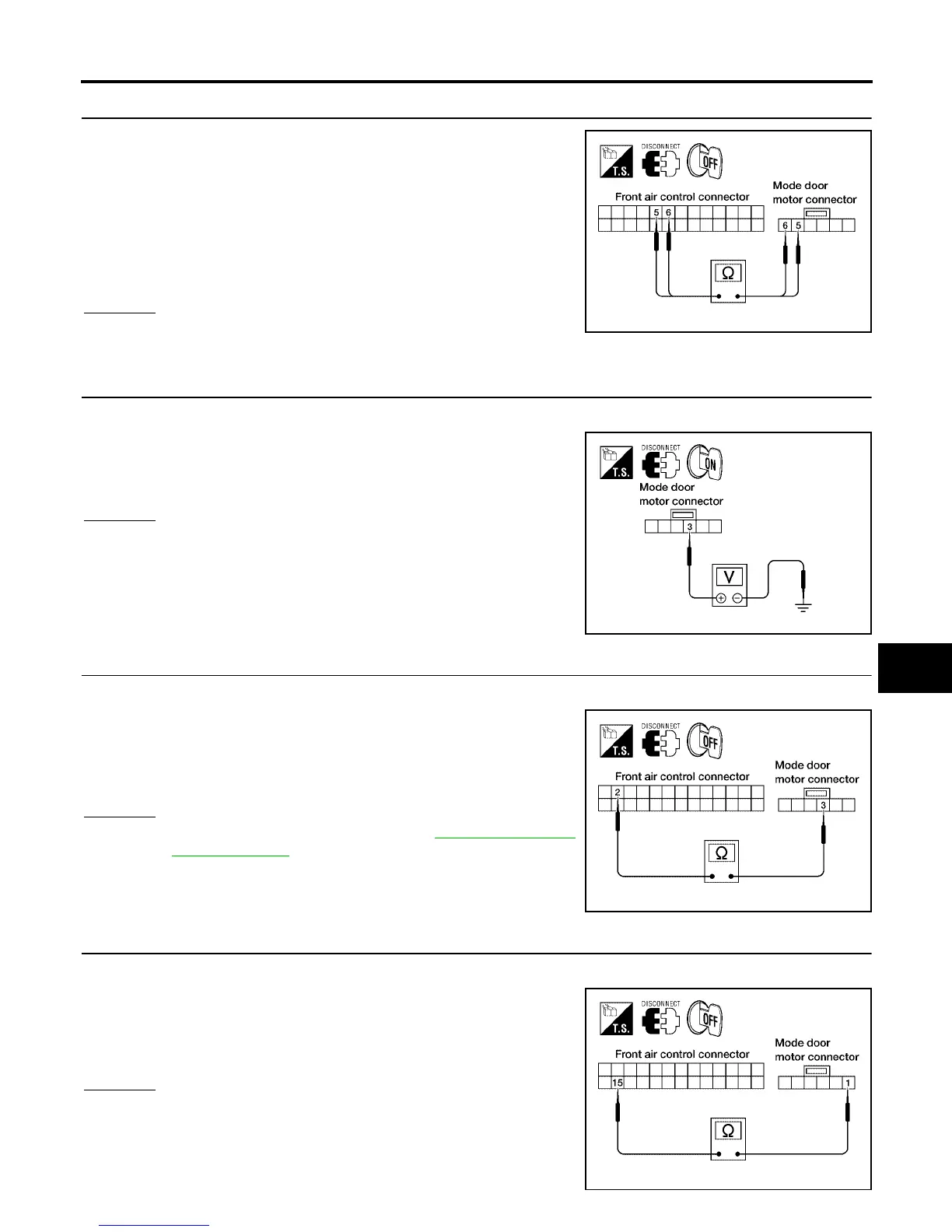
2. CHECK POWER SUPPLY AND GROUND CIRCUITS FOR MODE DOOR MOTOR
1. Disconnect front air control connector and mode door motor
connector.
2. Check continuity between front air control harness connector
M49 terminal 5 (SB) and mode door motor connector M304 ter-
minal 5 (SB) and between front air control harness connector
M49 terminal 6 (L/O) and mode door motor connector M304 ter-
minal 6 (L/O).
OK or NG
OK >> Replace mode door motor.
NG >> Repair or replace harness as necessary.
3. CHECK PBR REFERENCE SIGNAL VOLTAGE
1. Disconnect the mode door motor harness connector.
2. Check voltage between mode door motor harness connector
M304 terminal 3 (W/G) and ground.
OK or NG
OK >> GO TO 5.
NG >> GO TO 4.
4. CHECK PBR REFERENCE VOLTAGE CIRCUIT BETWEEN MODE DOOR AND FRONT AIR CONTROL
1. Disconnect the front air control harness connector.
2. Check continuity between mode door motor harness connector
M304 terminal 3 (W/G) and front air control harness connector
M49 terminal 2 (W/G).
OK or NG
OK >> Replace front air control. Refer to MTC-116, "FRONT
AIR CONTROL" .
NG >> Repair or replace harness as necessary.
5. CHECK PBR GROUND REFERENCE CIRCUIT
1. Disconnect the front air control harness connector.
2. Check continuity between mode door motor harness connector
M304 terminal 1 (Y) and front air control harness connector M49
terminal 15 (Y).
OK or NG
OK >> GO TO 6.
NG >> Repair or replace harness as necessary.
Continuity should exist.
LJIA0027E
5V (Approx.) should exist.
LJIA0028E
Continuity should exist.
LJIA0029E
Continuity should exist.
LJIA0031E



 To Next Page