TROUBLE DIAGNOSIS
MTC-87
C
D
E
F
G
H
I
K
L
M
A
B
MTC
Revision: January 2005 2004 Quest
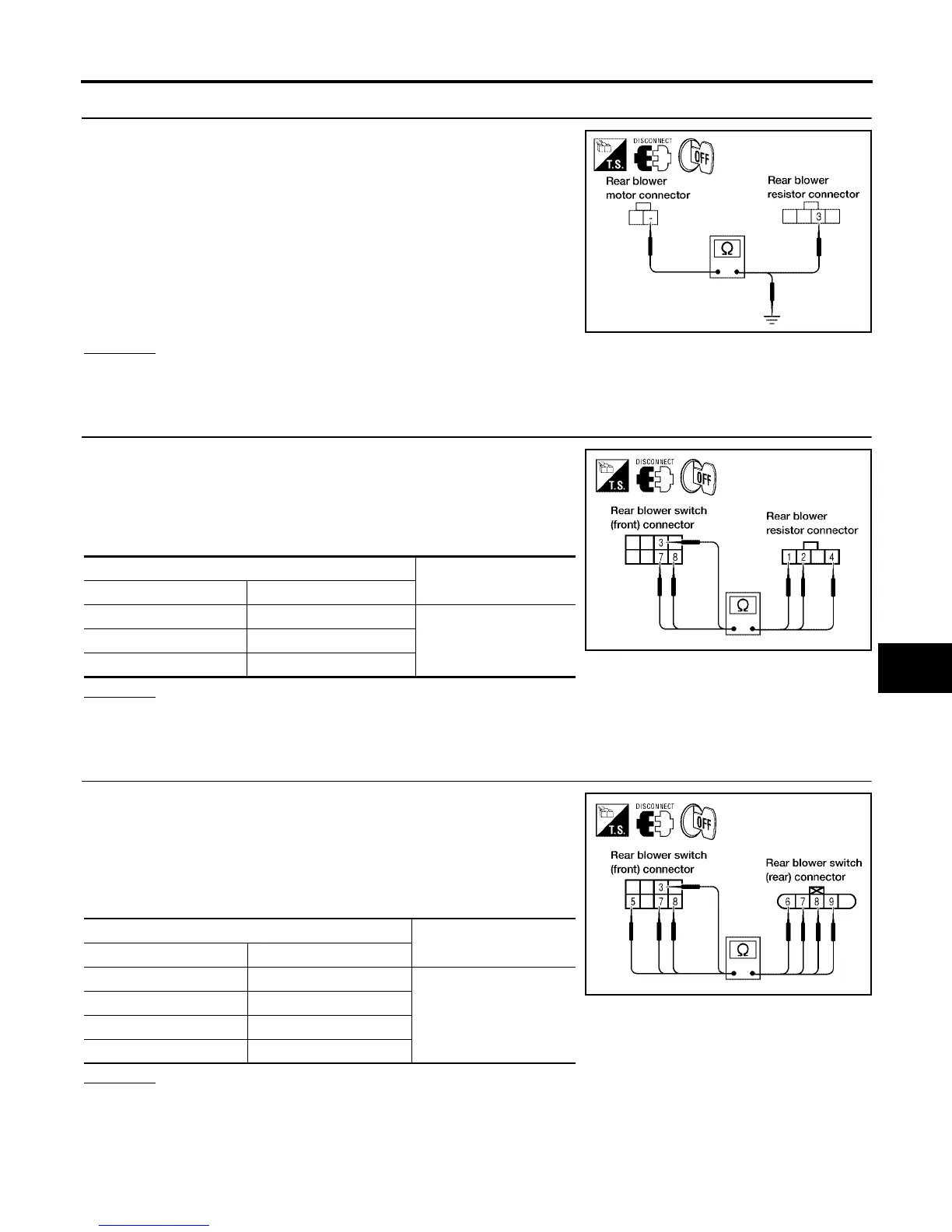
15. CHECK REAR BLOWER MOTOR GROUND CIRCUIT TO REAR BLOWER MOTOR RESISTOR
1. Disconnect rear blower motor and rear blower motor resistor
harness connector.
2. Check continuity between rear blower motor connector B134
terminal - (L/B) and rear blower motor resistor harness connec-
tor B133 terminal 3 (L/B).
3. Check continuity between rear blower motor connector B134
terminal - (L/B) and ground.
OK or NG
OK >> GO TO 16.
NG >> Repair harness or connector.
16. CHECK REAR BLOWER SWITCH (FRONT) CIRCUIT
1. Disconnect rear blower resistor harness connector.
2. Check continuity between rear blower switch (front) connector
M52 terminals 3 (LG), 7 (LG/B), and 8 (G), and rear blower
motor resistor connector B133 terminals 1 (LG), 4 (LG/B), and 2
(G).
OK or NG
OK >> Inspection End.
NG >> Repair harness or connector.
17. CHECK REAR BLOWER SWITCH (FRONT) CIRCUIT
1. Disconnect rear blower resistor and rear blower switch (rear)
harness connectors.
2. Check continuity between rear blower switch (front) connector
M52 terminals 3 (LG), 5 (L/B), 7 (LG/B), and 8 (G), and rear
blower switch (rear) connector B141 terminals 9 (LG), 6 (L/B), 8
(LG/B), and 7 (G).
OK or NG
OK >> GO TO 18.
NG >> Repair harness or connector.
Continuity should exist.
Continuity should not exist.
LJIA0118E
Terminal No.
Continuity
Rear blower switch (front) Rear blower motor resistor
31
Should exist74
82
LJIA0109E
Terminal No.
Continuity
Rear blower switch (front) Rear blower switch (rear)
39
Should exist
56
78
87
LJIA0110E



 To Next Page