MYDATA MY500 JetPrinter Installation
P-030-0014-EN – Service Manual Rev. 0003 2008-06 2 - 13
Main Machine Connections
The main connection points are found on the back of the machine. These
points are placed on the outside of the connection plate (the lower door).
This door can only be unlocked by a special key, which is provided with the
machine.
WARNING! There is dangerous voltage in units behind the door. Ensure that
the key is only available to trained maintenance personnel.
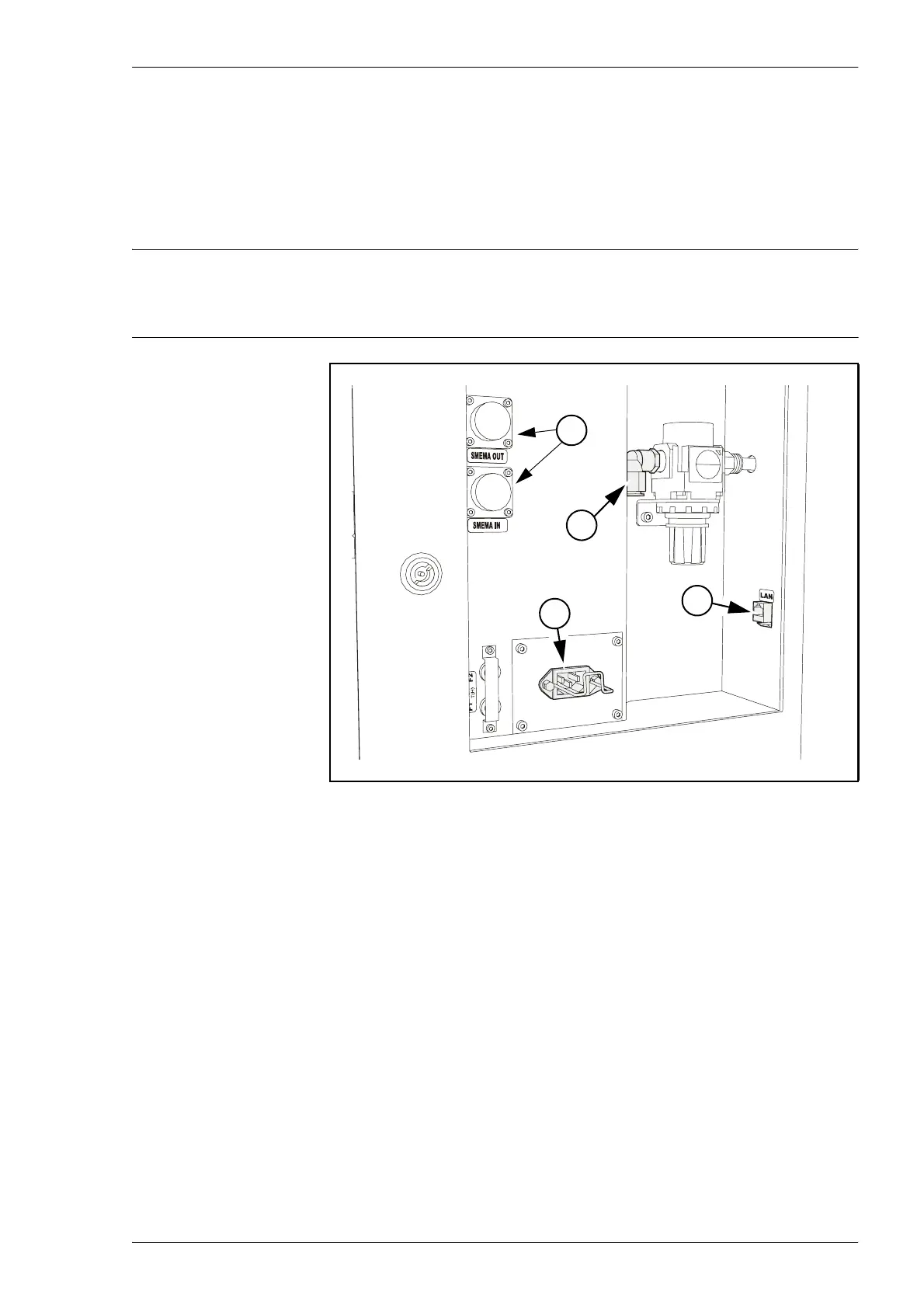
The main connection points are:
1. Powering
This is where the mains power supply is connected, see page 2-14 for
details.
2. Pneumatic connection
This is where the compressed air is connected, see page 2-16 for details.
3. Network connection
The Local Area Network is connected here, see page 2-19 for details.
4. SMEMA Connectors
These connectors are used for the communication with external
conveyors, see page 2-19 for details.
Figure 2-8. Main connections on machine backside.
3
1
2
4



 To Next Page