4.2 Sweep
4-20 WF1946B
Other operations:
• Sweep stop : Press the
STOP
key. When sweep is stopped at the stop value at single sweep
end or during sweep, press the
STOP
key to set the start value.
• Sweep pause : Press the
PAUSE
key. Again press the
PAUSE
key to resume sweep.
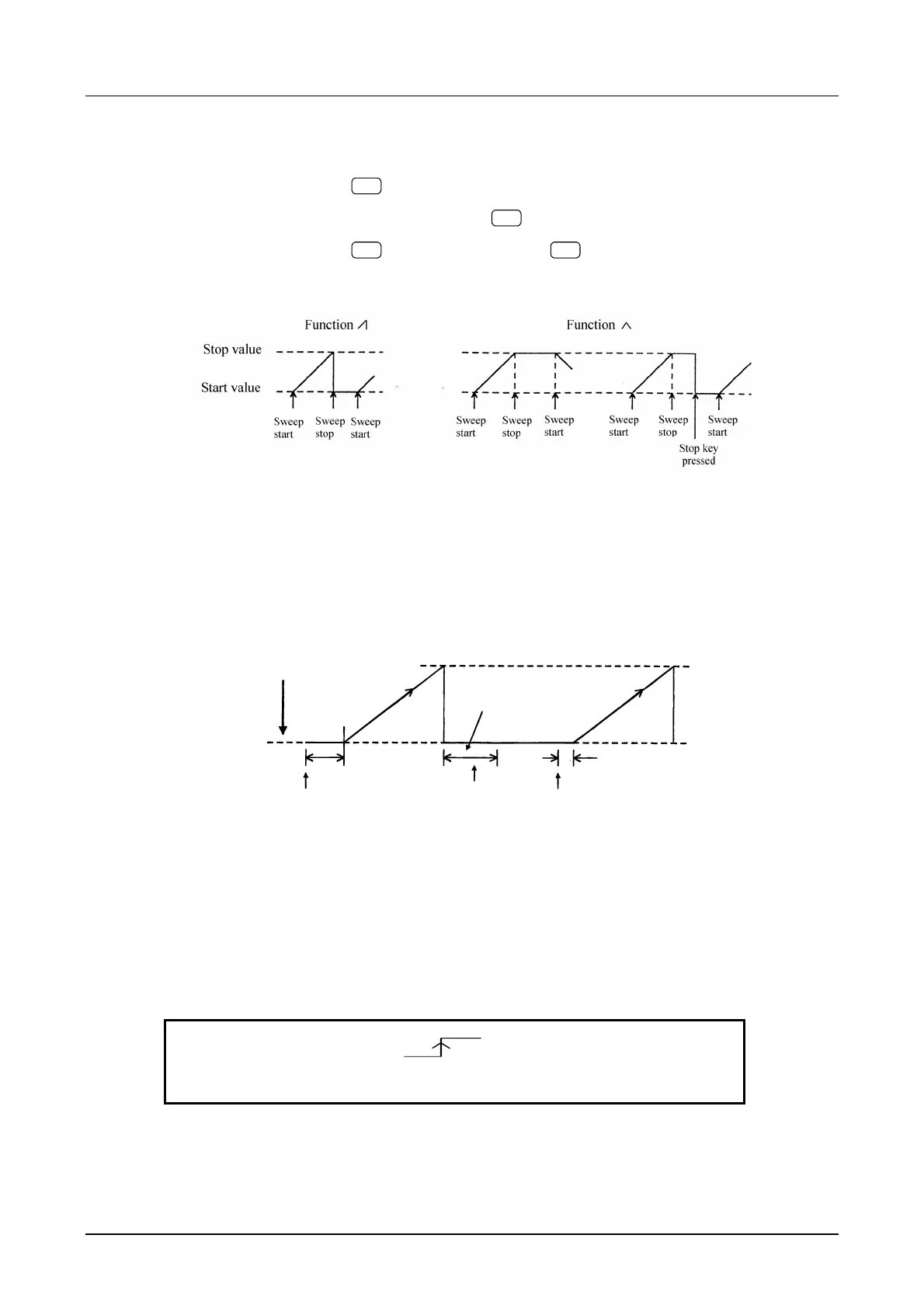
• Single sweep operation examples
• Dead time and trigger delay
: Triggers input within 100 ms of completion of the last sweep are ignored.
The trigger delay for the first sweep after power-on or a parameter change is 40 ms.
Otherwise, it is 2 ms.
Power-on or a sweep parameter
setting change
Stop value
Dead time = 100 ms
Start value
TriggerTrigger
Triggers during dea
time are ignored.
40ms
2ms
• External sweep start
: Set the sweep trigger source to EXT and select rising or falling. Supply an
external signal to the front panel TRIG/SWEEP IN connector. However, note that
retrigger cannot be applied for 100 ms after sweep start.
During a sweep, the sweep restarts if a trigger is input.
EXT
F-SWP:TYPE SOURCE MODE
4
• External pause
: Apply Low level to the rear panel SWEEP PAUSE IN connector.
To resume sweep, apply a High level or open input.



 To Next Page