3-26
3
HOT
4) Level
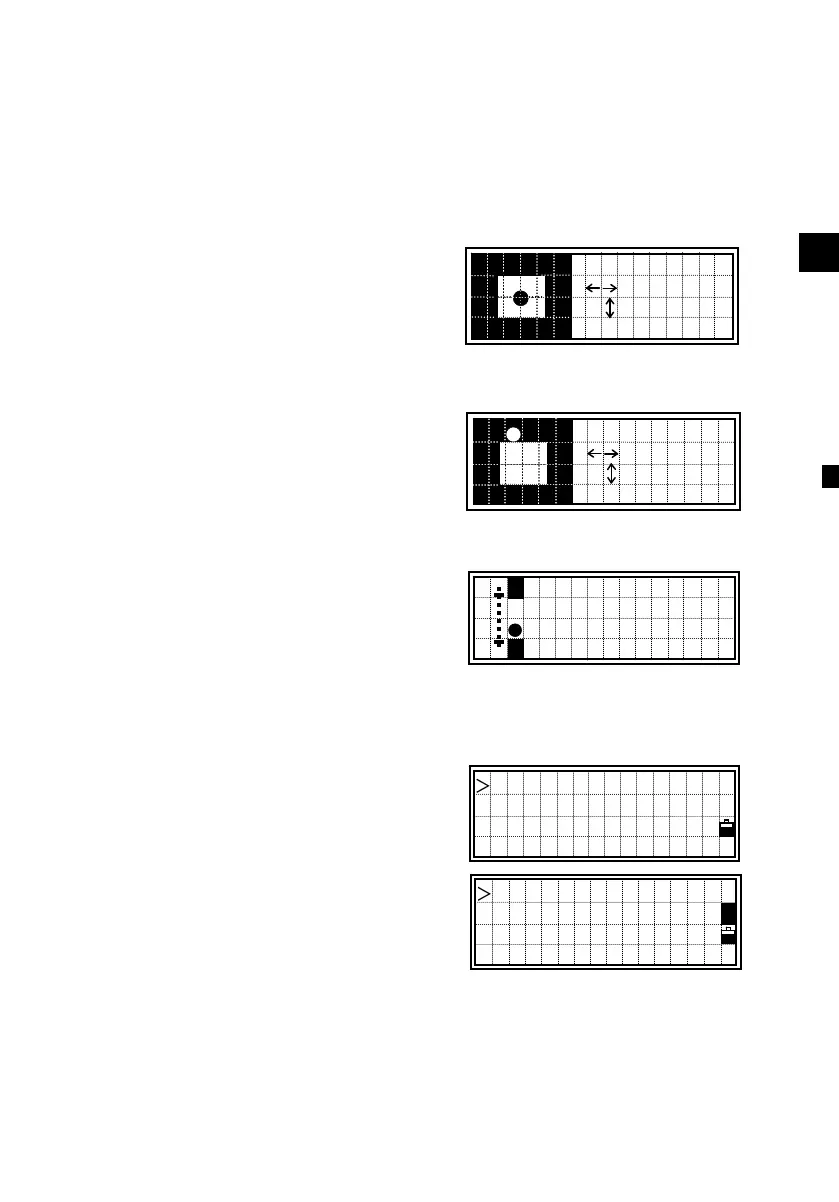
The leveling indication is displayed automatically on any measuring
screen if the instrument goes out of level while the compensators are
turned on. It can also be displayed by pressing the [HOT] and [4] keys.
<DTM-350 = 2axis compensation>
You can turn the leveling compensators
on or off by pressing the Right/Left arrow
keys.
It shows “OVER” when it is larger than
±3’30”. When the compensation is set to
off, it shows “OFF” on the screen right.
Press the [ESC] or [ENT] key to return to
the observation screen.
<DTM-330 = 1axis compensation>
DTM-330 has the vertical axis adjustment
only. It can be turned ON/OFF by the
Right/Left arrow keys.
5) Qedit
The list of feature codes currently
assigned in Quick code mode are
displayed.
Directly input the key number or select
the one by the Up/Down arrow keys.
Then, press the [ENT] key to start typing
characters in.
Press the [ENT] key or Up/Down arrow
key to complete input. Press the [ESC]
key to return to the observation screen.
1 HEDGE
2 FENCE
3 BUSH
4 MANHOLE ↓
7
■
8
9
0
A
:-0’36”
: OVER
:-0’05”
: 0’03”
-LEVELING-
-1’36”












 To Next Page