3-56
3
S-O
3: 2-Pt Reference Line (2REF)
Measuring distance and offset values along a specified line
Press the [3] key on the Stakeout menu
screen to start 2-Pt Reference Line.
Input the two point names for the
reference line.
You can search the point by inputting the
asterisk (wild-card) as well.
When more than two points are found,
the point list is shown. You can select
the desired point by pressing up/down
arrow and the [ENT] key.
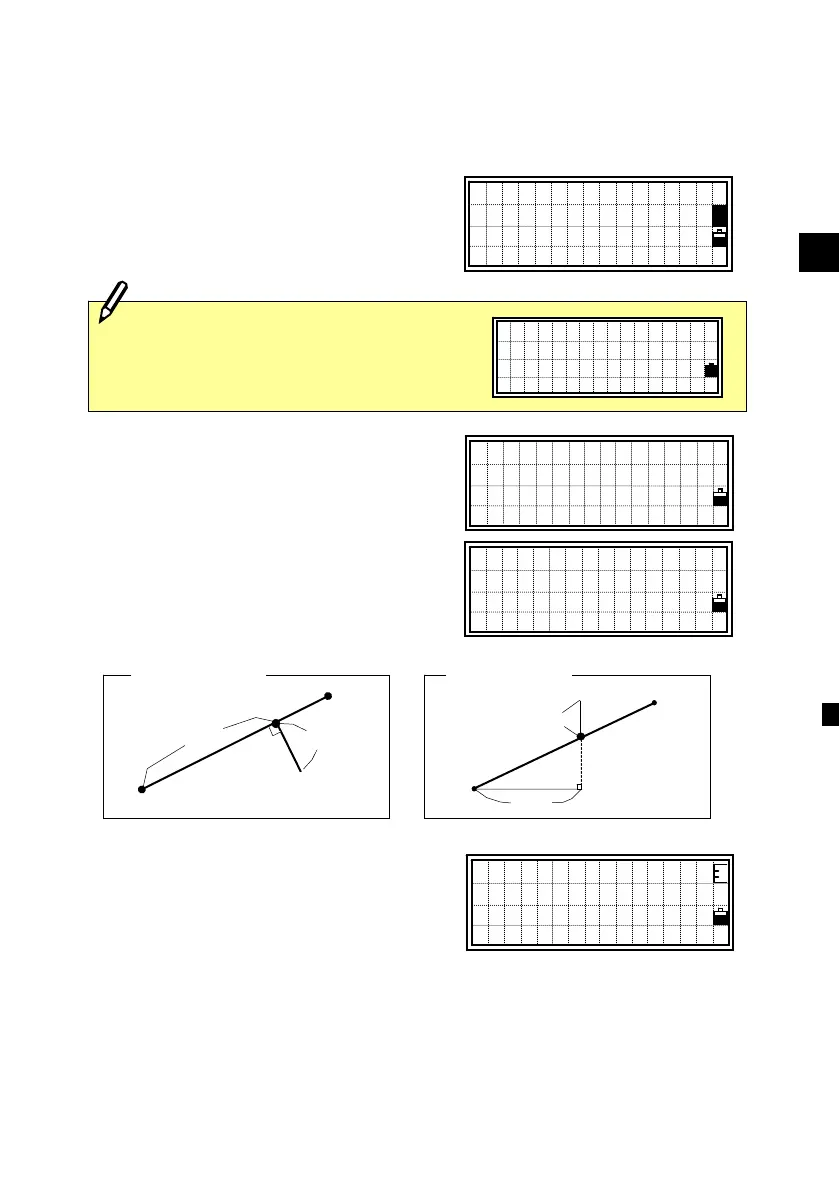
The observation screen is displayed next.
Sight the prism or reflective sheet and
press the [MSR] or [TRK] key.
Sta: Horizontal distance from P1 to the measure point along the
P1-P2 line
O/S: Horizontal offset from the P1-P2 line to the measured point
dZ : Vertical offset from the P1-P2 line to the measured point
Input Line PT1
P1:
■
P2:
Input Line PT2
P1:18
P2:20A*
■
>UP,20A-1,CURB
SS,20A-2,CURB
MP,20A-4,CURB
Sta: 15 .4564m
O/S: 2.3876m
dZ: 0.5209m
REF1/4
Inputting point by measurement is also
available. Press the [Mode] key to get
the observation screens.
Sight 1st Point
Press MSRorTRK
★Prism
PT1
O/
S
PT2
<Plain view>
<Side view>
S
PT1
dZ
Prism
PT2












 To Next Page