Solver NEXT SPM. Instruction Manual
16
5. Setup and Installation
5.1. Connecting the Electromechanical Units
ATTENTION! Before connecting or disconnecting any unit, switch off
the controllers. Disconnecting or connecting cables while the devices are
operating may cause damage to their electronic circuits.
1. Place the computer on its stationary location.
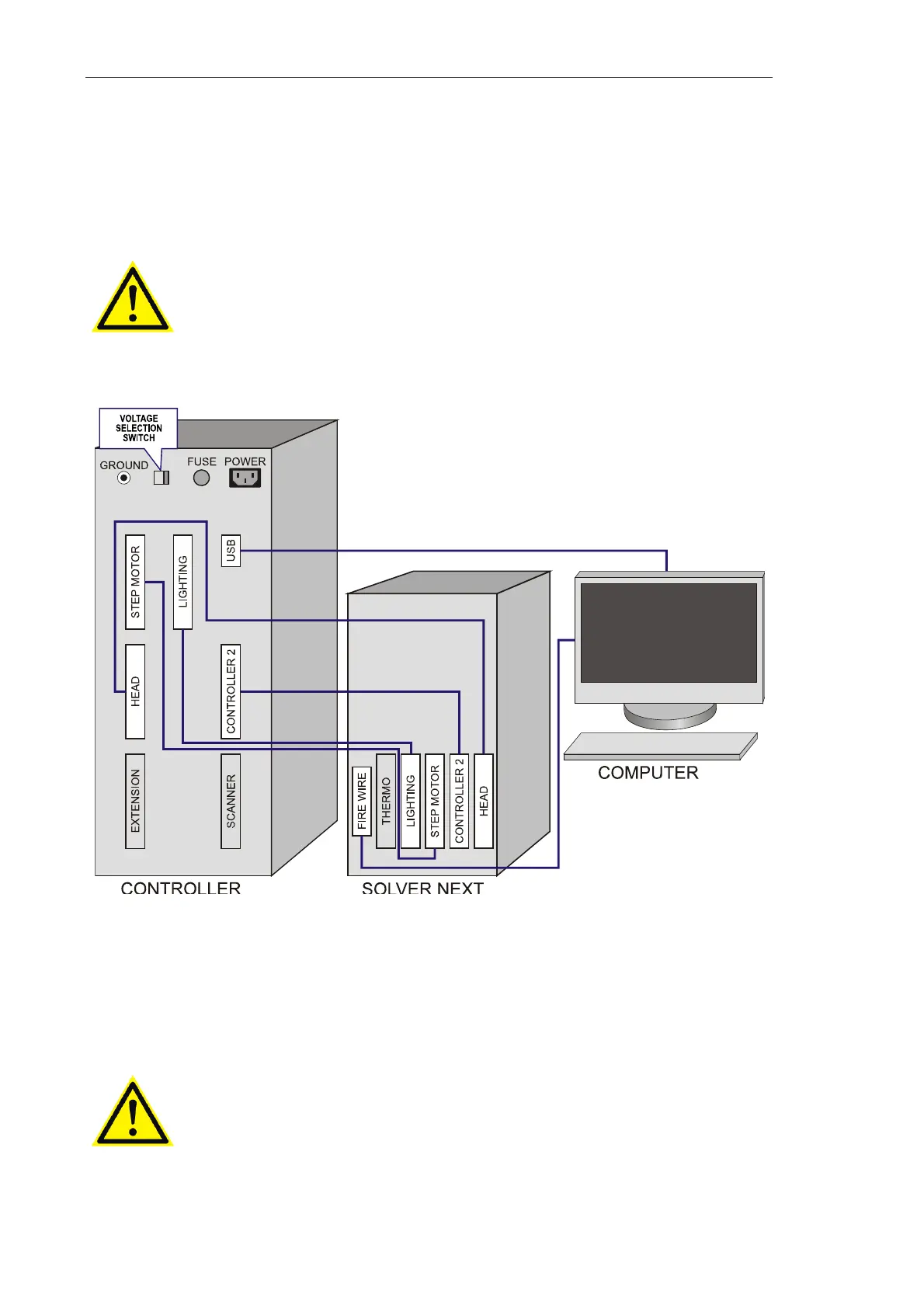
2. Perform cable connections according to the diagram of Fig. 5-1.
Fig. 5-1. Cable connections
3. Turn the voltage switch of the SPM controller to the position corresponding to the
actual voltage of the mains supply. The controller must be off at the moment of
switching!
4. Connect the SPM controller to the mains supply.
ATTENTION! The SPM controller can be connected to an electrical
power supply line of 110/220 V (60-50 Hz) after setting the voltage
selection switch to the position corresponding to this power supply line.
Observe this instruction to prevent damage of the electronic
components.



 To Next Page