Solver NEXT SPM. Instruction Manual
74
7.1.3.2. Procedural Sequence
Procedures of the Spreading Resistance Imaging Mode are based on those of the Constant
Force Mode that is described in detail in sect. 7.1.1 “Constant Force Mode” on p. 55.
Before starting the Spreading Resistance Imaging, make preparations for measurements
and perform measurements of surface topography by the Constant Force Mode
Remember to use the measuring head equipped with the conducting contact probe.
After preliminary measurements of surface topography by the Constant Force Mode, adjust
parameters for operating in the Spreading Resistance Imaging Mode.
7.1.3.3. Adjusting Scanning Parameters
1. Open the Scanning window with the button in the Main Operations panel.
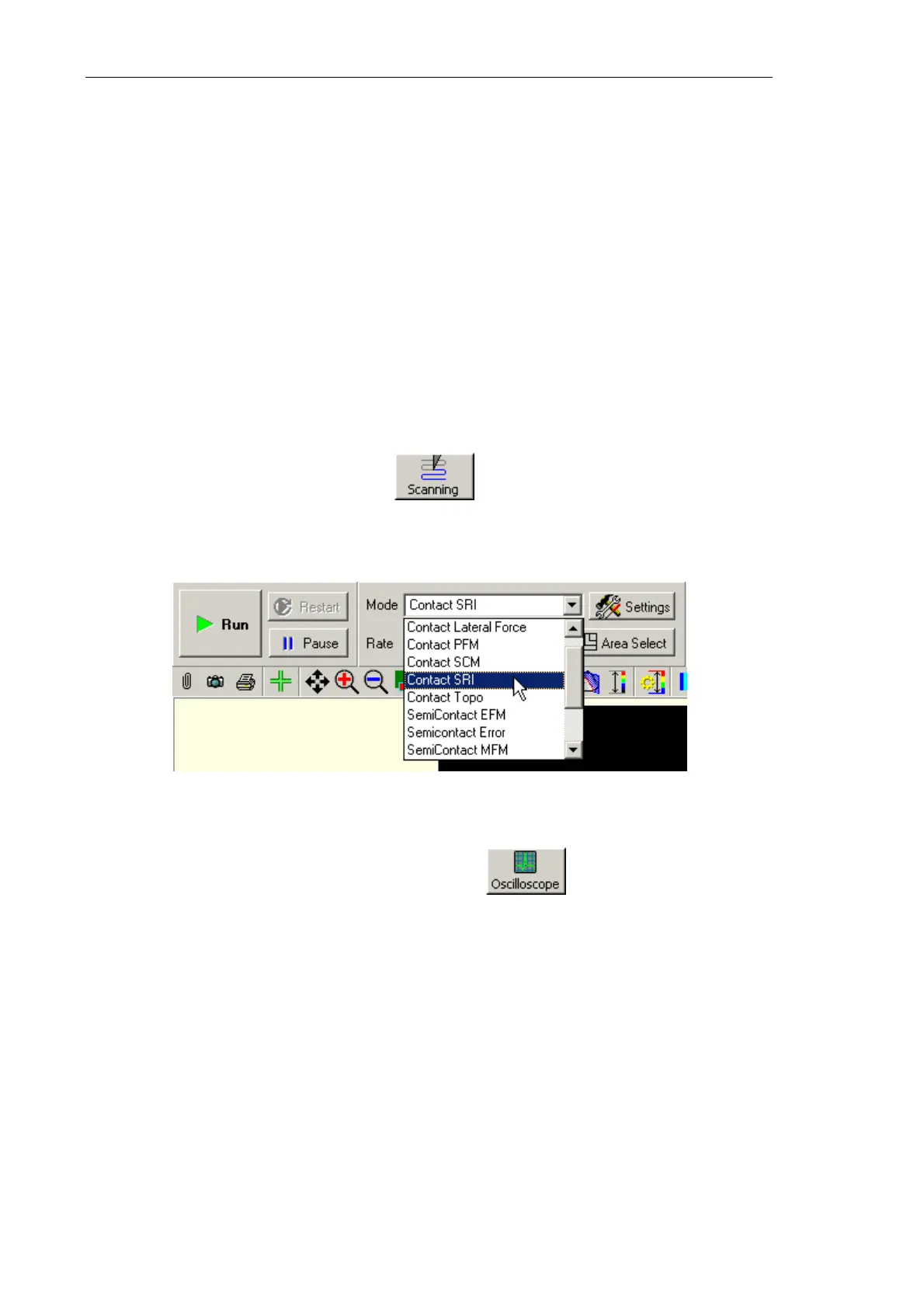
2. Select the Contact SRI mode in the Mode list on the Control panel of the scanning
window (see Fig. 7-29). This causes automatic rearrangement of the instrument to
provide the desired mode.
Fig. 7-29. Selecting the Spreading Resistance Imaging Mode
3. Open the software oscilloscope window with the button.
4. In the Oscilloscope window, select displaying of the
IprAFM signal (see Fig. 7-30).



 To Next Page