Solver NEXT SPM. Instruction Manual
32
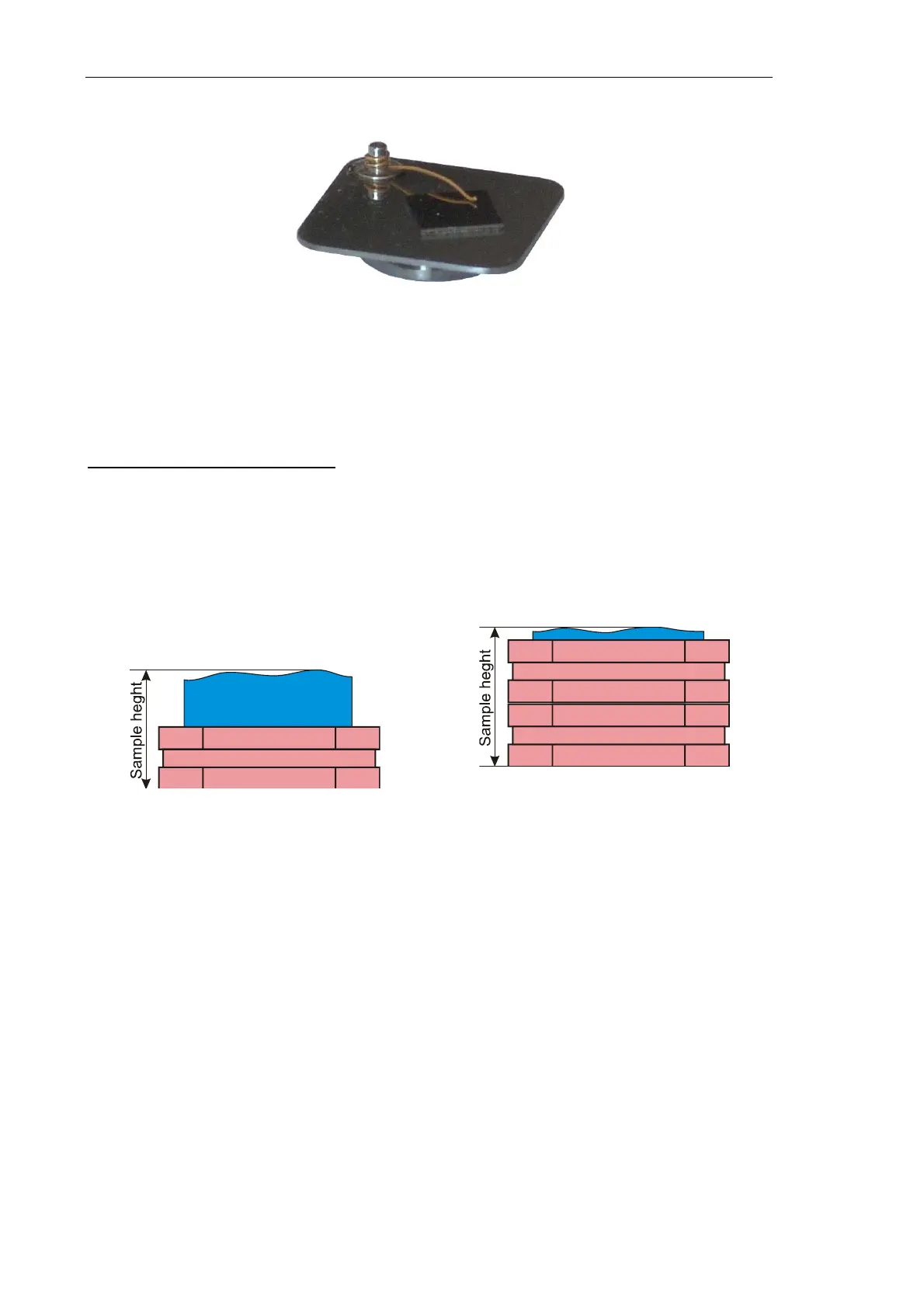
3. Place the sample-substrate assembly on a standard metal substrate (see Fig. 6-9).
Fig. 6-9. Sample-substrate assembly placed
on a standard metal substrate
4. Place the assembly of the sample and the two substrates on the scanner magnetic
fastener.
Setting the sample height value
Height of the sample above the scanner surface is important for accuracy of scan results.
For the sample height, the Control program Nova P9 reserves the Sample Height
parameter.
Take height of the sample-substrate(s) assembly (see Fig. 6-10) and assign this value to the
SampleHeight parameter of the Control program.
a) Assembly of a thick sample and a substrate
b) Assembly of a thin sample and two
substrates
Fig. 6-10. Definition of the
SampleHeight parameter
To define the sample height, enter the measured value of the sample height (in mm) in the
SampleHeight field of the Misc Params parameter group of the CalibrForm dialolg
(Fig. 6-11) (accessible through the
Tools Æ Calibration menu command).
If the sample height changes, redefine the SampleHeight parameter of the CalibrForm
dialog.



 To Next Page