Troubleshooting
Introduction
The main types of possible errors are the following.
• Errors that relate to the machine
• Errors that relate to the jobs
• Toner problems that relate to the use of fiber-rich media.
This section gives an overview of the possible errors and the solutions to these errors.
NOTE
Only operators who received the special maintenance training are allowed to replace or clean
parts and solve paper jams in the process units.
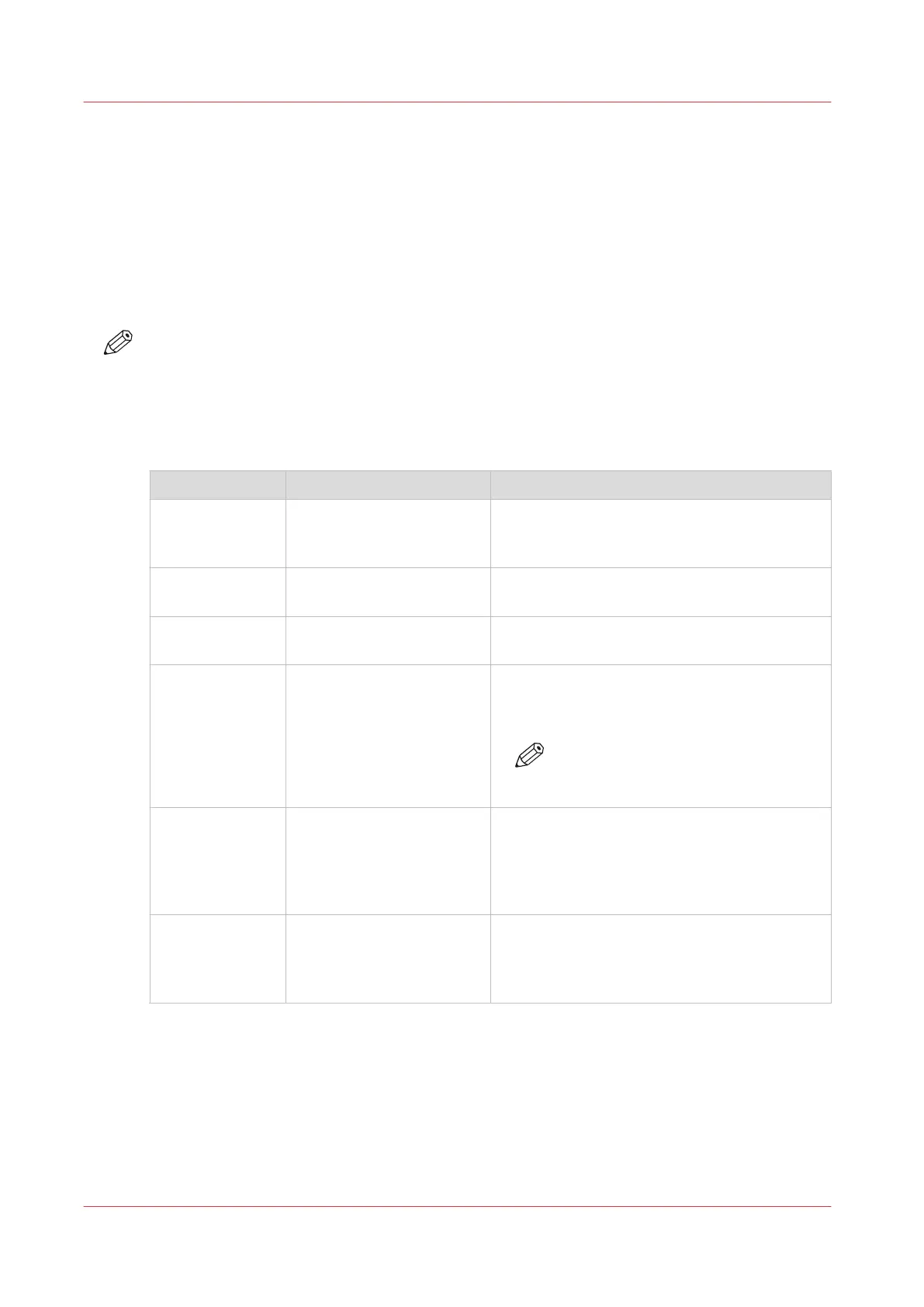
Overview of the possible machine errors
Handle the machine errors
Error Solution Additional information
Paper jam Follow the instructions on
the control panel.
After you solved the error, the machine starts
from the point where the printing stopped due
to the error. Please check for double prints.
Software error Follow the instructions on
the control panel.
A message on the control panel will indicate
that you must restart the machine.
Service required Follow the instructions on
the control panel.
A message on the control panel will indicate
that you must call Service.
Maintenance re-
quired
Follow the instructions on
the control panel.
The maintenance wizard appears. You need to
have access rights to perform maintenance
tasks.
NOTE
Only trained operators are allowed
to perform maintenance tasks.
Unit recondition-
ing
Follow the instructions on
the control panel.
After an error was solved, the machine checks
if the print job can continue from the point
where the printing stopped. When you use cy-
clic media, you must probably remove a cou-
ple of sheets.
The system can-
not determine if
the output is
complete
Follow the instructions on
the control panel and check
the output.
The system can sometimes not determine if
the output is complete. Then you must check
the output. Touch the [OK] button when the
output is complete.
Troubleshooting
278
Chapter 14 - Troubleshooting
Océ VarioPrint 6000 line













 To Next Page