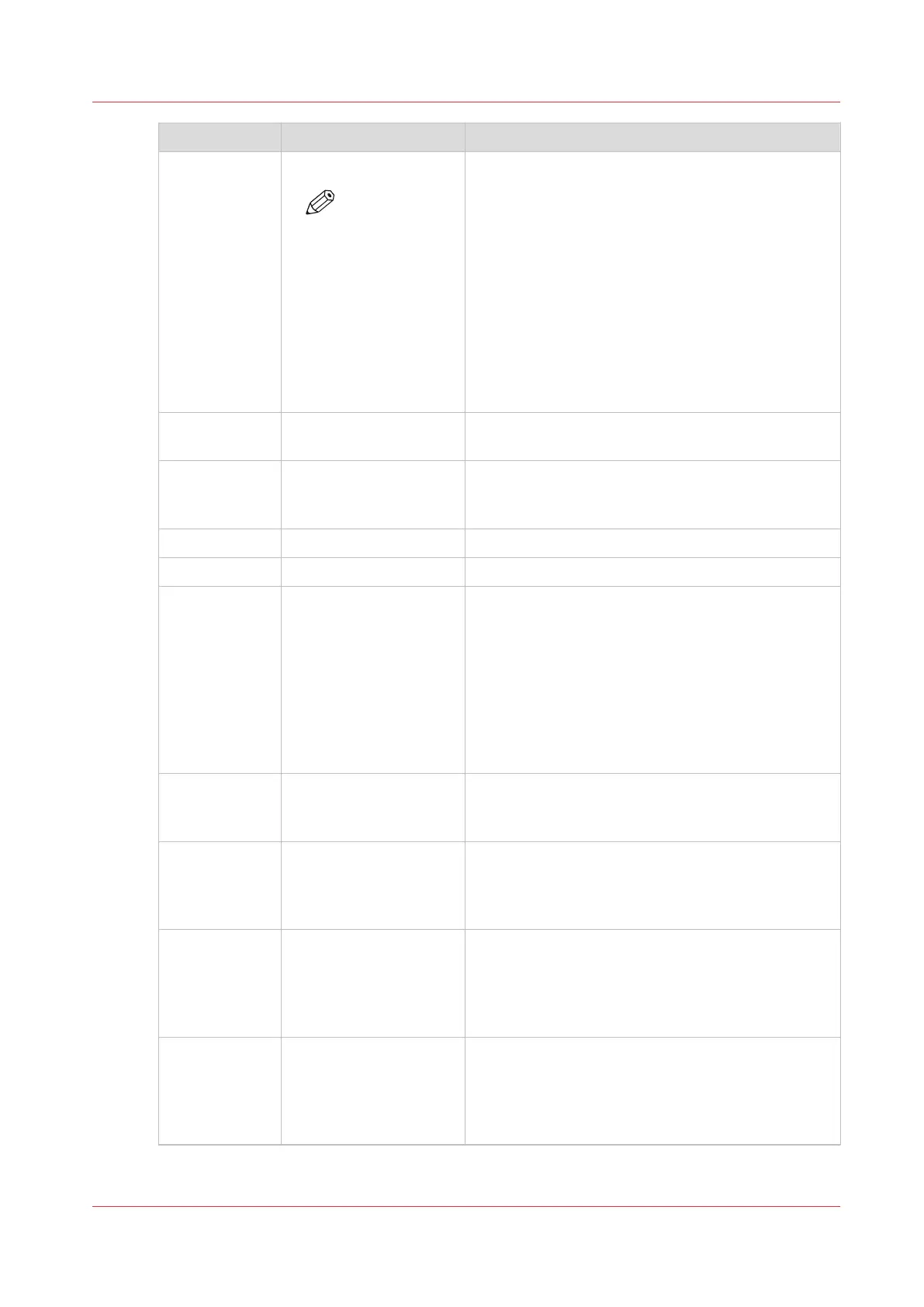
Field name Specification Description
<starttime> <hh>:<mm>:<ss>
NOTE
When you
open the file
in Microsoft®
Excel, the time
format
changes into
the time for-
mat that is de-
fined in Micro-
soft® Excel
The time on which the printer started printing the
job. Typically, this is the first moment that a job can
be interrupted or stopped via the control panel.
<activetime> <hh>:<mm>:<ss> The total time the job is active and actually printing.
Hours can exceed 24.
<idletime> <hh>:<mm>:<ss> The total time the job is active, but waits for an ac-
tion by the operator, such as clearing an error or
loading the required media. Hours can exceed 24.
<readydate> <yyyy>-<mm>-<dd> The date on which the job was finished or aborted.
<readytime> <hh>:<mm>:<ss> The time the job was finished or aborted.
<result> Possible entries:
• Done
• Abrt
• Stop
Information about how the job was completed.
• Done: The job was finished correctly.
• Abrt: The operator or the PRISMAsync controller
stopped or aborted the job, for example in case
of an error.
• Stop: The job was stopped by the user and
moved to the [Waiting jobs] section. When the
job is restarted or continued later, multiple ac-
count records will be generated for this job.
<username> A text string with a max-
imum length of 255
characters
The user name that is defined for the job, for exam-
ple in the attribute 'username' in an OJT.
<jobname> A text string with a max-
imum length of 255
characters
The name of the job for automatic or interactive
print jobs and scan jobs, for example in the attrib-
ute 'jobname' in an OJT. For scan jobs, the gener-
ated file name is used.
<costcentre> A text string with a max-
imum length of 40 char-
acters
The name of a department or user as defined in the
[Cost center] field of the [Account] tab of the printer
driver or in the attribute 'GroupName' in an OJT.
This field is empty when the attribute is not availa-
ble
<custom> A text string with a max-
imum length of 255
characters
Information as defined in the [Custom] field of the
[Account] tab of the printer driver or in the attribute
'custom' in an OJT, for example.
This field is empty when the attribute is not availa-
ble
4
The Account Log File
Chapter 5 - Prepare the print system
73
Océ VarioPrint 6000 line













 To Next Page