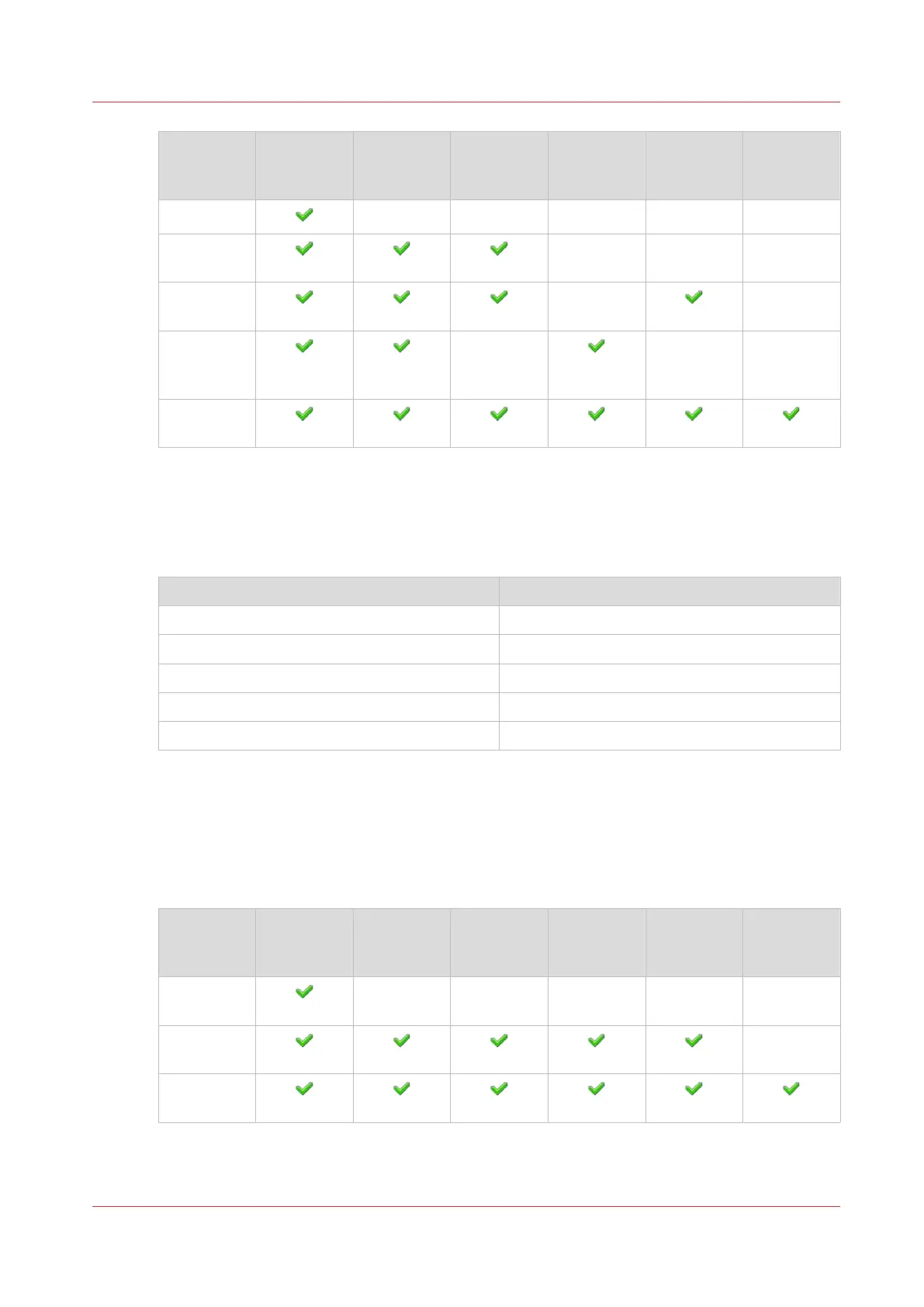
Default
user group
Only per‐
sonal jobs
All jobs Remote
tools
Mainte‐
nance tasks
Configura‐
tion set‐
tings
IT settings
Operators
Central op-
erators
Key opera-
tors
Mainte-
nance oper-
ators
System ad-
ministrators
Default user accounts
After installation of the printer, each default user group has a single default user account having
default credentials. For security reasons, it is strongly advised to change the default passwords as
soon as possible.
Default user group Default user account
Operators Operator
Central operators Central operator
Key operators Key operator
Maintenance operators Maintenance operator
System administrators System administrator
Custom user groups
The system administrator can decide to create other user groups that better match the print
environment or use corporate user groups.
In the following example the system administrator has defined two new custom user groups for
his print environment.
Custom
user group
Only per‐
sonal jobs
All jobs Remote
tools
Mainte‐
nance tasks
Configura‐
tion set‐
tings
IT settings
External op-
erators
Internal op-
erators
System ad-
ministrators
Learn about user authentication
Chapter 5 - Prepare the print system
79
Océ VarioPrint 6000 line













 To Next Page