Itala | INSTRUCTION MANUAL
7.3 Streaming bandwidth management
Itala has the possibility to select (and to adjust) the overall acquisition frame rate from the image
sensor: in particular, the GenICam custom feature involved in the sensor throughput settings is
oeAcquisitionFrameRateLimitMode.
By default, oeAcquisitionFrameRateLimitMode is set to oeLinkThroughput.
In this configuration, the acquisition frame rate is limited by the gigabit link bandwidth.
Sensors settings (like triggering logic, blanking periods and so on...) are automatically computed in
order to match the throughput of the gigabit connection, i.e. 1 Gbps.
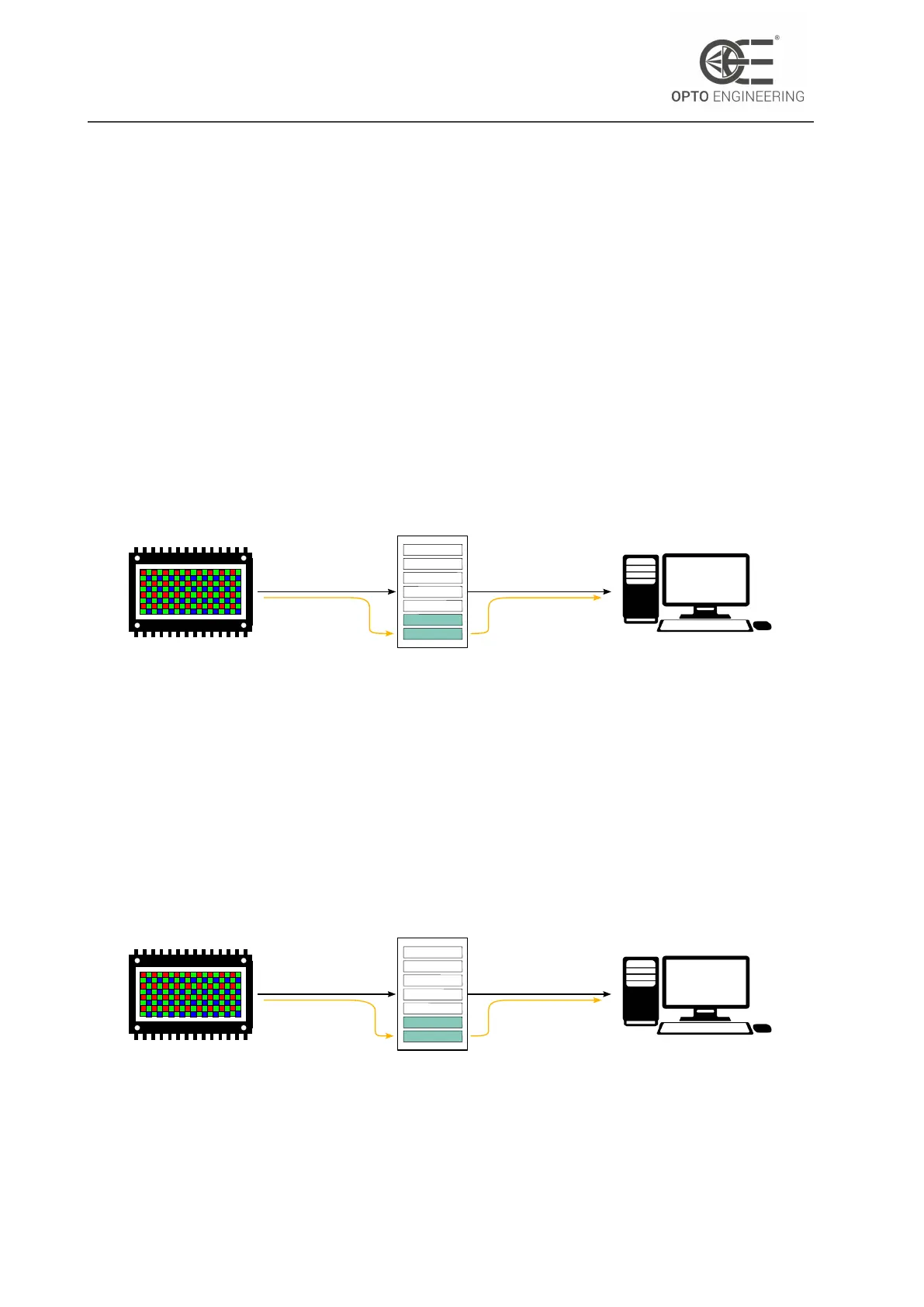
This scenario is depicted in Figure 79: frames, represented by turquoise blocks, are captured from
the image sensor and stored in the internal camera buffer; then are read by the user application.
Figure 79 also shows the behaviour of the on-board image buffer: since read data rate is always
equal to write data rate, there isn’t the possibility for the internal memory to be completely full.
Image Sensor
Camera buffer
Host
BW= 1GbpsBW= 1Gbps
(master)
Figure 79: When oeAcquisitionFrameRateLimitMode = oeLinkThroughput, sensor
throughput is automatically adjusted in order to match the gigabit bandwidth.
On the other hand, when oeAcquisitionFrameRateLimitMode is set to oeSensorThroughput, the
driver of the acquisition bandwidth becomes the image sensor, as depicted in Fig 80.
In this case, the overall bandwidth between camera and host is still limited by the ethernet inter-
face, however, acquisition data rate is no more related to the link bandwidth and its value can be
higher or lower than the gigabit link speed, depending on the image sensor model and its mode
of operation.
Image Sensor
Camera buffer
Host
BW= 1Gbps
BW = X Gbps
(master)
Figure 80: When oeAcquisitionFrameRateLimitMode = oeSensorThroughput, ac-
quisition bandwidth is completely unrelated to the link bandwidth.
v1.12 - eng 118


 To Next Page