Itala | INSTRUCTION MANUAL
• The camera is now balanced and ready to be used.
An example of auto white balance procedure is shown in Fig.51: on the left side an uncorrected
image is displayed; on the right side a white balance corrected picture is shown.
Figure 51: On the left side an uncorrected image is displayed; on the right side a white balance
corrected picture is shown.
6.4.3 Gamma correction
Gamma correction is a non-linear operation which follows the formula 12:
V
out
= V
γ
in
(12)
where V
out
is the grey level of the pixel n after the gamma correction, V
in
is the grey level of the
pixel n and γ is the coefficient used for the non-linear transformation, set with the Gamma feature.
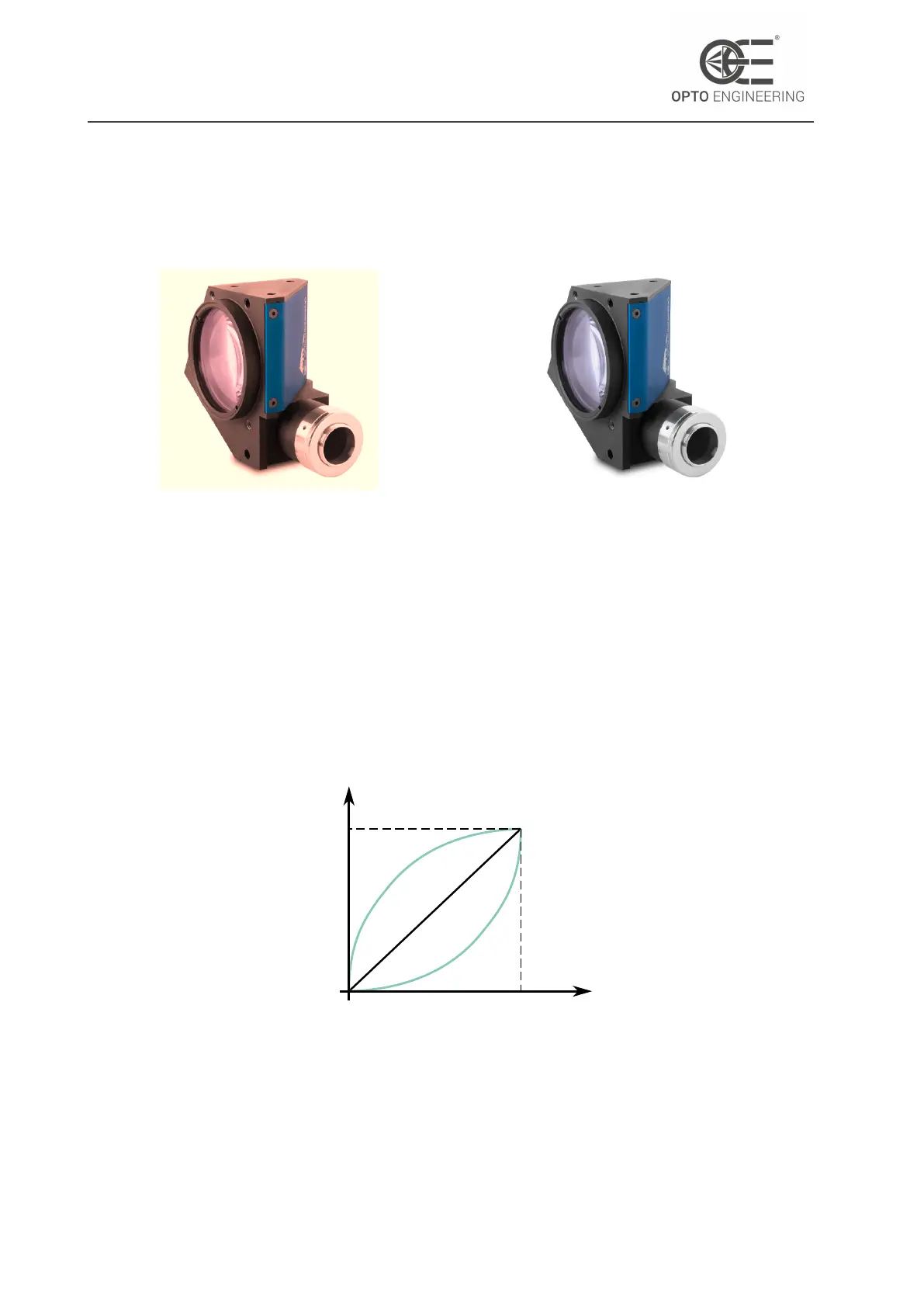
input
output
gamma<1
1
1
gamma=1
gamma>1
Figure 52: Gamma correction curves for
γ = 1, γ < 1 and γ > 1. X-axis and Y-
axis are normalized.
This operation is clearly shown in Fig.52: while "black" and "white" pixels remain the same after the
correction, the different grey pixels are re-mapped on a non-linear curve, which enhances dark or
v1.12 - eng 73



 To Next Page