Itala | INSTRUCTION MANUAL
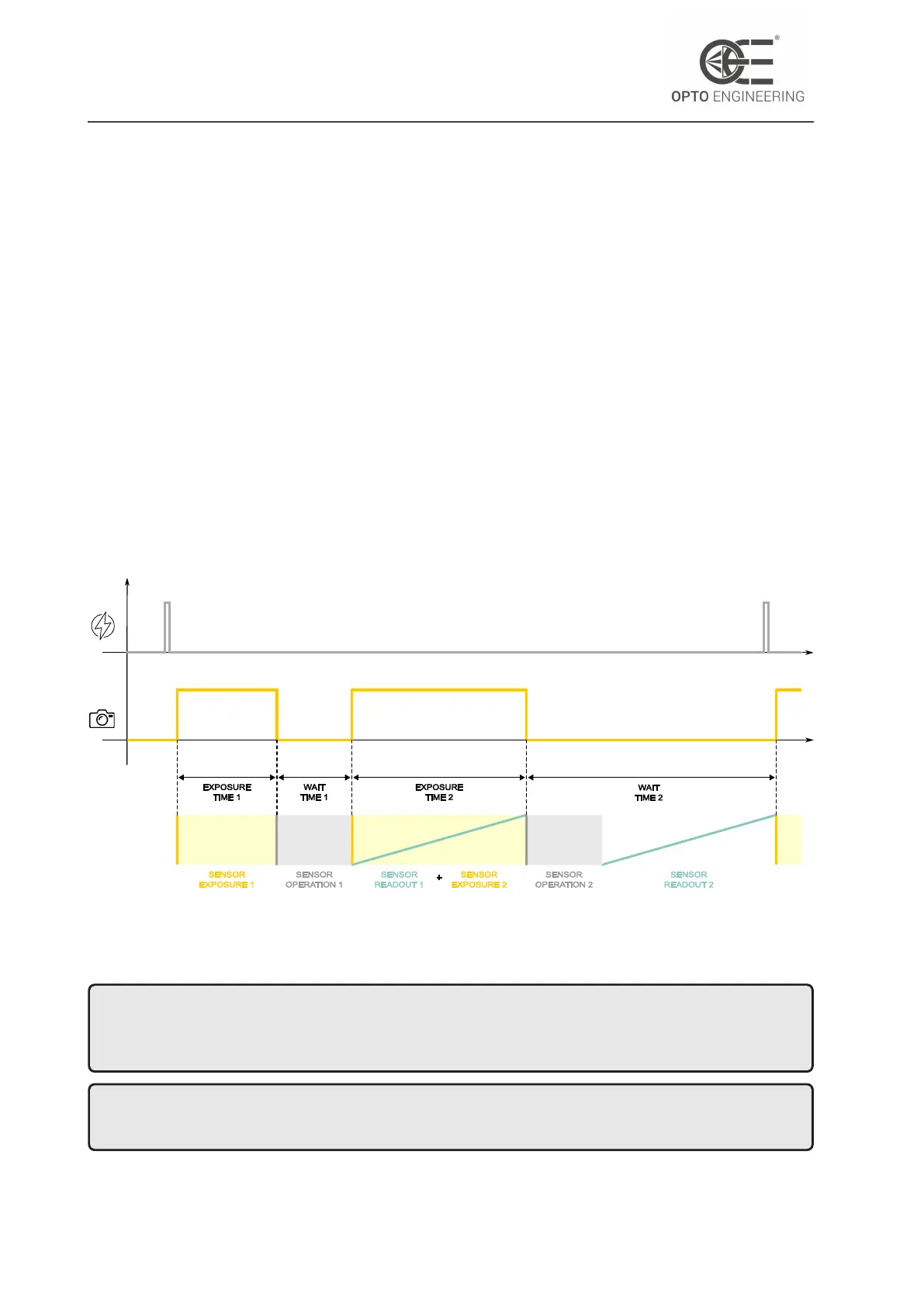
Dual Exposure is only available when a valid TriggerSource is set. The trigger starts the process
explained below:
• The first exposure time EXPOSURE TIME 1 follows ExposureMode settings: its duration can
be Timed or TriggerWidth, as explained in subsection 6.3.4.
• Once the first exposure is completed a WAIT TIME 1 is needed for sensor operation. This time
represents the minimum achievable time span between two frames. This time is fixed.
• When it comes to EXPOSURE TIME 2, here takes place the trigger overlapping since the camera
starts the second exposure during the first sensor readout. The EXPOSURE TIME 2 lasts as long
as the SENSOR READOUT 1. This time is fixed.
• After the second exposure the WAIT TIME 2 occurs, allowing sensor operation and the sensor
readout of the second frame. This time is fixed.
All fixed times are sensor dependent and are needed for the correct camera operation in dual
exposure mode. These values depends on the sensor configuration (ROI, Pixel Format, Binning and
Decimation) and can be read from oeWaitTime1, oeExposureTime2 and oeWaitTime2 features.
Figure 46: Dual Exposure timings and operation. From top to bottom, the trigger signal, the sensor
exposure signal and the camera operation and are depicted.
NOTE: bear in mind that a second hardware trigger can occur only after the entire process is
completed, which means after the WAIT TIME 2. All triggering signals which occur during WAIT
TIME 1 or EXPOSURE TIME 2 or WAIT TIME 2 will be ignored.
NOTE: WAIT TIME 1 should be considered when designing your machine vision system to properly
select the camera model, depending on the application requirements.
v1.12 - eng 67



 To Next Page