279
Setting Inspection Conditions
Example of Output
Time:
Scan Count:
Total Judgement:
Judgement:
09:25:48
1234 times
OK
JDC000 = OK, JDC001 = unset, JDC002 = NG
CAC000 = 215.8, CAC001 = unset, CAC002 = -368.0
No. of Digits:
Decimal Digit:
Unused Digit:
Output (Not available when Destination is Serial(COM.0))
6
1
Filled with ‘0’
Output (Not available when Destination is SD Card)
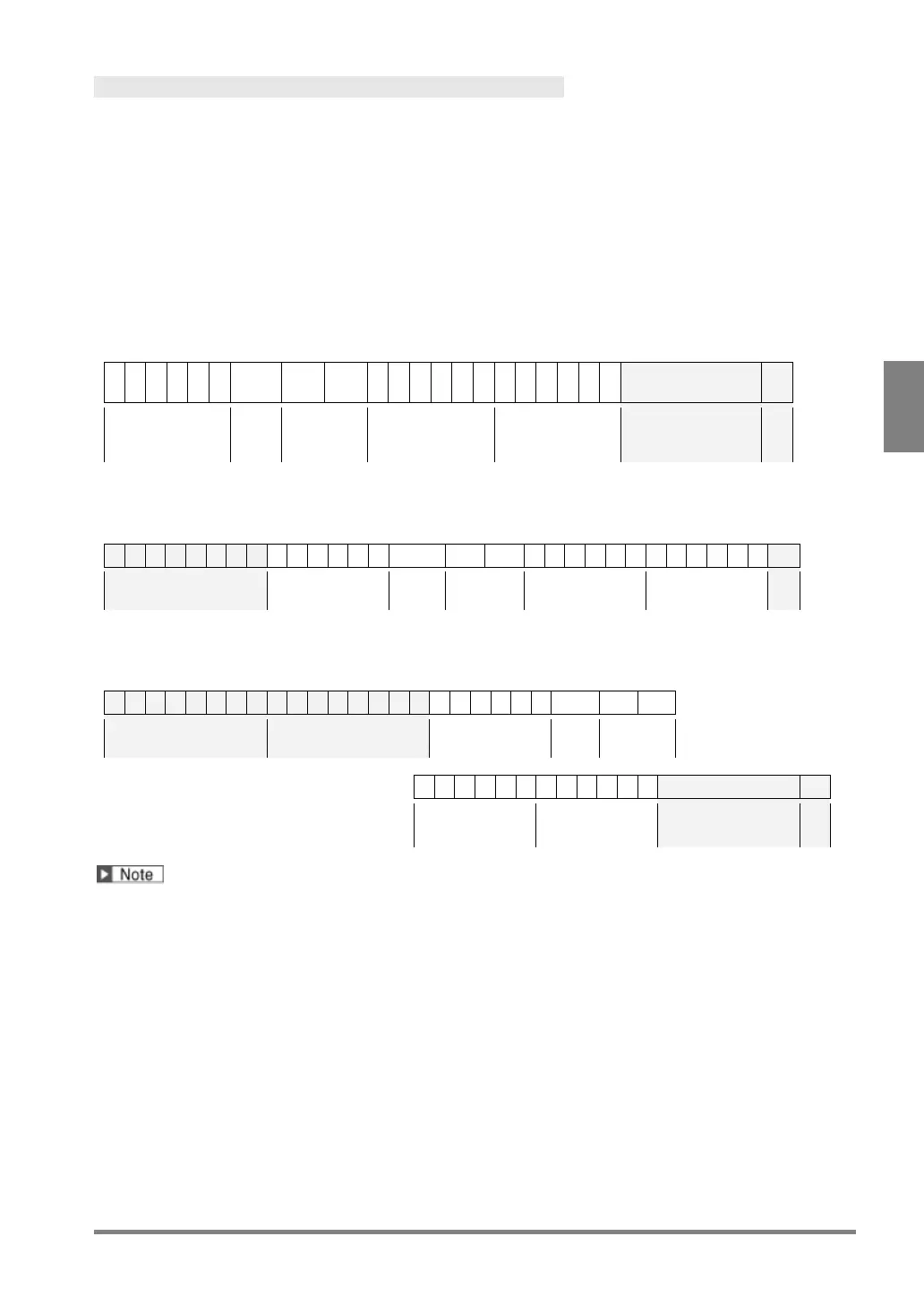
Output destination=”Serial (COM.0)”:
0
0
1
2
3
4
1 1 0 0
0
2
1
5
8
-
0
3
6
8
0
BCC C
Scan Count Total
Judg
Judgemen
t
Numerical
Calculation 0
Numerical
Calculation 2
2-digit
Block Check Code
Output destination=”SD card”:
Time Scan Count Total
Judgement
Numerical
Numerical
Output destination=”Ethernet”:
Date Time Scan Count Total
Judgement
Numerical
Calculation 0
Numerical
Calculation 2
2-digit
Judgement JDC001 and Numeric Calculation CAC001 are not output because they are unset.



 To Next Page