Previous Page Table of Contents Section Contents
Back
Index Next Page
LIFEPAK 500 automated external defibrillator Replacement Procedures
11-21
Removing Top Cover Page 1 of 2
Application Remove the top cover to gain access to internal assemblies. Once you have
removed the top cover and discharged the Energy Storage Capacitor, jump to
any of the replacement procedures listed on the next page.
To remove the top cover:
1. Turn off the LIFEPAK 500 AED.
2. Remove the battery and turn the AED upside down on a clean surface.
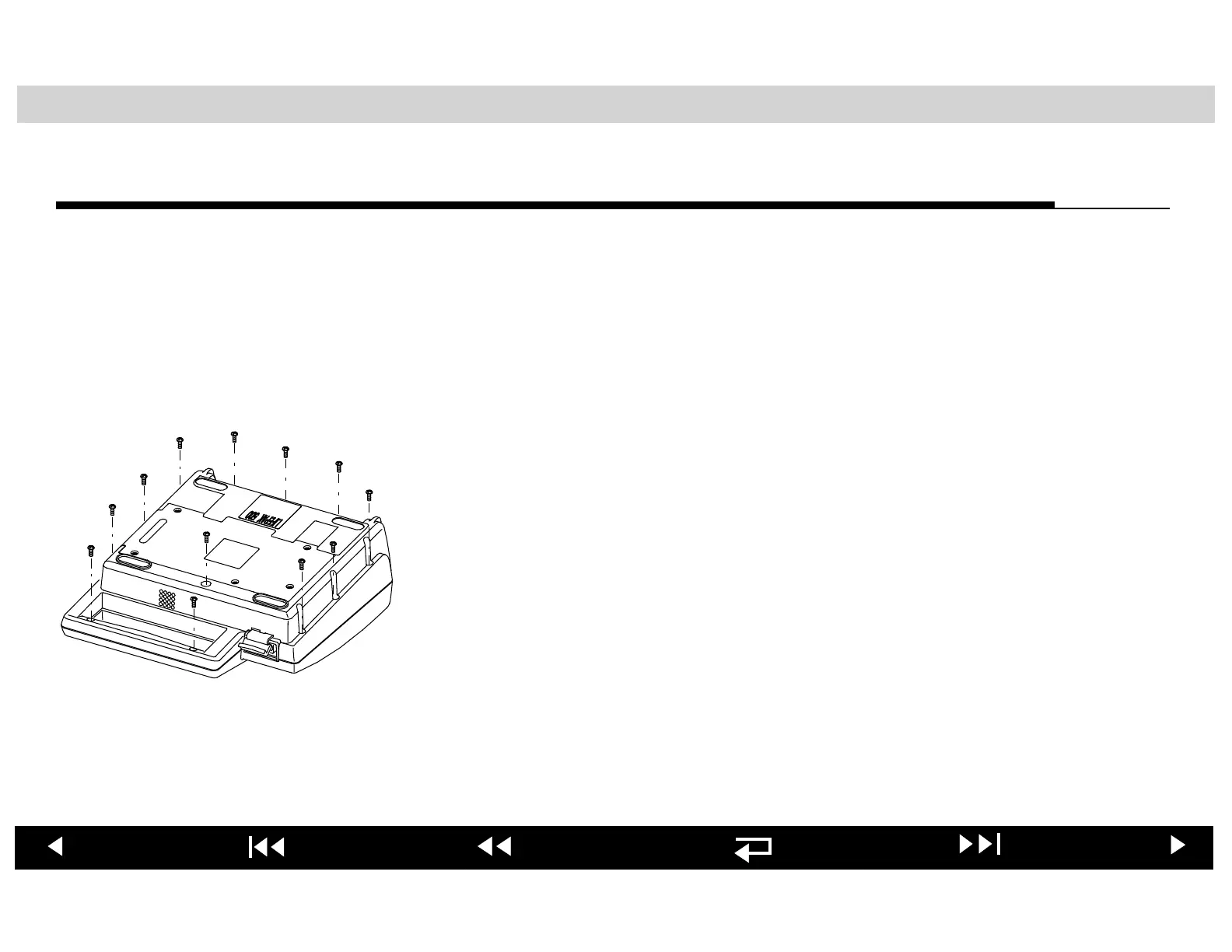
3. Remove and discard the 12 screws that hold the top cover to the lower
enclosure as shown at the left. Do not remove the 5 battery plate screws.
Note: Case screws used in the LIFEPAK 500 AED are designed for one use
only. Always use new case screws when reassembling the AED.
4. Return the AED to the upright position and carefully remove the top cover.
5. To ensure safety and protect the AED, proceed next to Discharging Energy
Storage Capacitor.
WARNING!
Shock hazard. The Energy Storage Capacitor carries high voltage.
Remove the battery and discharge the capacitor before handling.












 To Next Page