F-19
MacBAT 5 – USER GUIDE. Version 1.0
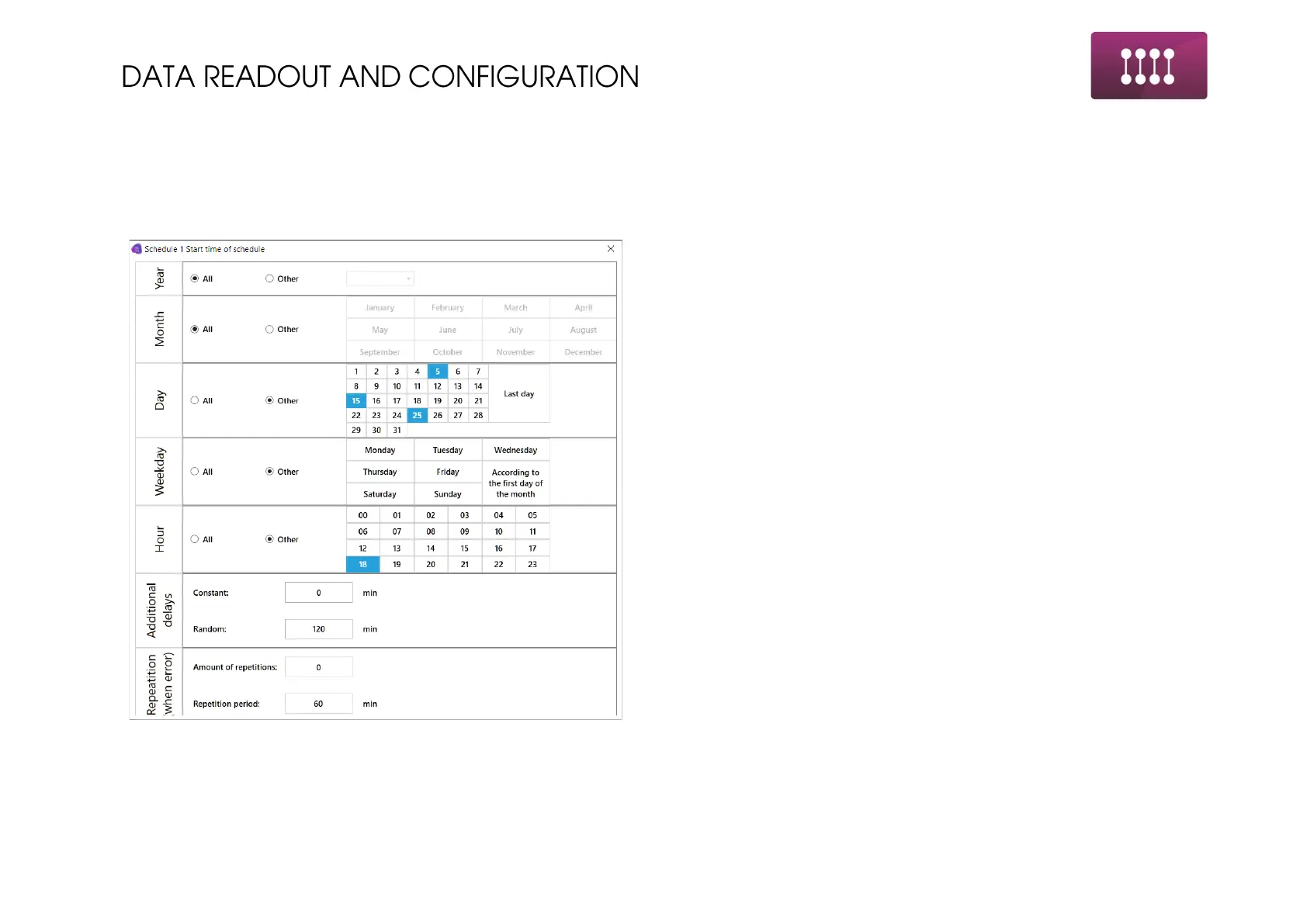
EXAMPLE SCHEDULE CONFIGURATION:
Explanation of following fields in Schedules Configuration menu:
a) Name: Name of the schedule, up to 24 characters.
b) Start: settings determining date and time of schedules executing:
1. Distinguishing the year of schedule enabling. All –
schedule will be turned on every year – so present
state. There are possibilities to delay the schedule to
next year.
2. Month of the schedule enabling. All – schedule will work
every month.
3. Day of the month – here we can set the days of the
schedule enabling. It is important when user does not
want to have device connecting every day but only
several selected days.
4. Day of the week. This option is additional to the
previous one for the day. For example, if day is set to
5, 15 and 25 day of the month, and additionally –
Wednesday; which will be 1; 7; 14; 21; 28 day of the
month – device will start the schedule also on these
days.
5. Hour. This option determines how often during the day
device will connect to the network.
6. Constant and random delay. In previous section 6pm
was set to start the schedule.
• setting in “Constant” i.e. 24 will cause modem turning
on always on 6:24pm.
• Setting in “Random” i.e. 36 will cause modem turning
on randomly between 6:00 and 6:36pm.



 To Next Page