DANGER
CAUTION
Set up
Risk of injury from RFID
sensor for persons with
pacemakers or debrilla-
tors
If you wear a pacemaker, keep a distance of at least
24 in from the RFID sensor on the front panel.
If you wear a debrillator, keep a distance of at least
16 in from the RFID sensor on the front panel.
A test in accordance with DIN VDE 0100 or the
applicable national regulations must be carried out
during initial commissioning and at the prescribed
maintenance intervals.
Information
The meter reading of the integrated electricity meter
is not 0 kWh for production reasons.
Congure the service
Faulty Wallbox
A Wallbox with an active fault is not fully functional.
There is an active fault if the LED for the operating
state is lit red.
Information
The service should be congured without a vehicle
connected.
The Wallbox is switched on as soon as it is powered.
e
Switching on the Wallbox
🡆 The LEDs are lit one by one.
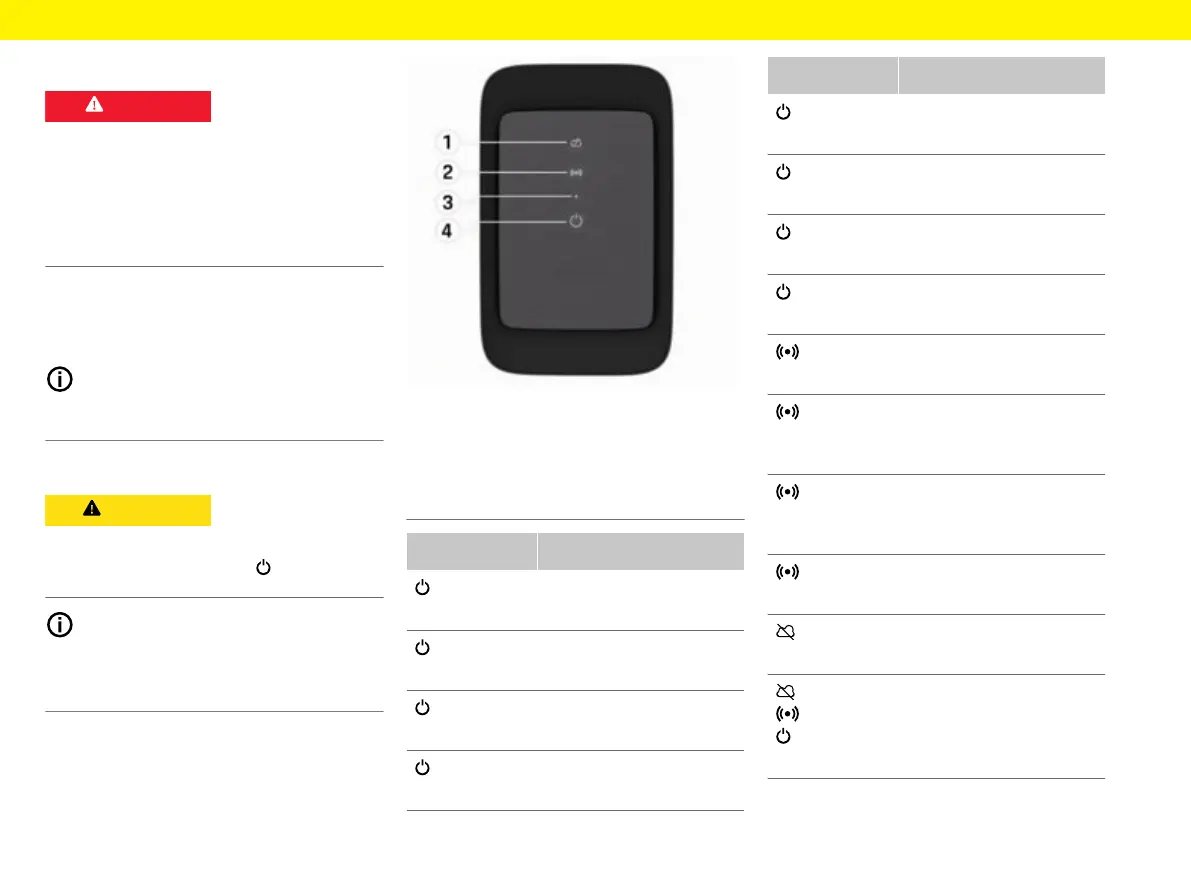
Fig.19: Design front of the control unit
1 Backend indicator light
2 Authorisation indicator light
3 Brightness sensor
4 Power switch
Display Meaning
White
Wallbox is switched on and
ready for operation
Flashing white
Connecting
Green
Charging complete
Flashing green
Charging vehicle
Display Meaning
Flashing blue
Charging paused (ISO)
Orange
Restart Wallbox
Flashing orange
Wallbox starts
Red
Charging error
White
Authentication required
Green (2 -
4 secs)
Authentication successful
Flashing red (2 -
4 secs)
Authentication failed
Red
Module error
White
Back-end connection failed
Flashing blue
Wallbox is reset to factory
settings


 To Next Page
 Loading...