MAX™ Operator Manual
©
Original Printed In English
SECTION 1 - INTRODUCTION
SECURITY
SECURITY LEVELS
Security is screen based and defined as three levels:
High, Medium, and No Security.
High Security - The user can access the Main
Menu, Dashboard, PLC Settings, Job Download
screens.
Medium Security - The user has all permissions of
High Security level but cannot access Service, Lan-
guage, and I/O screens.
No Security - The user has access to all screens
and functions except Factory Configuration screen.
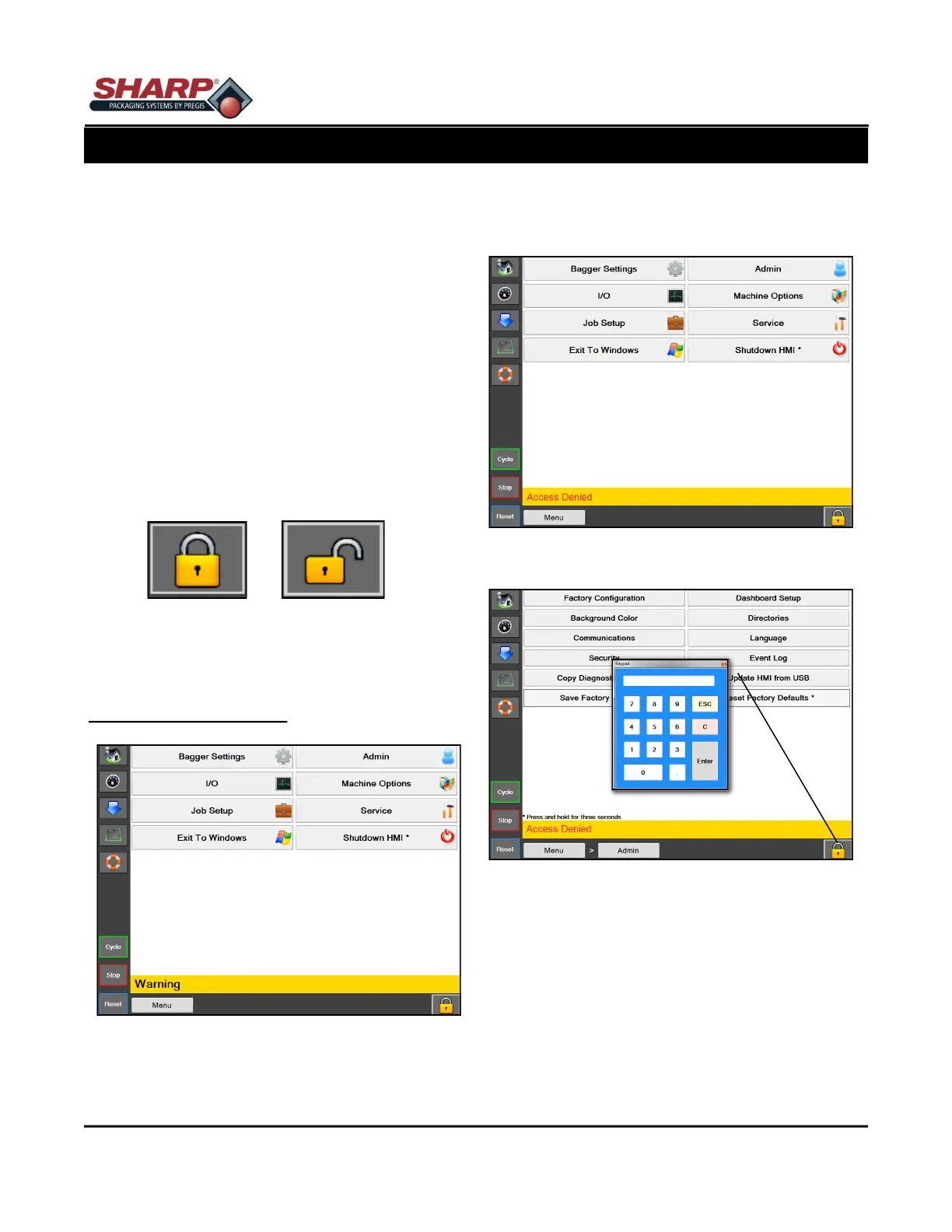
When security level is in High, the screen displays a
locked padlock icon in lower right corner of screen.
Figure 1-11A.
An “Access Denied” message will be displayed
when user attempts to access protected screens.
Figure 1-11B.
To Change Security Levels
1. Touch the padlock Icon and enter the designat-
ed password. Figure 1-11C.
NOTE: See supervisor or manager to change or
determine the proper security level for your ap-
plication.
1-16
Figure 1-11A. High Security Screen.
Figure 1-11B. High Security - Access Denied Screen.
Figure 1-11C. Keypad
Locked Unlocked



 To Next Page