MAX™ Operator Manual
©
Original Printed In English
SECTION 4 - HMI SCREENS
ADMIN SCREEN
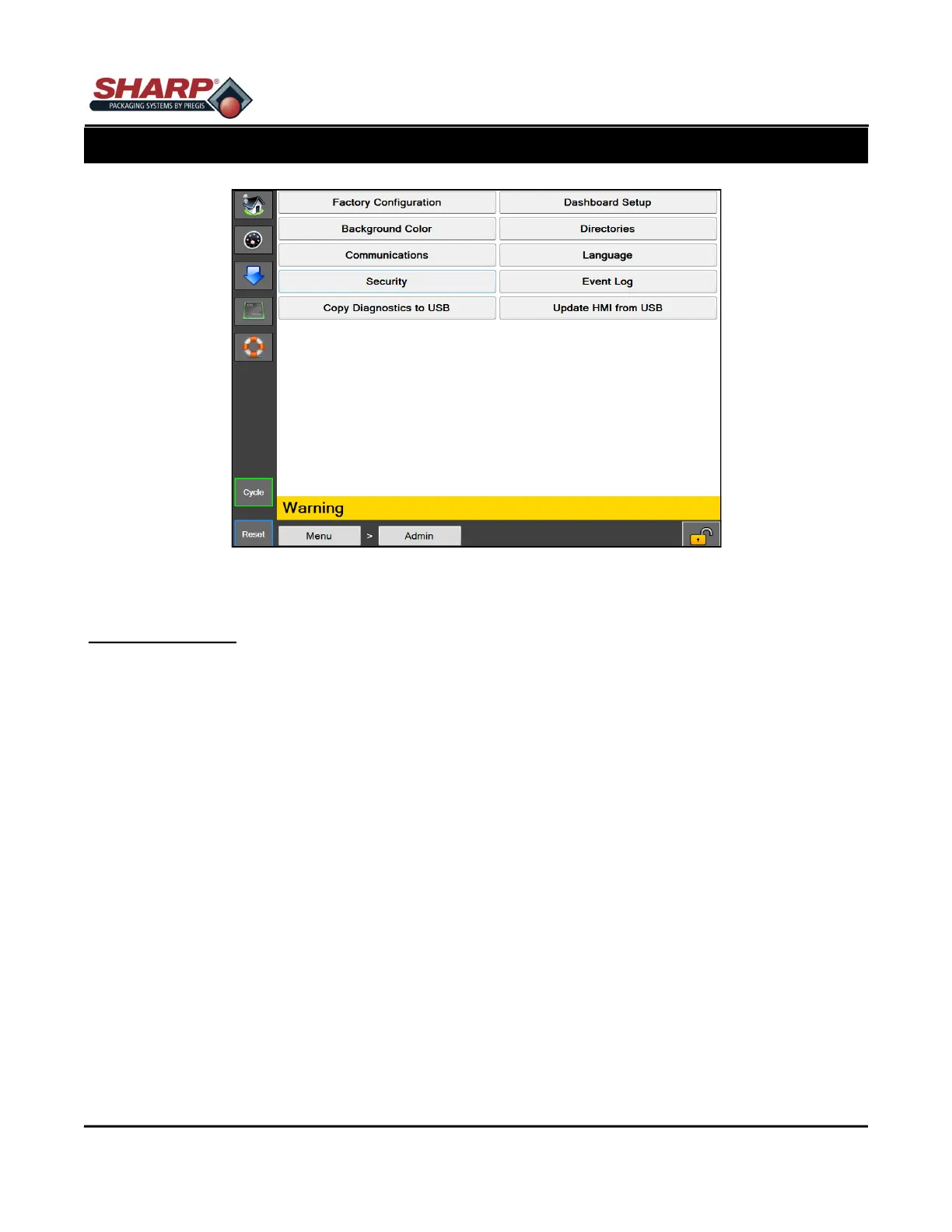
Figure 4-7A. Admin Screen.
4-7
ADMIN SCREEN
General Description
The Admin screen is a collection of administrative functions used to setup the HMI and monitor bagger perfor-
mance.
Minimum Security Access: No Security
Button/Label Descriptions:
Factory Configuration - This screen is used by the factory to configure purchased options.
Background Color - This will change the background color of the HMI.
Communications - This will open the Communications screen used to setup the IP communication settings for
the PLC and the Printer.
Security - This will open the Security screen used to set security level passwords.
Copy Diagnostics to USB - This will copy the Event Log, and the Machine Settings xml file to a "Diagnostics"
folder on a connected USB flash drive. This is a way to export diagnostic information from the machine.
Dashboard Setup - This will open the Dashboard Setup screen that is used to setup the custom dashboard.
Directories - This will open the Directories screen to setup file locations and Database connection settings.
Language - This will open the Language screen to set the Language used for the HMI.
Event Log - This will open the Event Log screen that allows users to view system events.
Update HMI from USB - This will look for a connected USB flash drive with a folder named "Max" and, if found,
will copy all of the contents of the folder to the "Max" folder located on C:/Programs Files. This is the common
way to do HMI software updates.



 To Next Page