MAX™ Operator Manual
©
Original Printed In English
SECTION 4 - HMI SCREENS
MACHINE OPTIONS SCREENS - CONTINUED
4-23
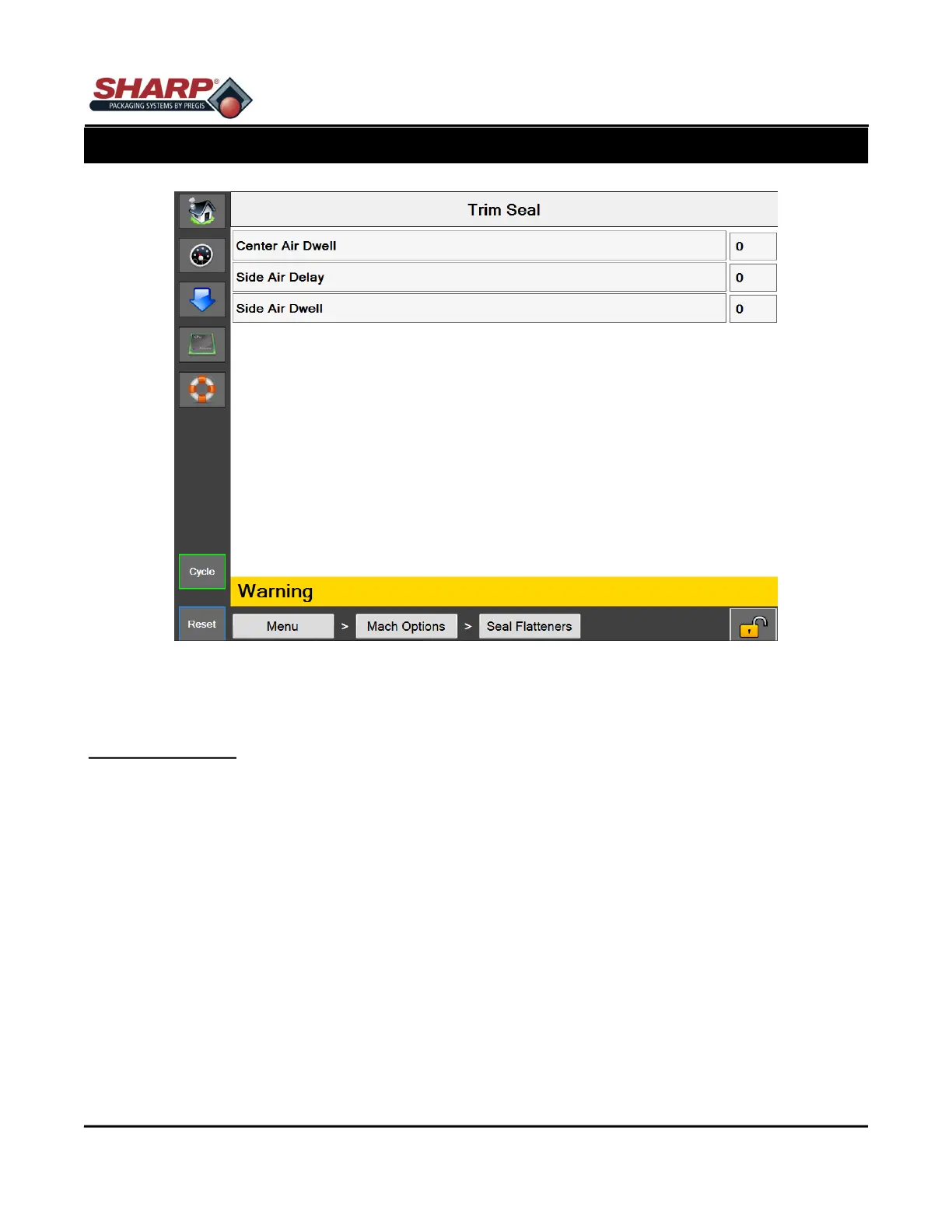
Figure 4-23A. Trim Seal Screen.
TRIM SEAL SCREEN
General Description
This option utilizes a Seal Trimming Knife attached to the Seal Bar. This removes the excess material fro the
sealed bag. The options includes Air Knives to blow off the trimmed scrap material into a waste bag.
Button/Label Descriptions:
Trim Seal - This will toggle on/off the Trim Seal option.
Center Air Dwell - Adjustable from 0.0 to 3.0 seconds. (Functional only on the MAX Plus
©
Bagger).
Side Air Delay - Adjustable from 0.0 to 1.0 seconds.
Side Air Dwell - Adjustable from 0.0 to 3.0 seconds.
A Feed Delay may be needed. This can be added from t he Job Settings Screen. In this case, the Feed Delay
should be set to a value greater than or equal to the combined Side Delay and Side Dwell settings. This ensures
that the scrap is out of the way before feeding out the next bag.



 To Next Page