MAX™ Operator Manual
©
Original Printed In English
SECTION 4 - HMI SCREENS
MACHINE OPTIONS SCREENS - CONTINUED
4-21
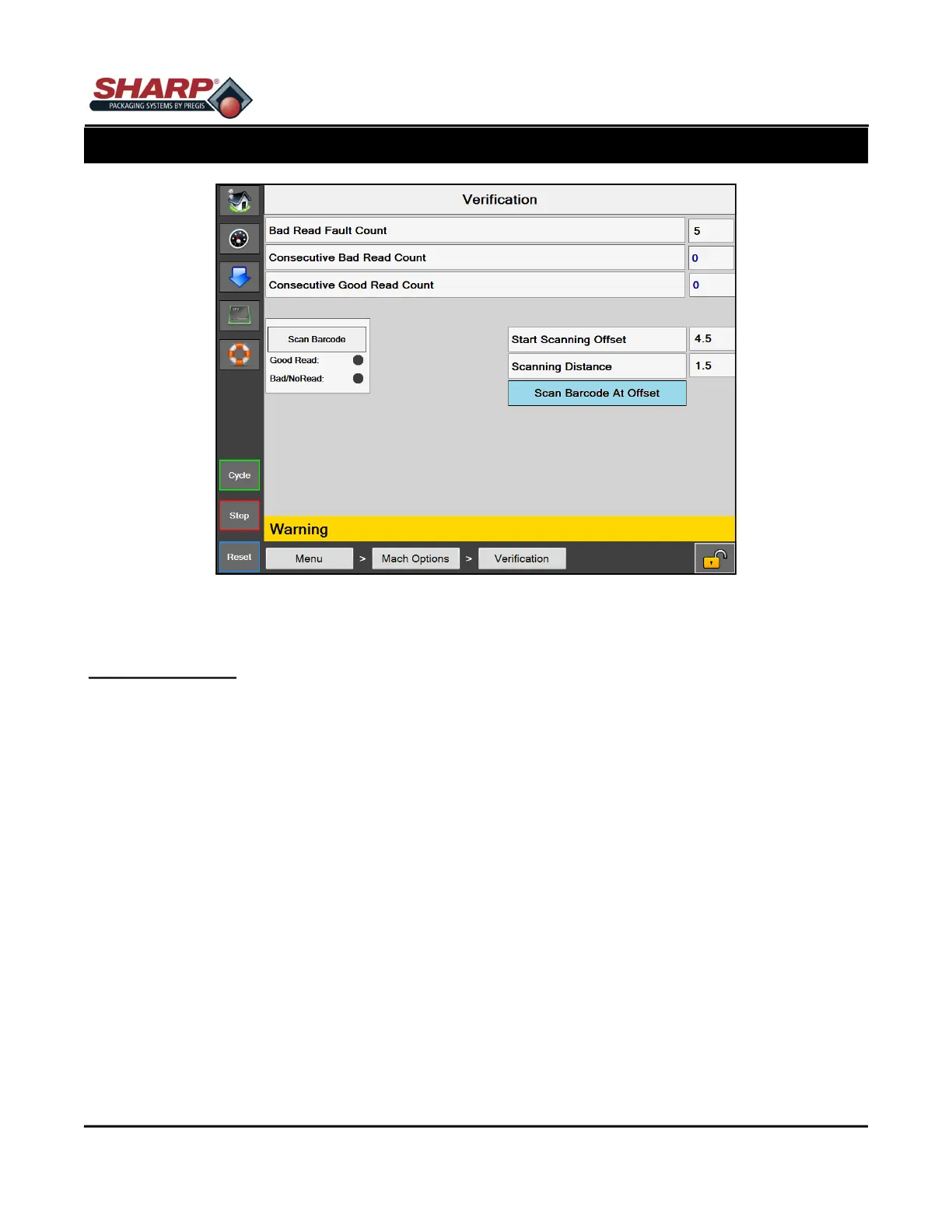
Figure 4-21A. Verification Screen.
VERIFICATION SCREEN
General Description
The Verification Option screen displays available Verification settings.
Minimum Security Access: Medium
Button/Label Descriptions:
Verification - This will toggle on/off the Verification option.
Bad Read Fault Count - This setting determines how many consecutive bad reads are required before the ma-
chine is faulted.
Consecutive Bad Read Count - A numeric display of how many Consecutive bad reads attempts have occurred.
Consecutive Good Read Count - A numeric display of how many Consecutive good reads attempts have oc-
curred.
Start Scan Offset - A numeric setting to start the barcode scan some distance from where the web starts to ei-
ther print or feed forward.
Scanning Distance - A numeric setting which determines the scanning distance or length in inches. This value
gets added to the Scan Offset and determines when the scanner stops.
Scan Barcode At Offset - This button selects the Scan Offset feature.
Scan Barcode - This is a test button that allows the user to scan a barcode when the bagger is not cycling.
Good Read Indicator - This will light up when a good read occurs. It stays on until the next scan
Bad/NG Indicator - This will light up when a either bad read or no read occurs. It stays on until the next scan.



 To Next Page