MAX™ Operator Manual
©
Original Printed In English
SECTION 4 - HMI SCREENS
SERVICE SCREEN
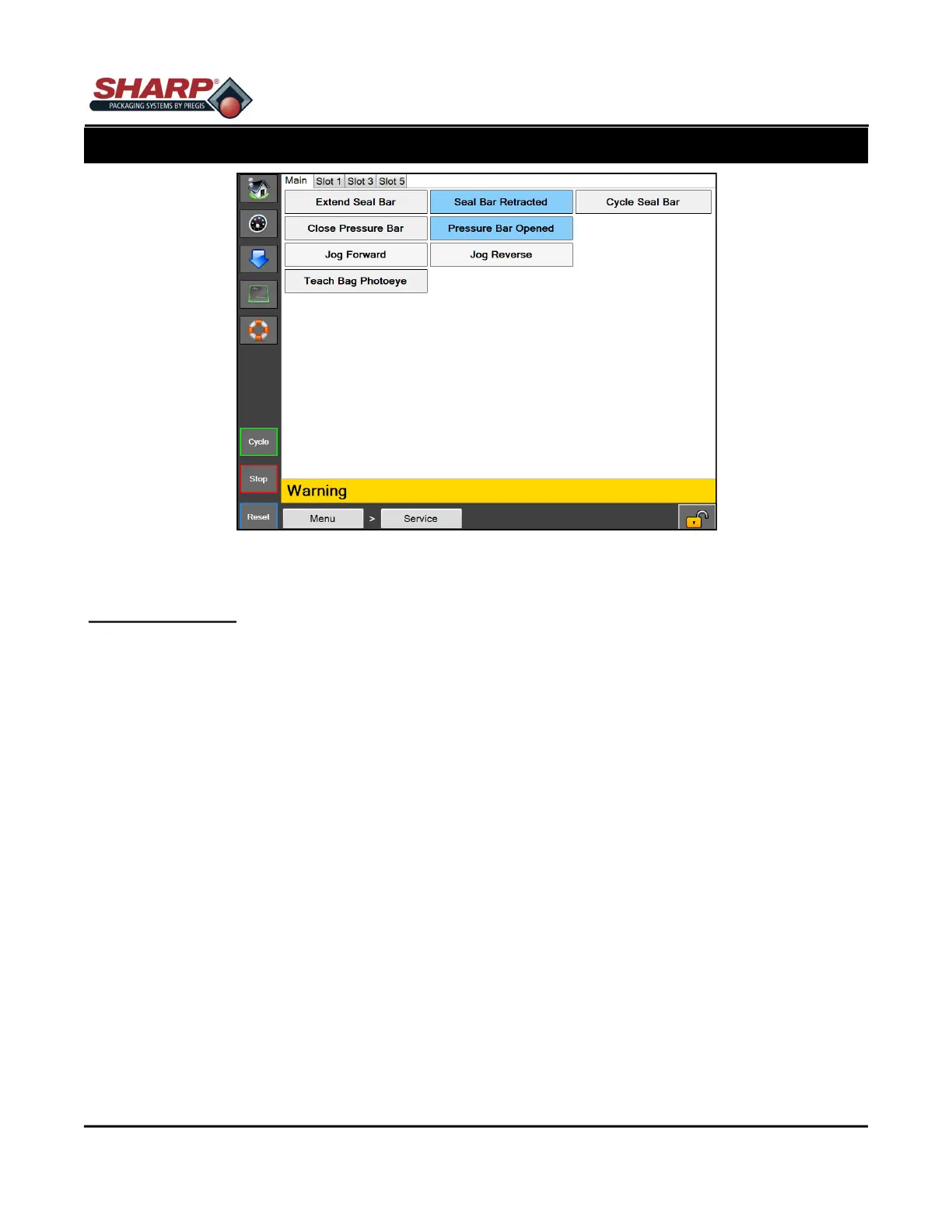
Figure 4-26A. Service Screen.
4-26
SERVICE SCREEN
General Description
The Service Screen provides manual control over the major components of the machine. Use this screen when
troubleshooting options on the machine.
Minimum Security Access: No Security
Button/Label Descriptions:
Main
Extend Seal Bar - This will extend the seal bar. The button will display Seal Bar Extended when the Seal Bar
Extended Sensor is made.
Retract Seal Bar - This will retract the seal bar. The button will display Seal Bar Retracted when the Seal Bar
Retracted Sensor is made.
Cycle Seal Bar - This will extend the Seal Bar and then retract the Seal Bar.
Close Pressure Bar - This will close the pressure bar. The button will display Pressure Bar Closed when the
Pressure Bar Closed Sensor is made.
Open Pressure Bar - This will open the pressure bar. The button will display Pressure Bar Opened when the
Pressure Bar Opened Sensor is made.
Jog Web Forward - This will move the web forward.
Jog Web Reverse - This will back the web up.
Teach Bag Photoeye - Film should not be in between eye and reflector. Pressing this button will teach the eye.
The button will display Teaching Bag Photoeye for 3 seconds.



 To Next Page