MAX™ Operator Manual
©
Original Printed In English
SECTION 4 - HMI SCREENS
MACHINE OPTIONS SCREENS - CONTINUED
4-25
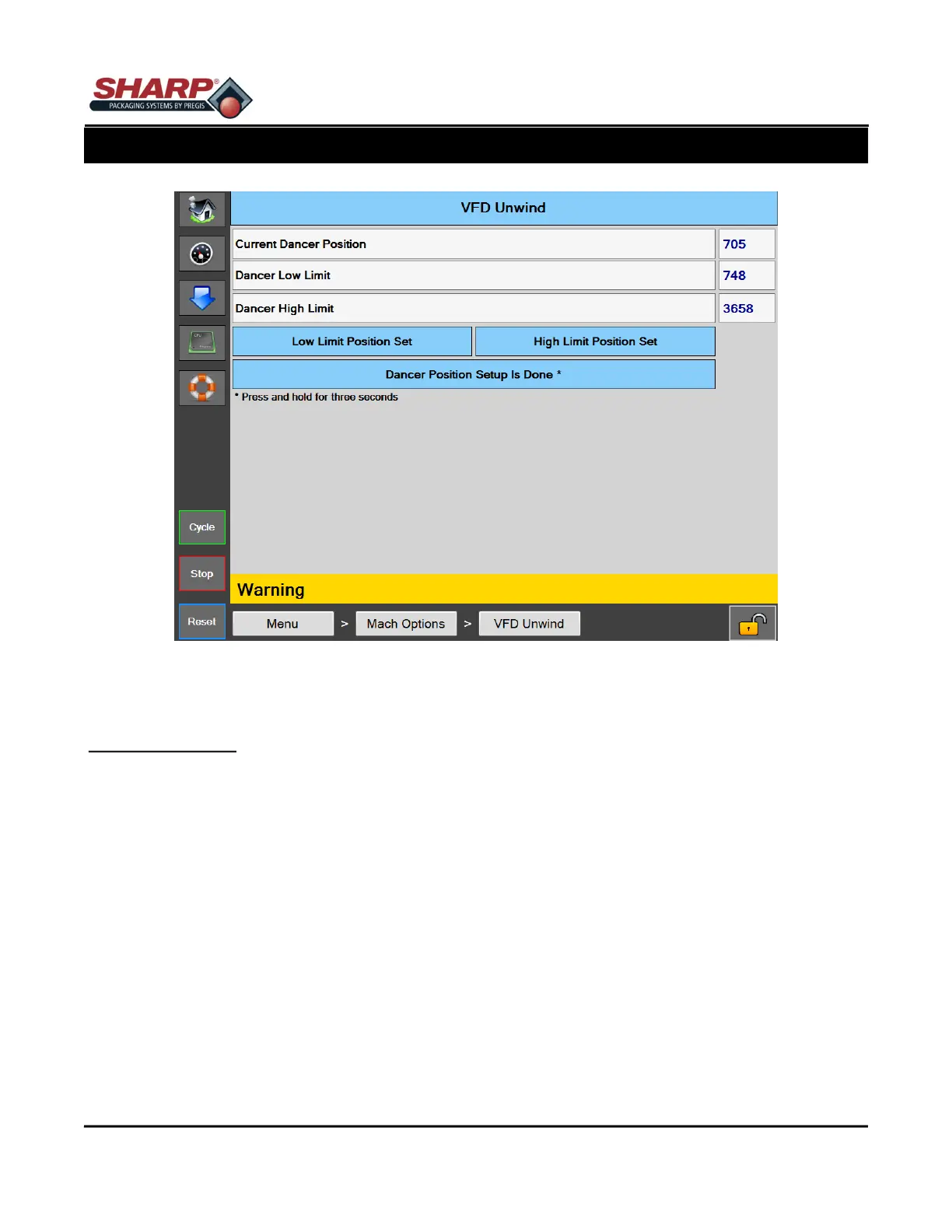
Figure 4-25A. VFD Unwind Screen
VFD UNWIND SCREEN
General Description
The VFD Unwind Option screen is used to setup the Dancer Feedback positions.
Minimum Security Access: Medium
Button/Label Descriptions:
VFD Unwind - This button is automatically turned on by the PLC and can not be turned off whenever a VFD Un-
wind is enabled in the Factory Configuration
Current Dancer Counts - This is a live numeric reading of the raw analog counts from the dancer position sen-
sor.
Low Dancer Position - This is the numeric value that was captured when the Set Low Position button is pressed.
Dancer Upper Limit Position - This is the numeric value that was captured when the Set High Limit Position but-
ton is pressed.
Set Low Dancer Position - Pressing this button during the Setup Mode will capture and store the Low Position.
Set High Dancer Limit - Pressing this button during the Setup Mode will capture and store the High Operating
Limit Position.
Setup Dancer Positions - Press and Hold This Button for 3 seconds to activate the Dancer Setup mode.



 To Next Page