MAX™ Operator Manual
©
Original Printed In English
SECTION 5 - MACHINE OPERATION
EDITING A JOB
The following steps will edit a saved job. The security
level is medium for this procedure. To changes securi-
ty, See Security Pass Codes, page 1-11.
1. From the Main Menu, press the Job Setup button.
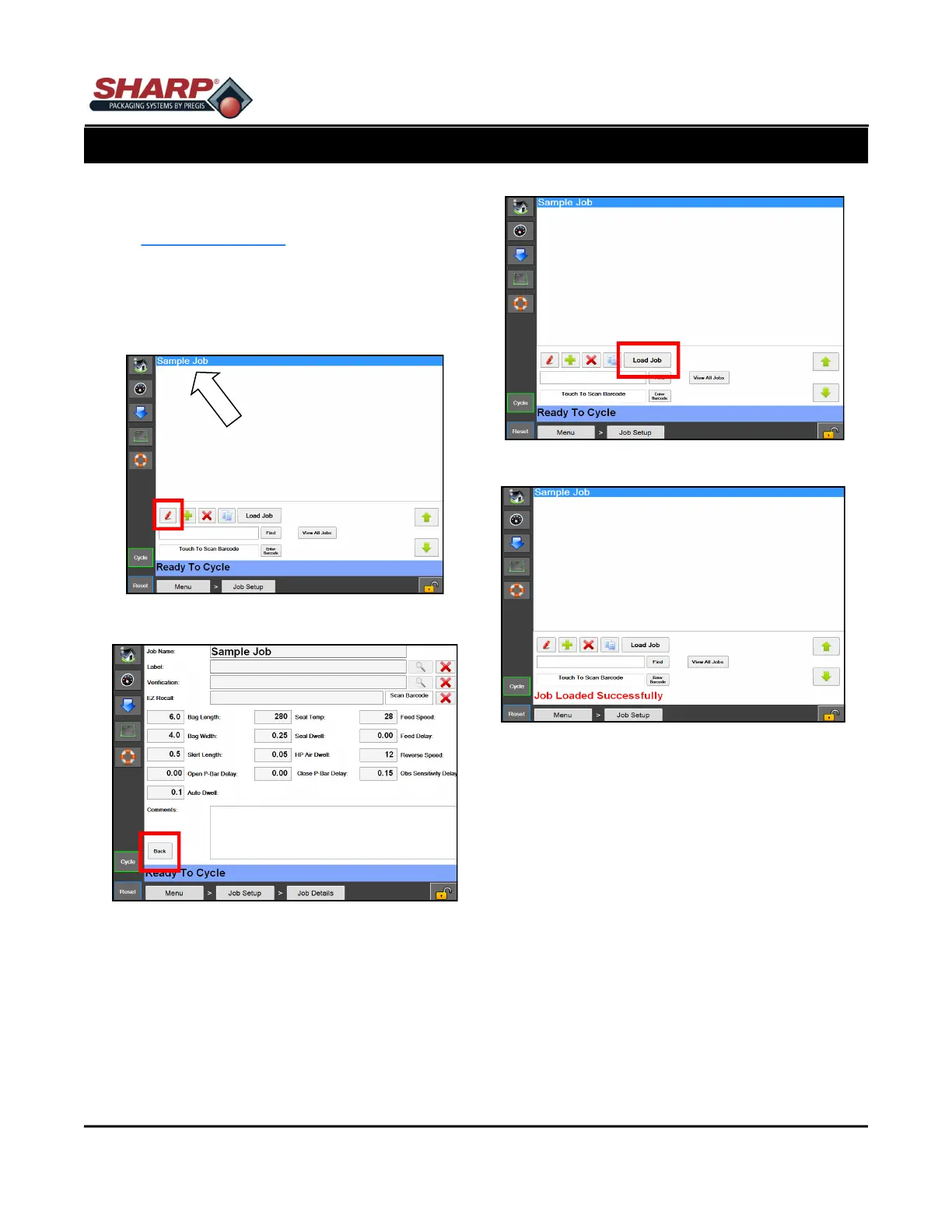
2. From the Job Setup Screen, highlight the job to be
edited and press the Red Pencil button. Figure 5-
3A.
3. Edit the appropriate information in each box. Fig-
ure 5-3B.
4. Press the back button. Figure 5-3B.
5. Press the Load Job Button. This will send the
highlighted job to the PLC and send the label, if
applicable, to the printer. Figure 5-3C.
NOTE: If temperature settings are +/- 10° from pre-
viously loaded job, a fault message will appear.
The message will automatically resolve when tem-
perature setting is reached.
Figure 5-3C. Load Job Button.
5-3
Figure 5-3A. Editing Job.
Figure 5-3B. Job Details Screen.
Figure 5-3D. Job Loaded Successfully Message.



 To Next Page