MAX™ Operator Manual
©
Original Printed In English
SECTION 4 - HMI SCREENS
MACHINE OPTIONS SCREENS - CONTINUED
4-17
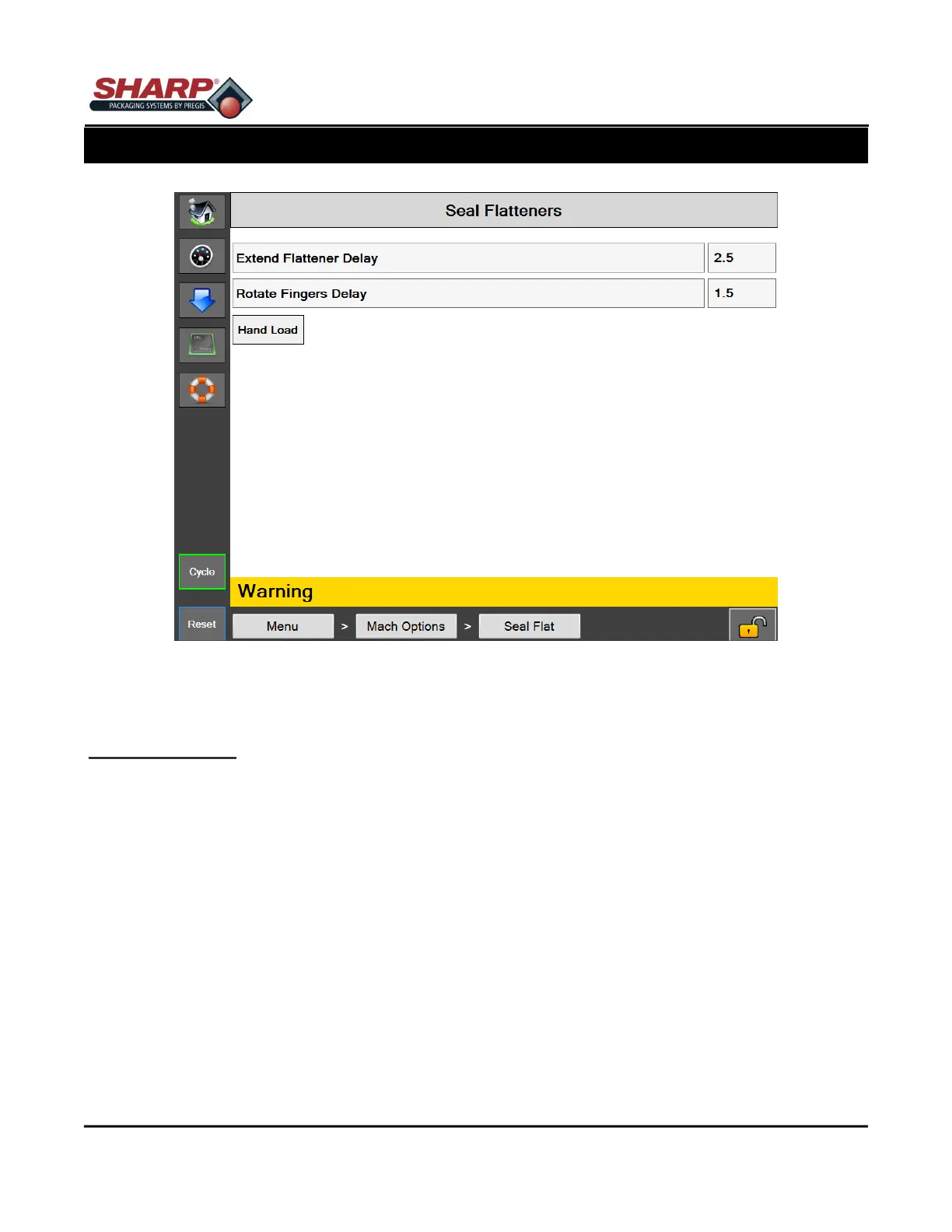
Figure 4-17A. Seal Flatteners Screen.
SEAL FLATTENERS SCREEN
General Description
Seal Flatteners are designed to flatten out the opening of the bag prior to sealing. This has the effect of remov-
ing wrinkles from film in the seal area and creates an anesthetically pleasing seal.
Button/Label Descriptions:
Seal Flatteners - This will toggle on/off the Seal Flatteners option.
Extend Flattener Delay - Amount of time, in seconds, that the seal flattener fingers extend motion is delayed fol-
lowing the completion of the HP Air timer.
Rotate Fingers Delay - Amount of time, in seconds, that the seal flattener finger rotate motion is delayed follow-
ing the completion of the extend motion.
Hand Load - This feature changes the sequence of the seal flattener operation. With Hand Load active, the seal
flatteners do not enter the bag until the product is loaded and the cycle is initiated. With Hand Load inactive, the
seal flatteners will enter the bag directly following the opening of the bag.



 To Next Page