ProntoNetLC User Manual
12
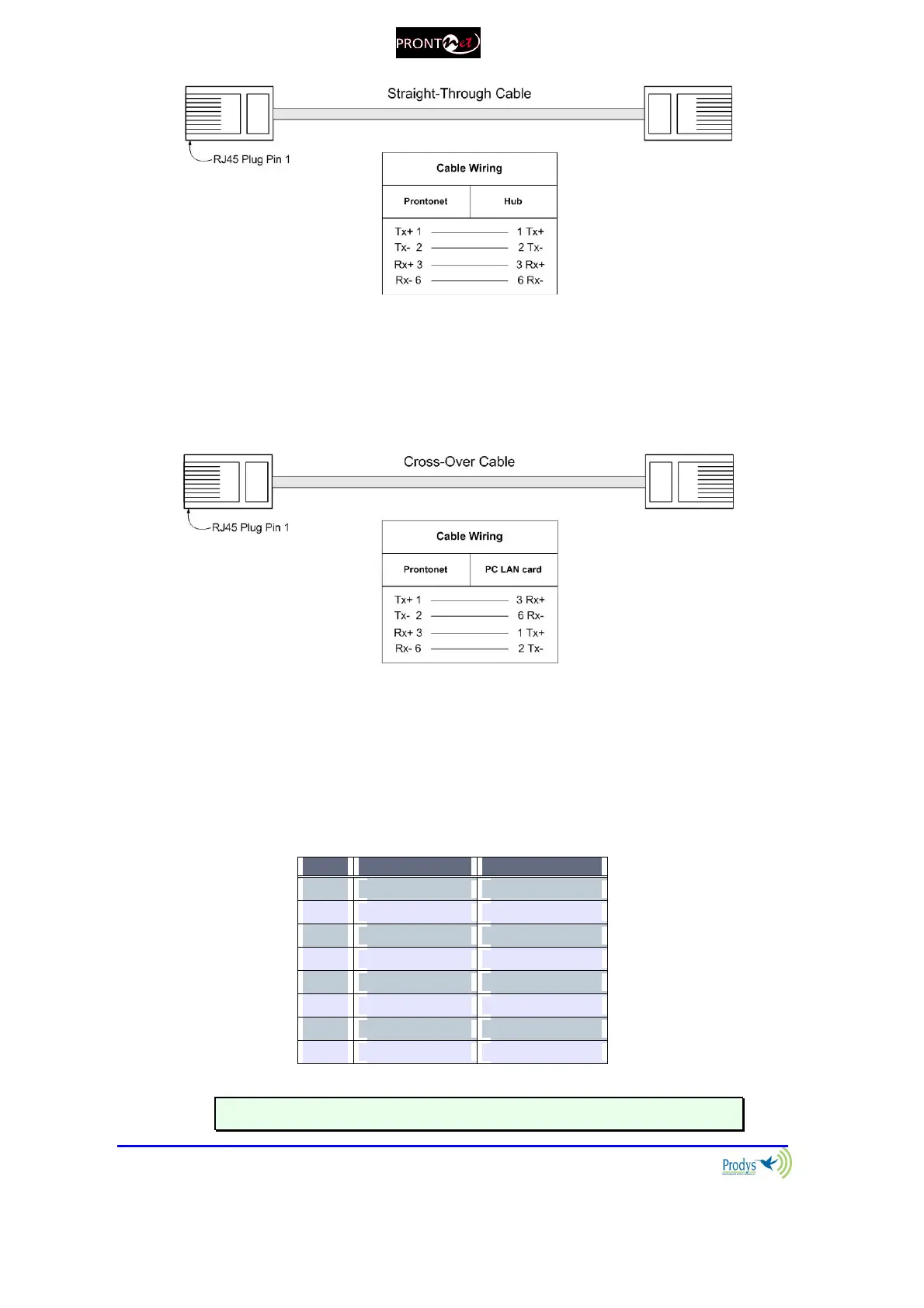
Connection to a PC
In some cases, such as when you configure the equipment, it is possible
that you will want to connect the unit directly to a PC. In this case the PC
must have a free Ethernet port to connect to and you must use a ‘cross-
over’ Ethernet cable. Again, any good IT shop will stock these cables. This
time the wiring is as follows:
II.3.2.1. ISDN Port (Optional)
The ProntoNetLC incorporates an ISDN terminal adapter that allows connection
to a basic ISDN line (2B+D). It supports different ISDN protocols (EURO_ISDN,
DMS100, AT&T 5ESS and NAT1). To connect there are two RJ45 connectors: one
for connecting to an S/T interface and the other for connecting to a U interface.
Pin S/T Connector U Connector
1
NC NC
2
NC NC
3
Tx + NC
4
Rx+ RING
5
Rx- TIP
6
Tx- NC
7
NC NC
8
NC NC
The U connector is only available if an NT1 interface is installed.



 To Next Page