ProntoNetLC User Manual
74
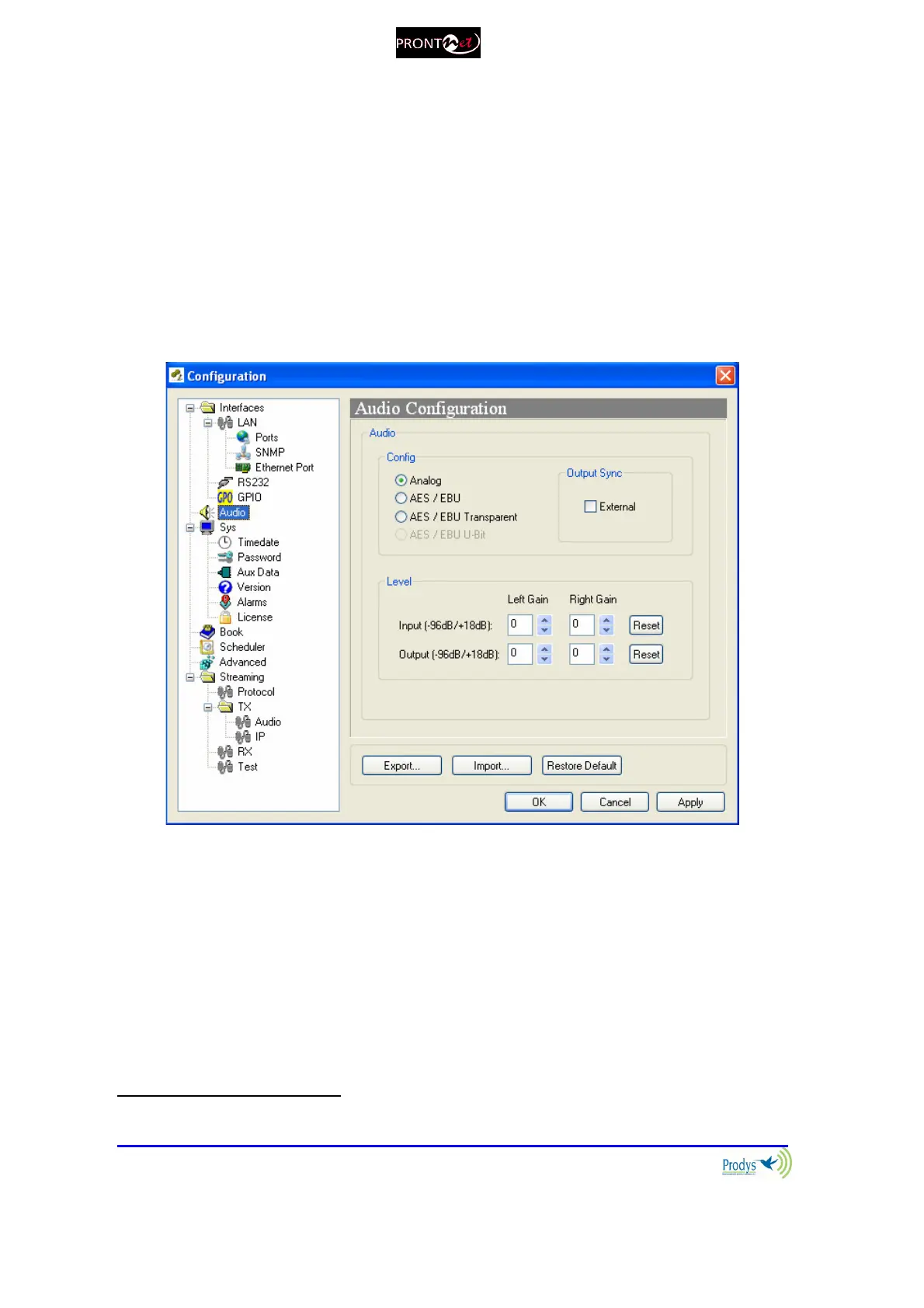
V.1.2 Audio Configuration
From here select the audio input (analog or digital). If it is digital we can choose
between synchronising with the audio input or with an external clock. The
AES/EBU Transparent is a special transmission mode for PCM 24 bits digital audio
without any processing at all. This mode allows the transmission of “NON-PCM
audio” or data between devices that use AES3 digital audio interface, for
example Dolby E systems.
Audio gain adjustment: Audio inputs and outputs can be adjusted, even when
lines are connected, and each audio channel independently
25
.
It is possible to select Digital Audio Output synchronization to ‘external’ when the
audio input is set to analog.
AES/EBU U bit allows the user to route User Bit data from the AES/EBU frame
along with the audio over IP. This can be useful to remote control some units
which can be controlled via this field of the AES/EBU frame.
25
From version 5.2.1 onwards.



 To Next Page