ProntoNetLC User Manual
80
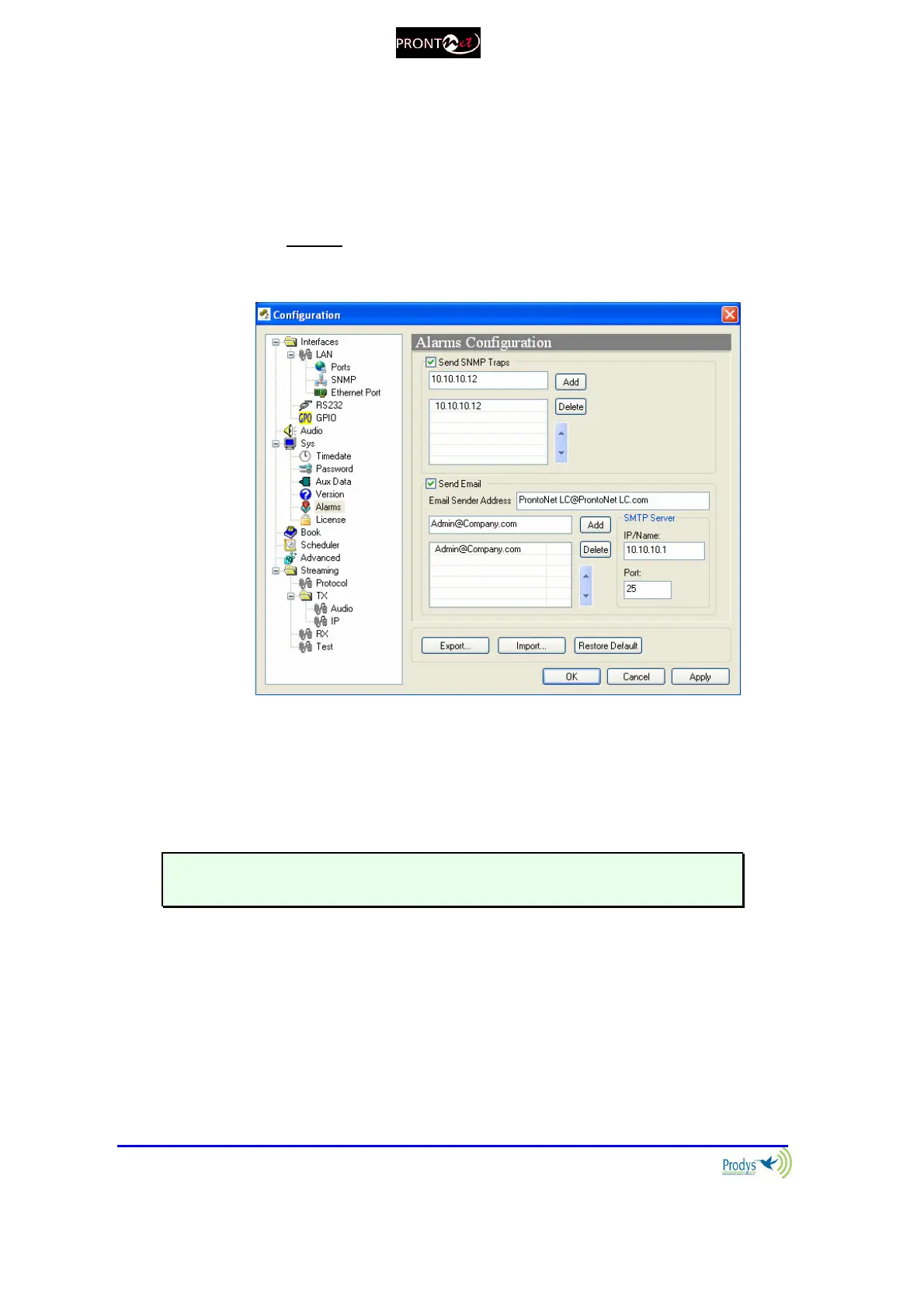
V.1.3.5. Alarms
From this option it is possible to select the IP address where the SNMP traps will
be sent. An SNMP manager located at this IP address will receive and process
the information according to the SNMP protocol. These SNMP traps will notify
alarm information, that is, an SNMP trap will be sent when an alarm is activated
or deactivated, with the time and type of alarm. For this to happen, alarms have
to be enabled (see Alarms). ProntoNetLC can be fully monitored though SNMP
protocol. It is also possible to notify alarm events via email. The user can send
alarm information to several email addresses at the same time.
V.1.3.6. Backup
Backup Configuration. The ProntoNetLC allows the user to use the ISDN line as a
backup when the unit works in IP or X21 mode.
The backup is enabled by clicking the “Backup” box.
For more information about the backup operation see chapter VI.11– How the
backup mode Works?
V.1.3.7. Scheduler
The Scheduler allows the user to program calls to be made automatically.
For more information please read chapter V.5 - Scheduler.



 To Next Page