VisualMotion 9 Troubleshooting Guide VisualMotion Tools for Diagnosing 2-5
DOK-VISMOT-VM*-09VRS**-WA02-EN-P
Diagnostic Log…
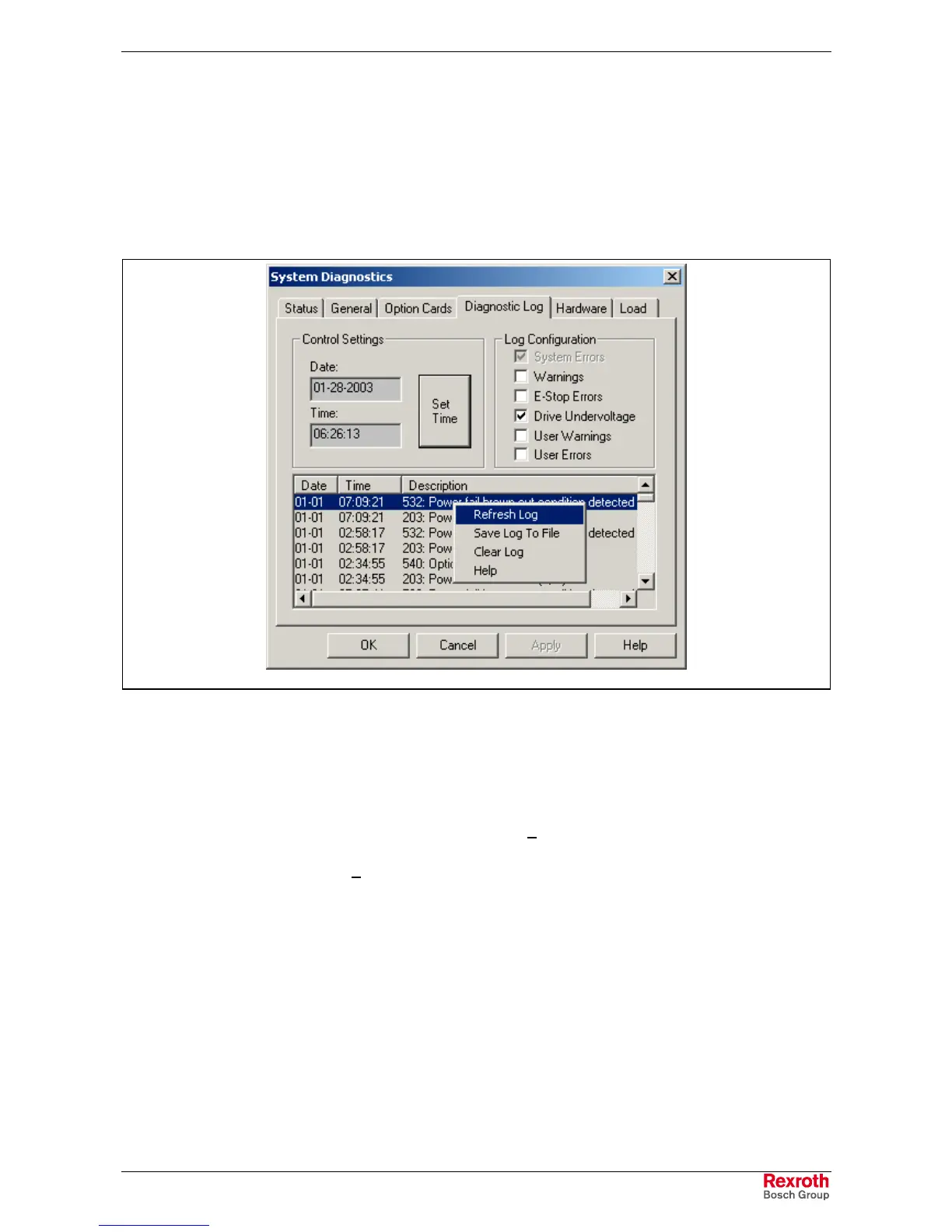
The diagnostic log tab displays the last 100 errors that the control has
encountered. Along with the error messages, the date, time and
extended error codes are displayed.
Diagnostic Help
Error codes displayed in the Diagnostic log contain context sensitive help.
Double clicking on an error code opens the context sensitive help for the
selected error.
diagnosticlog.tif
Fig. 2-7: Diagnostic Log Options
Date and Time
Date and time are relative to the power on of the control; they have no
battery-backup clock unless the PPC-R is equipped with a battery. Refer
to chapter 4 of the VisualMotion 9 Project Planning Manual
DOK-VISMOT-VM*-09VRS**-PR02-EN-P for installation instructions.
After power up, select the Set Time button to retrieve the date and time
from the PC. The date and time are stored in parameter C-0-0126.
Log Configuration
The user can select what options are best suited for their application.
Refresh, Save and Clear Log
Right clicking over the diagnostic errors opens a small pop-up window
where the user can perform the following features:
• Refresh Log
• Save Log to File
• Clear Log
• Help



 To Next Page