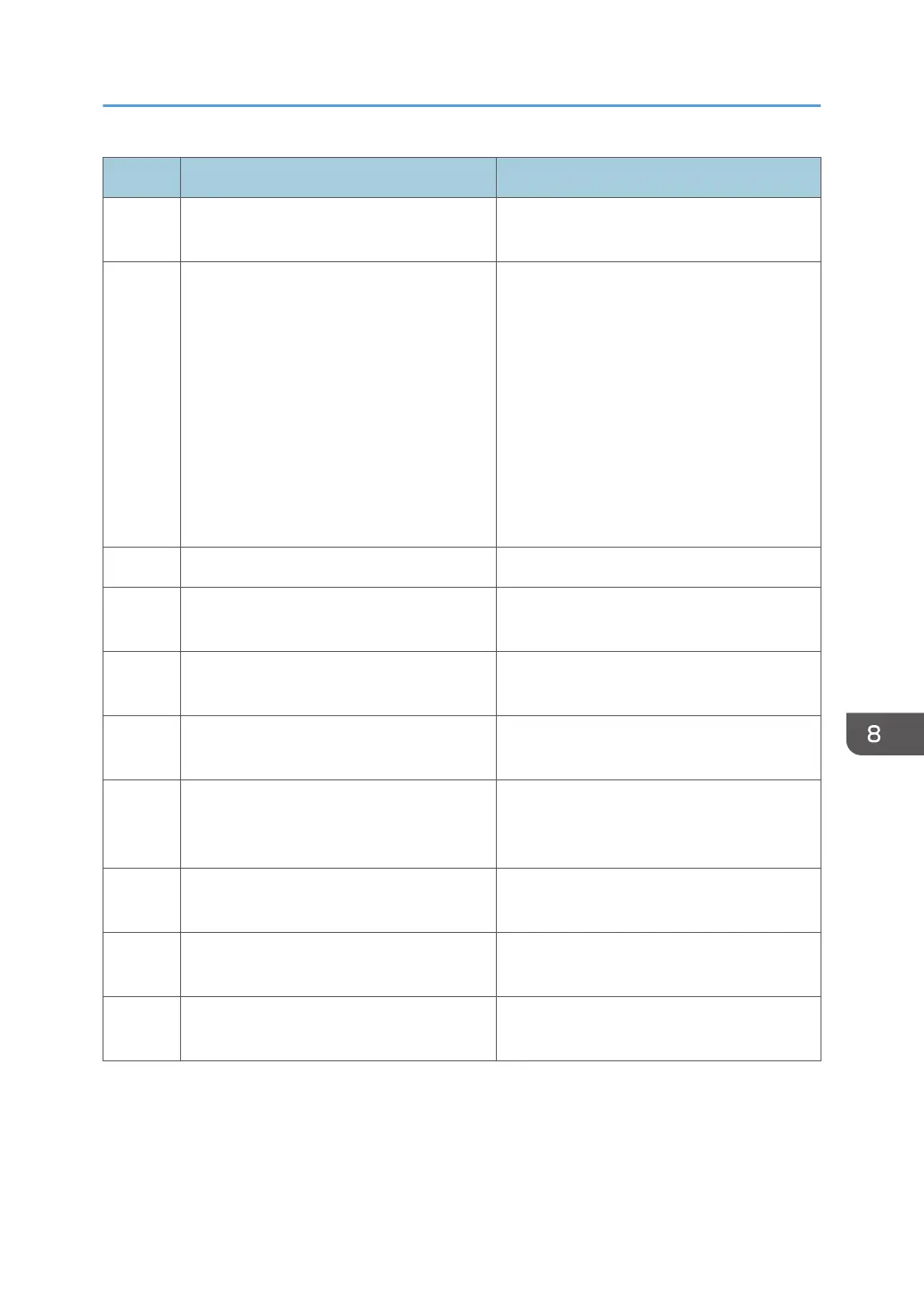
Code Cause Solution
212 SC has occurred. The target device has a problem. Resolve
the device problem.
214 Failed to restart the device. Check whether the following settings of the
device access account are correct.
• User name and password of Device
Administrator
• Community name if SNMP v1/v2
protocol is used
• User name and password if SNMP v3
protocol is used
See page 59 "Configuring Access
Accounts".
240 The user code/login name is prohibited. Enter the correct user code/login name.
241 The user code/login name is duplicated. Enter a user code/login name that is not
already registered.
242 Failed to retrieve the counter per user. Check the user data (address book) on the
target device.
243 Failed to reset the counter per user. Check the user data (address book) on the
target device.
250 Failed to check. A problem such as the device being turned
off may have occurred while configuring the
settings. Check the device status.
260 Failed to change the entry information. Restart the device and perform the operation
again.
261 Failed to delete the entry. Restart the device and perform the operation
again.
266 Failed to restore the Address Book. Restart the device and perform the operation
again.
Troubleshooting
113



 To Next Page