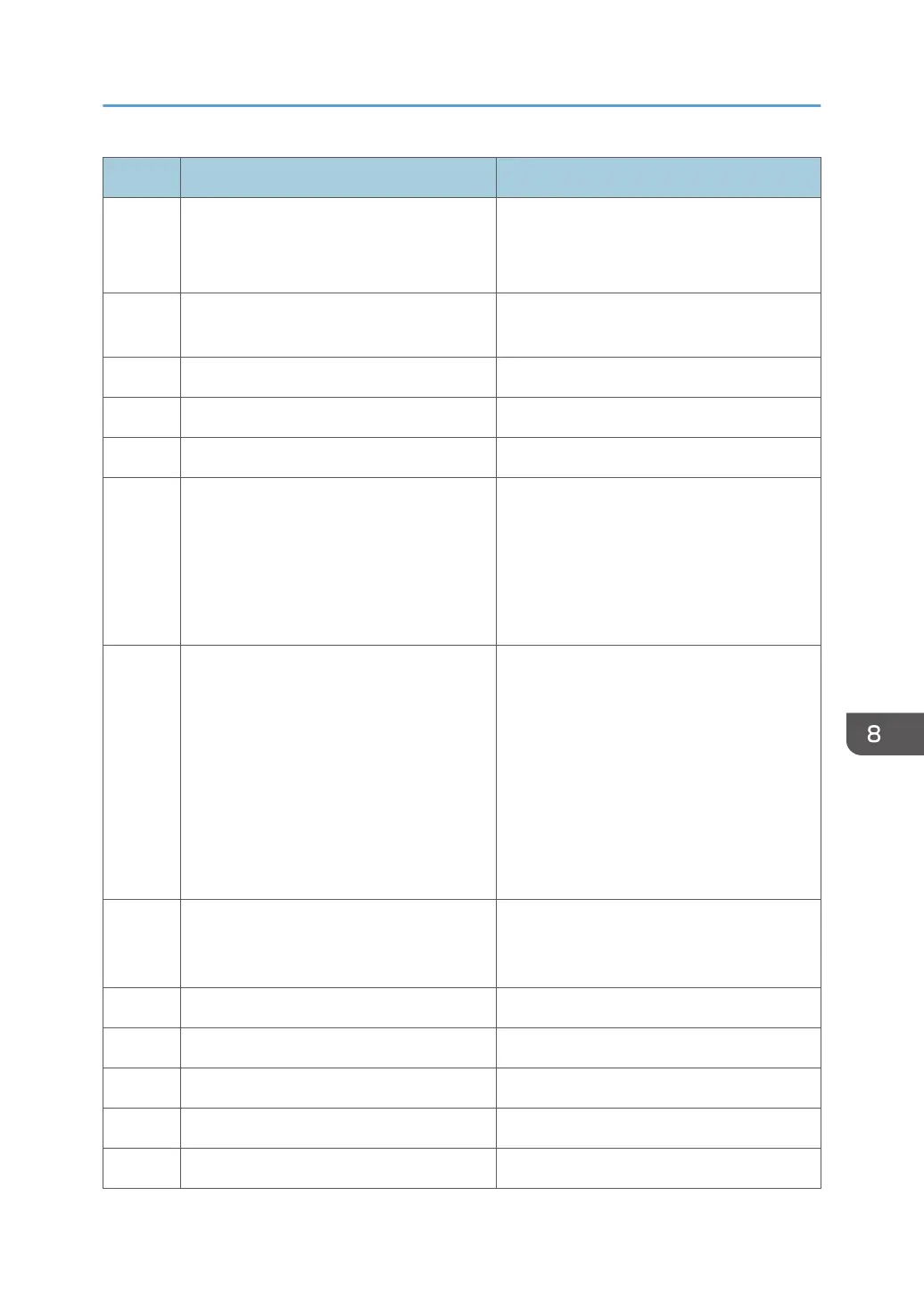
Code Cause Solution
634 Failure has occurred on the previous setting
item.
• Check the target device.
• Check that the task setting is properly
configured.
640 There is more than 1 newly discovered
device.
The machine is operating normally.
641 There are no newly discovered devices. The machine is operating normally.
642 There are no failed devices. The machine is operating normally.
643 There are no configured devices. The machine is operating normally.
650 An other system error. • Check that the system setting of the RC
Gate is properly configured.
• The free space on the hard disk may be
insufficient. Delete unnecessary logs/
data to ensure there is enough free
space.
660 Failed to read the data. Check that the following settings of the
device access account are properly
configured:
• User name and login password of
Device Administrator
• Community name if SNMP v1/v2
protocol is used
• User name and login password if
SNMP v3 protocol is used
670 There are some non-executed tasks that
cannot be performed because the system
has been suspended.
The machine is operating normally.
700 An attempt to add data has failed. Contact your service representative.
701 An attempt to update data has failed. Contact your service representative.
702 An attempt to delete data has failed. Contact your service representative.
703 An attempt to get data has failed. Contact your service representative.
704 An error has occurred in the server. Contact your service representative.
Troubleshooting
117



 To Next Page