User Interface
R&S
®
GP-E/GP-S
112User Manual v16.2.1 ─ 01
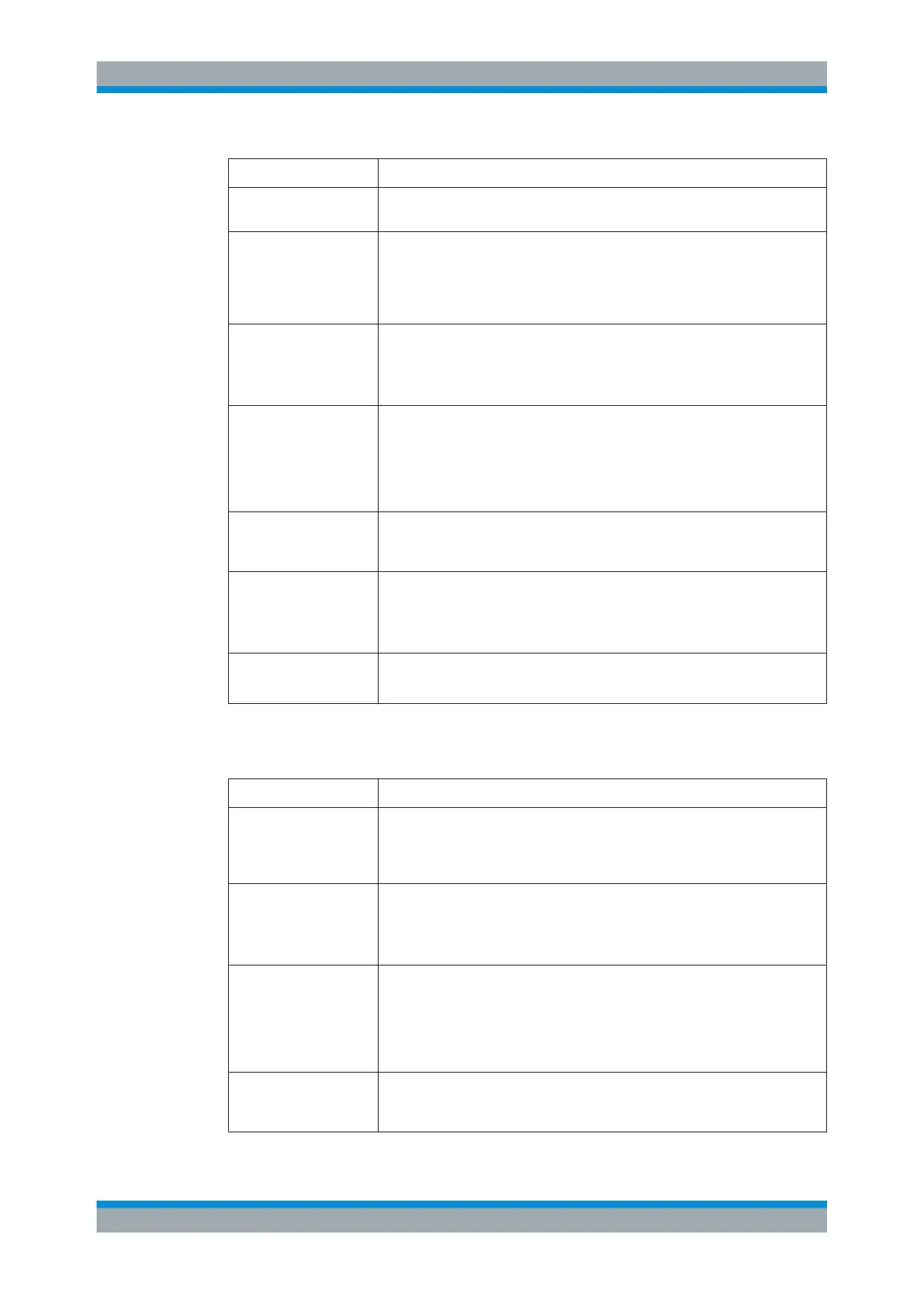
Field Description
"Access Zone" From the drop-down list, select the zone in which the tunnel should end and
encrypted data being sent through the VPN tunnel arrive.
"Local Address" Enter a valid public IP address or the fully qualified domain name (FQDN)
under which the firewall is reachable from the outside. If the local network is
behind a NAT device, enter %defaultroute to indicate the reachable host IP
address in the selected zone. The IPsec stack will listen for IPsec packets on
that address.
"Use Local Identity" Select this checkbox to be able to choose a "Local Identity Type" determining
the type of identity to be entered in the "Local Identity" field.
Note: If you set up more than one IPsec connection in the same access zone,
this option is mandatory for all IPsec connections in this zone.
"Local Identity Type" The type of identity can be selected from:
●
Mail – an email address
●
Hostname – a fully qualified domain or host name (this name will not be
resolved via DNS)
●
IP – an IP address or a DNS name which will be resolved via local DNS
●
KeyID – an alphanumeric string without spaces
"Local Identity" The local identity is used to uniquely identify the local end of a connection for
authentication. Define a value in accordance with the selected local identity
type.
"Full Tunnel" Optional: This checkbox is cleared by default. To push all packets from connec-
ted clients into the encrypted tunnel, select this checkbox.
If the "Use L2TP" checkbox is selected, the "Full Tunnel" checkbox is selected
by default.
"Local Zones" Select the local zones that will be accessible to remote VPN clients.
Note: When using an IKEv1 profile, you can only select one single local zone.
On the "Remote Configuration" tab, you can define the settings for the subnet to which
remote VPN clients will be connected:
Field Description
"Remote Subnet" Specify the remote subnet for the new network object. It has to be a valid CIDR
subnet specification (IP address followed by a slash »/« and the number of bits
set in the subnet mask, for example 192.168.50.1/24). Clients will receive
an IP address from this subnet when they connect to gateprotect Firewall.
"Use Remote Identity" Select this checkbox to be able to choose a "Remote Identity Type" determining
the type of identity to be entered in the "Remote Identity" field.
Note: If you set up more than one IPsec connection in the same access zone,
this option is mandatory for all IPsec connections in this zone.
"Remote Identity Type" The type of identity can be selected from:
●
Mail – an email address
●
Hostname – a fully qualified domain or host name (this name will not be
resolved via DNS)
●
IP – an IP address or a DNS name which will be resolved via local DNS
●
KeyID – an alphanumeric string without spaces
"Remote Identity" The remote identity identifies the remote end of the connection and works simi-
lar to the "Local Identity" . Define a value in accordance with the selected
remote identity type.
Menu Reference



 To Next Page