Application Examples
R&S
®
GP-E/GP-S
199User Manual v16.2.1 ─ 01
4.12.4.3 Setting Up the Secondary Box
On the receiving end, the system must be configured to accept the connection request
(the branch office, or »subsidiary« in this example).
Before you proceed, make sure the gateprotect Firewall at the remote site (at the »
headquarters«) is configured to initiate the connection (see Chapter 4.12.4.2, "Setting
Up the Primary Box", on page 196.)
1. From the menu in the navigation pane, select "VPN > OpenVPN > Site-to-Site".
2.
Click the plus button
in the item list bar header to create a new virtual private
network connection.
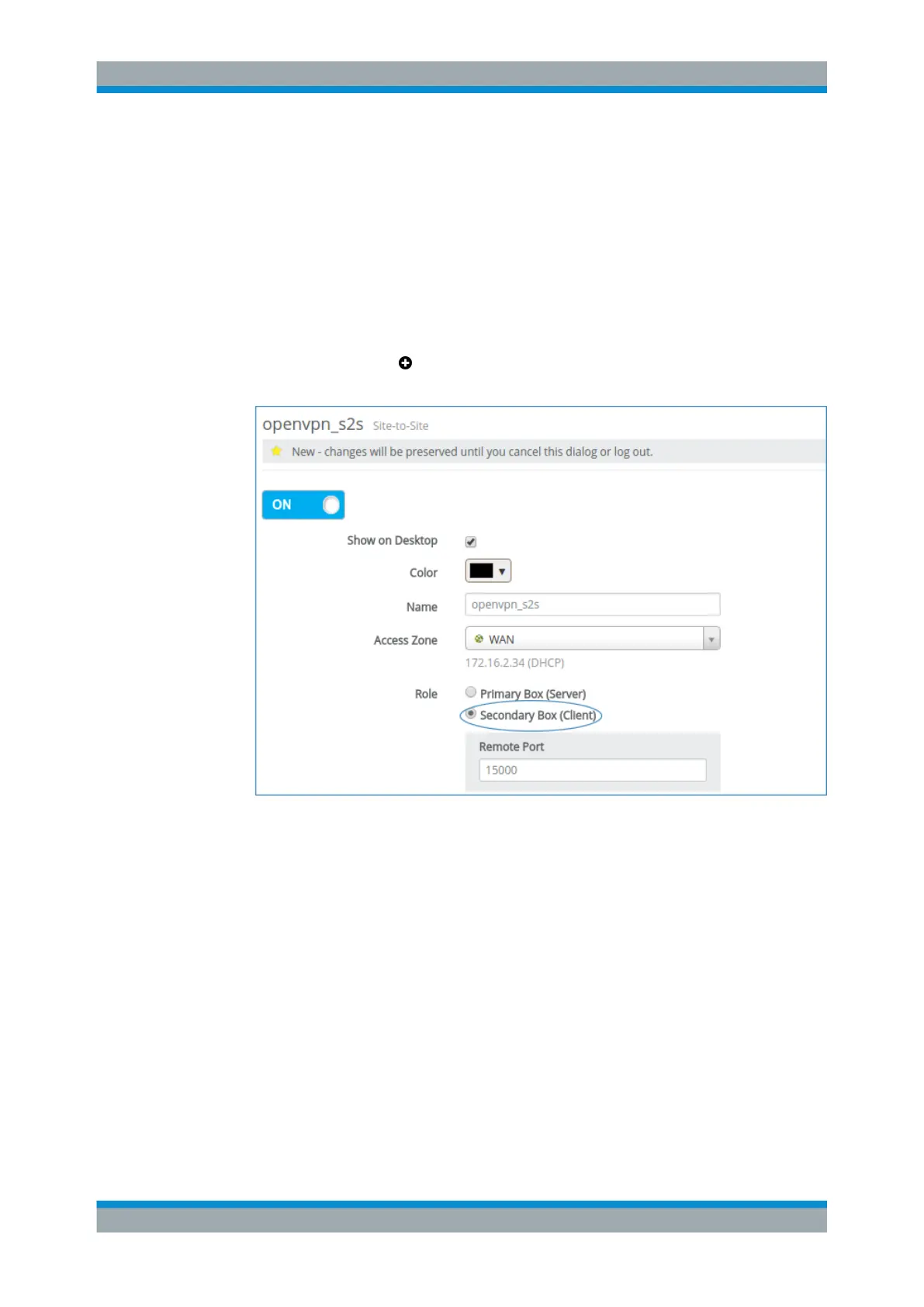
Figure 4-68: Sample OpenVPN S2S connection settings for the »subsidiary«.
3. Decide whether you want to enable the connection.
4. Decide whether you want the connection to be displayed on the desktop.
5. If you want the connection to be displayed on the desktop, choose a color for its
representation.
6. Specify a "Name" for the connection.
7. Under "Access Zone" , select the zone which is directly accessible to the remote
site.
8. Select "Secondary Box (Client)" as the "Role" for the system.
9. Enter the "Remote Port" number used for this connection in the access zone of the
remote site.
VPN Setup Examples



 To Next Page