Application Examples
R&S
®
GP-E/GP-S
132User Manual v16.2.1 ─ 01
Figure 4-4: Sample firewall rules settings to block certain websites.
Position Policy Source Destina-
tion
Applications/Protocols Filter Enabled
Options
1 Allow Zone-eth2 WAN DNS
2 Allow Zone-eth2 WAN HTTP Web Filter
Profile
SSL
Inspection
With this set of rules all websites/URLs are allowed except those related to gaming.
4.1.3 Allowing Certain Websites Using Web Filters
This example shows how to allow only education-related websites using a web filter.
Create a web filter to allow websites related to education.
1. Ensure that the web filter module is up-to-date (refer to Chapter 3.4.1.3, "Updates",
on page 33).
2.
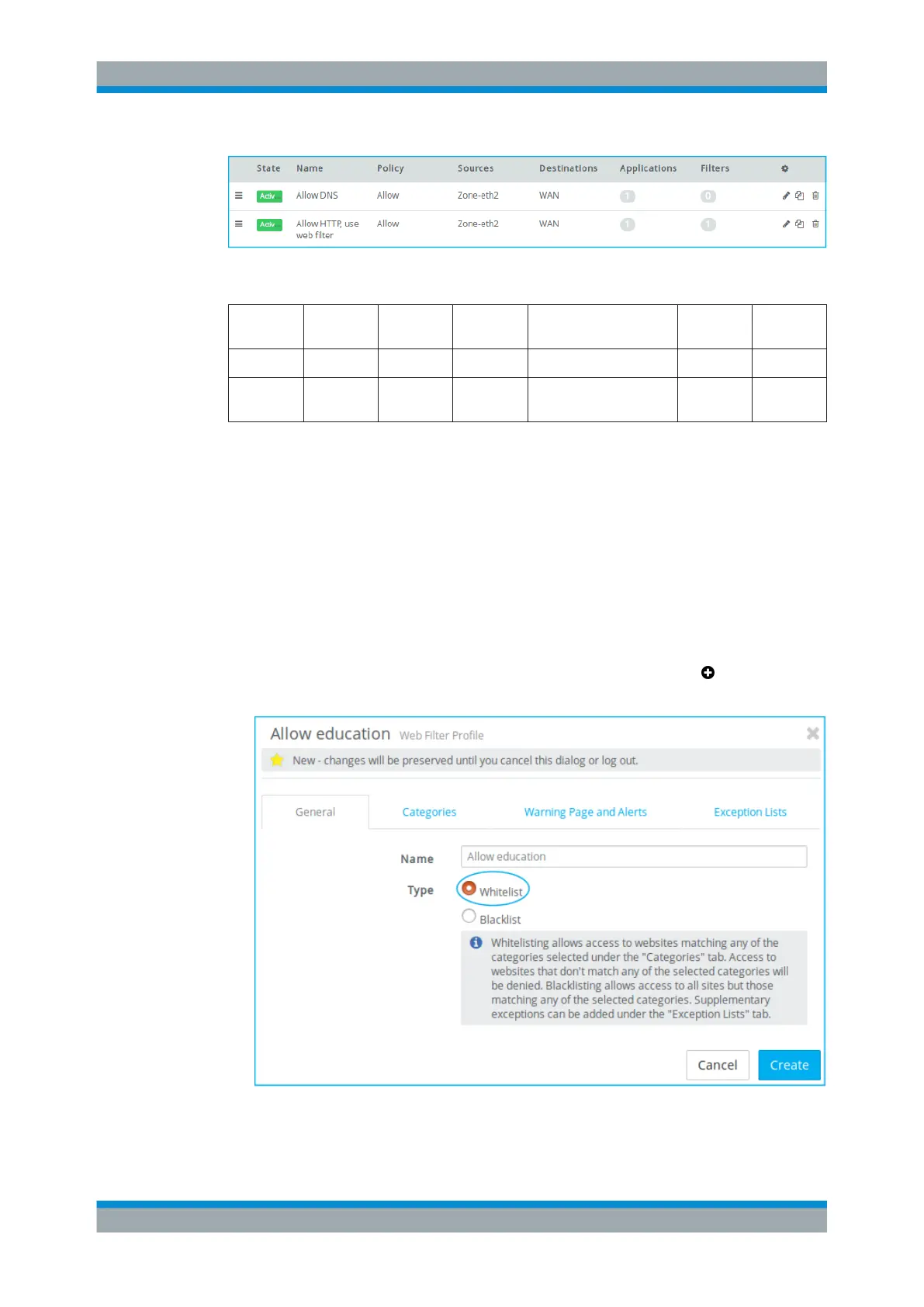
Navigate to "UTM > Web Filter Profiles" and click the plus button
to create a web
filter profile of the type Whitelist.
Figure 4-5: Sample General tab settings.
Firewall Rule Examples



 To Next Page