Application Examples
R&S
®
GP-E/GP-S
198User Manual v16.2.1 ─ 01
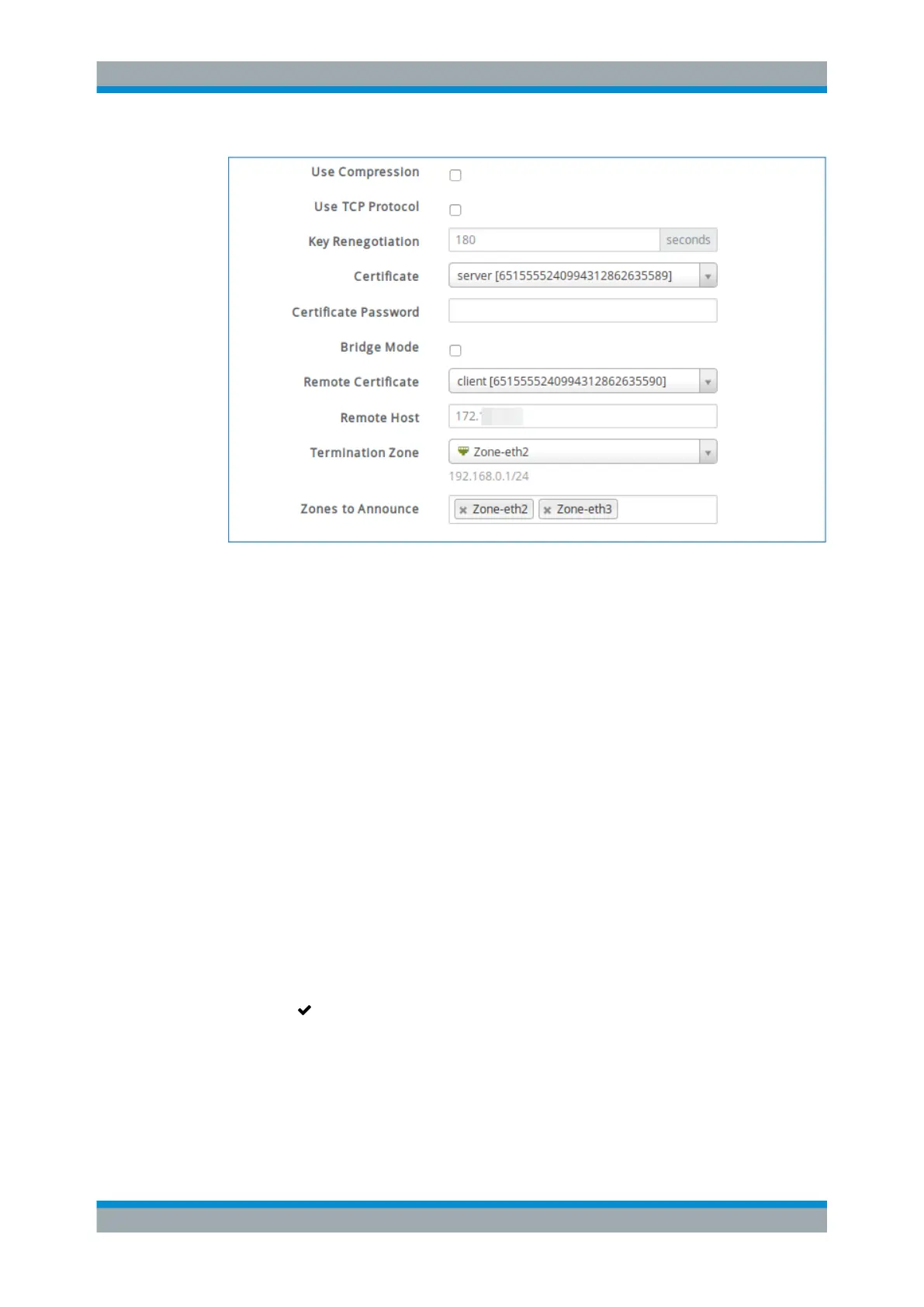
Figure 4-67: Sample Site-to-Site settings for the »headquarters«.
1. Specify the "Key Renegotiation" time after which the session key will be renegoti-
ated.
2. Select the VPN "Certificate" created earlier for this site (the company »headquar-
ters« in this example) and enter its password, if applicable. (See Chapter 4.12.4.1,
"Creating VPN Certificates", on page 193.)
3. Select the "Remote Certificate" created earlier for the »subsidiary«.
4. Under "Remote Host" , enter the hostname or IP address under which the access
zone of the remote gateprotect Firewall is reachable from the Internet (in this
example the WAN IP address of the remote box).
5. From the drop-down list, select the "Termination Zone" in which the traffic being
sent through the VPN tunnel will be made accessible.
6. From the drop-down list, select the "Zones to Announce" . These zones will be
available to the remote site.
7. Click "Create" to add the new VPN to the list of connections.
The new VPN setup appears in the list of available connections.
8.
Click "
Activate" in the toolbar at the top of the desktop to apply your configura-
tion changes.
VPN Setup Examples



 To Next Page