Application Examples
R&S
®
GP-E/GP-S
172User Manual v16.2.1 ─ 01
The system prompts you to select the service that the new certificate should be
used for.
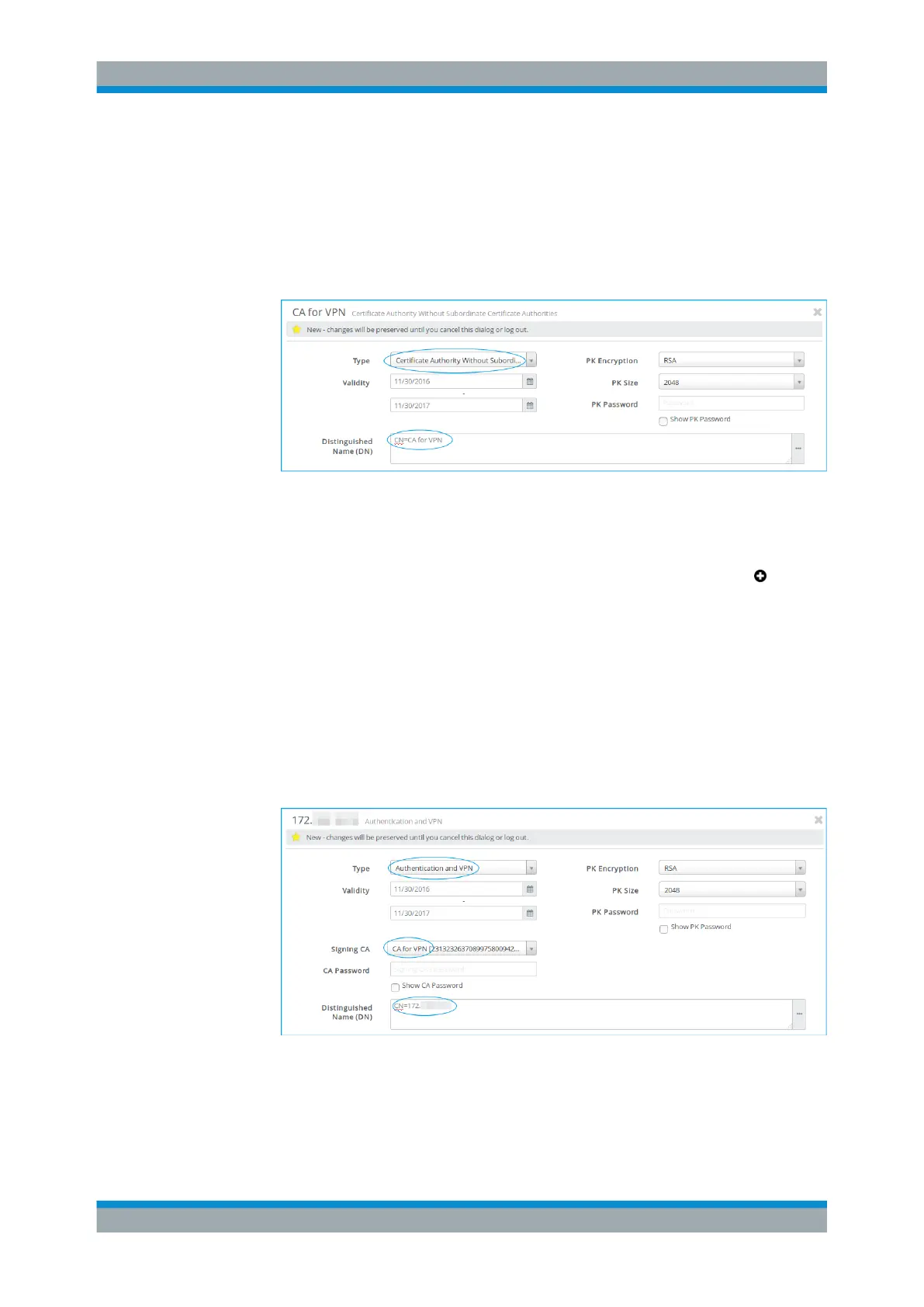
a) Under "Type" , select Certificate Authority Without Subordinate
Certificate Authorities which will be used to authorize the necessary
VPN certificate.
b) Adjust the information as necessary for your environment.
Figure 4-36: Sample CA certificate settings.
c) Click "Create" to add the new certificate authority to the list of available certifi-
cates.
3.
Create a certificate for the host and the client each. Click the plus button in the
item list bar header to create a VPN certificate.
The system prompts you to select the service that the new certificate should be
used for.
4. Create the host certificate with the following settings:
a) Under "Type" , select Authentication and VPN.
b) Under "Signing CA" , select the CA created in step 2.
c) Under "Distinguished Name" , enter the name of the gateprotect Firewall that
serves as host, i.e. its IP address or hostname.
d) Adjust the remaining information as necessary for your environment.
Figure 4-37: Sample VPN certificate settings.
e) Click "Create" to add the new certificate to the list of available certificates.
5. Create the client certificate with the following settings:
VPN Setup Examples



 To Next Page