User Interface
R&S
®
GP-E/GP-S
61User Manual v16.2.1 ─ 01
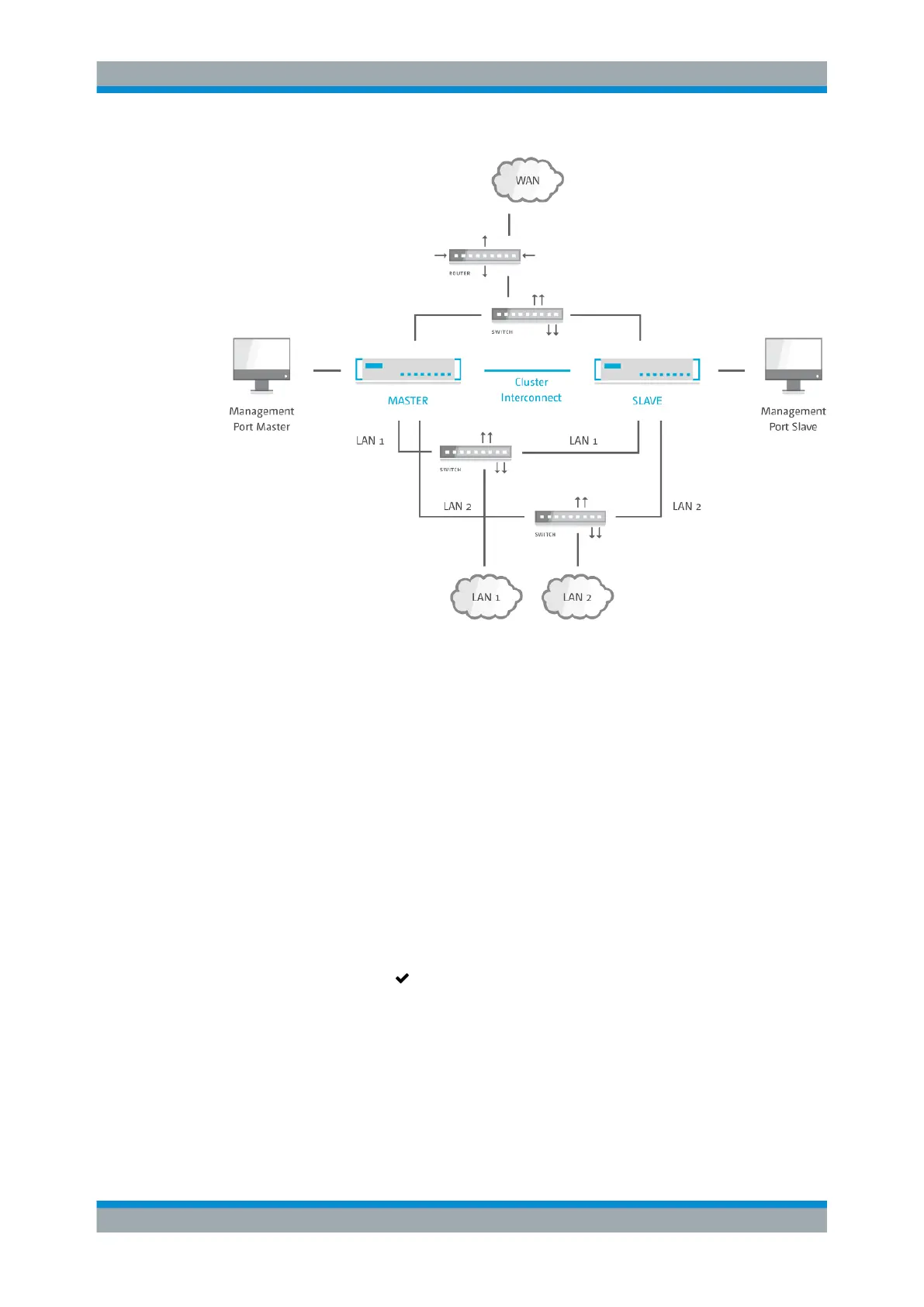
Figure 3-11: Sample network setup for High Availability.
High Availability Settings
Use the "High Availability" settings to specify the connection parameters for the mas-
ter/slave configuration.
The High Availability feature requires two identical systems of the same hardware type
(for example GP-E-800 with GP-E-800 or GP-S-1600 with GP-S-1600) and software
version, each with a free network interface (NIC) that is not currently associated with a
zone. For more information, see Chapter 3.4.3.1, "Ethernet Zones", on page 68. The
same NIC must be used on both systems for Cluster Interconnection.
The master system synchronizes its initial configuration and any subsequent configura-
tion changes to the slave system to ensure that the same configuration will be used in
the event of failure.
Before the High Availability feature can be enabled, all pending configuration changes
must be applied. (If the "
Activate" button is highlighted in the toolbar at the top of the
desktop, click it to apply your changes.)
To set up High Availability, complete the following steps:
1. On the master system:
● Log in to the web client.
● Under "Network > High Availability" :
– Use the slider switch to enable High Availability.
Menu Reference



 To Next Page