User Interface
R&S
®
GP-E/GP-S
91User Manual v16.2.1 ─ 01
For further information, see Chapter 3.2, "Icons and Buttons", on page 21.
IP Forwarding Settings
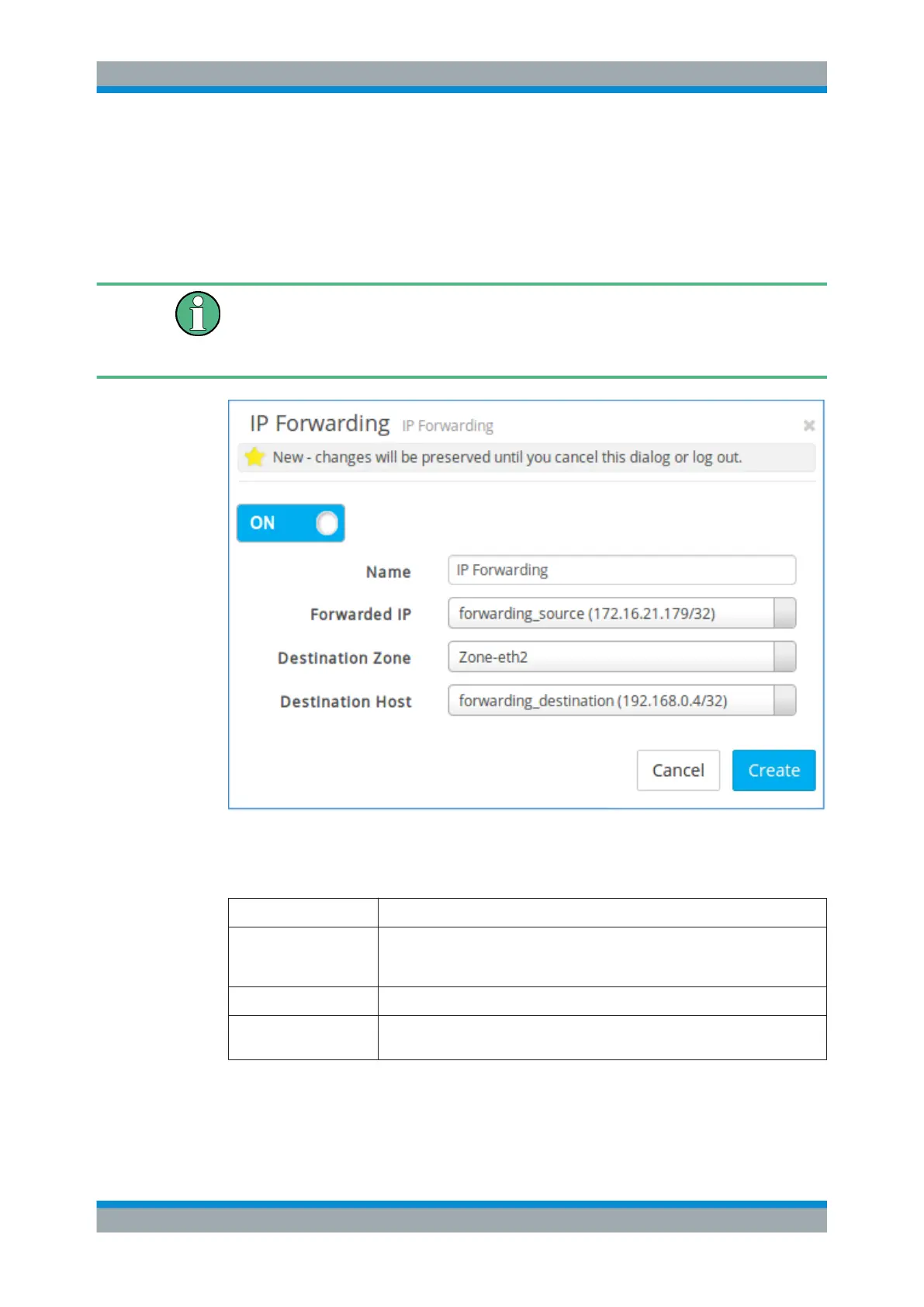
Under "WAN > IP Forwardings" , you can add a new or edit an existing IP forwarding
rule.
Before creating an IP forwarding rule, you must first configure custom hosts for the
public IP address in the WAN zone and for the private IP address of the internal target
(destination host). See Chapter 3.4.5.1, "Custom Hosts", on page 94 for more infor-
mation.
Figure 3-16: Sample IP forwarding rule settings.
The "IP Forwarding" settings allow you to configure the following elements:
Field Description
"On" / "Off" A slider switch indicates whether the IP forwarding rule is active ( "On" ) or inac-
tive ( "Off" ). By clicking the slider switch, you can toggle the state of the IP for-
warding rule. A new IP forwarding rule is enabled by default.
"Name" Enter a unique name for the IP forwarding rule.
"Forwarded IP" From the drop-down list with all available static IP addresses for the WAN zone,
select the custom host (the public IP address) that you want to forward.
Menu Reference



 To Next Page