2
Basic
Operation
Loading Media
22
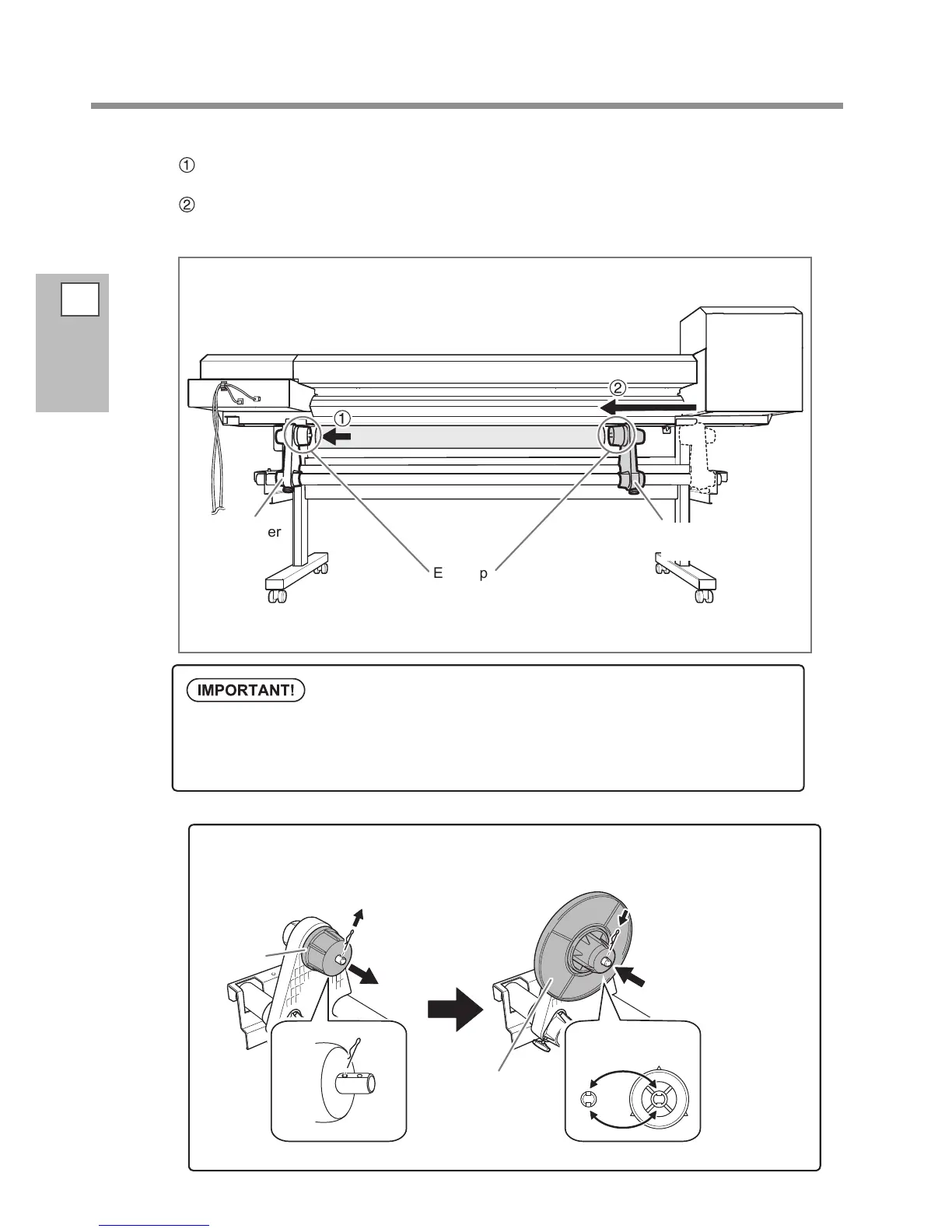
Fit the paper tube (core) onto the end cap of the media holder [Left].
Do not secure the media holder now.
Move the media holder [Right] and t the end cap onto the paper tube (core) of the
media.
Fit it securely to prevent the media from easy loose.
Media holder
[Left]
Media holder
[Right]
End cap
Install conforming to the procedures.
Load the media while the left media holder is positioned close to the left edge, as shown in the g-
ure. Also, never secure the media holder in place before loading the media. Loading media without
performing these steps in the proper order may make smooth media feed impossible or adversely
aect print results.
How to use the media anges for the paper tube inner diameter 2 inches
* The media anges for the paper tube inner diameter 2 inches are optional items.
Media anges for
paper tube inner
diameter 2 inches
Insert the clip.
Line up the ridges
and grooves
Pull out the clip.
If it is difcult to pull
out, use a pair of pliers
or other such tool.
End cap














 To Next Page